FindingPosts
|
Size: 234
Comment:
|
← Revision 14 as of 2013-12-03 13:28:10 ⇥
Size: 1353
Comment: SearchLinks isn't detailed enough. This is only for UA posts
|
| Deletions are marked like this. | Additions are marked like this. |
| Line 1: | Line 1: |
| The two previous links were removed at the request of bapoumba due to the fact they disabled the forums. To search for unanswered post you can use the forum tools, unanswered post. Example enter the beginners forum then forum tools. | ## page was renamed from UnansweredPostsTeam/SearchLinks #title UA Team 'Searching for unanswered posts' <<Include(UnansweredPostsTeam/Header)>> <<BR>> ||<tablestyle="float:right; font-size: 0.9em; width:30%; background:#F1F1ED; background-repeat: no-repeat; background-position: 98% 0.5ex; margin: 1em 0em 0em 0em; padding: 2em;"><<TableOfContents>>|| = Basic Search = To search for unanswered posts, you can follow these steps: * Go to the main page of the [[http://ubuntuforums.org/|Ubuntu Forums]] * Click the link '''Quick Links''' on the right of the screen, above the threads. It will open a drop-down list. * Click '''Unanswered Posts''' in the drop-down list. == Picture Guide == === Step 1 === {{attachment:UATeam-Step1.png}} === Step 2 === {{attachment:UATeam-Step2.png}} == Advanced Search: == * Click the link '''Advanced Search''' on top of the screen (this is visible in any page of the forums). It will open a drop-down list. * Under ''Additional Options'', there's a box '''Find Threads with'''. There you can select '''At Most''' in the drop-down list. In the text box right of the drop-down list, you can enter a '''0''' (this should be the default). * Click the '''Search Now''' button at the bottom of the screen. '''Subpages''' <<Navigation(children, 1)>> ---- CategoryUnansweredPostsTeam |

|
Basic Search
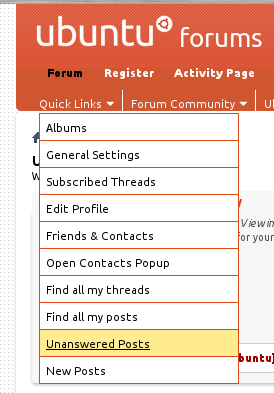
To search for unanswered posts, you can follow these steps:
Go to the main page of the Ubuntu Forums
Click the link Quick Links on the right of the screen, above the threads. It will open a drop-down list.
Click Unanswered Posts in the drop-down list.
Picture Guide
Step 1

Step 2
Advanced Search:
Click the link Advanced Search on top of the screen (this is visible in any page of the forums). It will open a drop-down list.
Under Additional Options, there's a box Find Threads with. There you can select At Most in the drop-down list. In the text box right of the drop-down list, you can enter a 0 (this should be the default).
Click the Search Now button at the bottom of the screen.
Subpages
UnansweredPostsTeam/FindingPosts (last edited 2013-12-03 13:28:10 by g189094)