FindingPosts
|
Size: 1546
Comment:
|
Size: 1291
Comment:
|
| Deletions are marked like this. | Additions are marked like this. |
| Line 8: | Line 8: |
| = Searching for unanswered posts = | = Basic Search = |
| Line 11: | Line 11: |
| * Go to the main page of the ubuntu forums (http://ubuntuforums.org/index.php) * Go to a forum by clicking on it's name (for example, 'Absolute Beginner Talk', which will lead you to http://ubuntuforums.org/forumdisplay.php?f=326) * Click the link 'Forum Tools' on the right of the screen, above the threads. It will open a drop-down list. * Click 'Unanswered Posts' in the drop-down list. |
* Go to the main page of the [[http://ubuntuforums.org/|Ubuntu Forums]] * Click the link '''Quick Links''' on the right of the screen, above the threads. It will open a drop-down list. * Click '''Unanswered Posts''' in the drop-down list. == Picture Guide == === Step 1 === {{attachment:UATeam-Step1.png}} === Step 2 === {{attachment:UATeam-Step2.png}} |
| Line 16: | Line 20: |
| Alternatively: * Click the link 'Search' on top of the screen (this is visible in any page of the forums). It will open a drop-down list. * Click 'Advanced Search' in the drop-down list. * Under 'Search Options', there's a box 'Find Threads with'. There you can select 'At Most' in the drop-down list. In the text box right of the drop-down list, you can enter a '0' (this should be the default). * Click the 'Search Now' button at the bottom of the screen. Note: Previously, there were two other links that could be used to search for unanswered posts. These were removed at the request of ''bapoumba'' due to the fact they disabled the forums. |
== Advanced Search: == * Click the link '''Advanced Search''' on top of the screen (this is visible in any page of the forums). It will open a drop-down list. * Under ''Search Options'', there's a box '''Find Threads with'''. There you can select '''At Most''' in the drop-down list. In the text box right of the drop-down list, you can enter a '''0''' (this should be the default). * Click the '''Search Now''' button at the bottom of the screen. |

|
Basic Search
To search for unanswered posts, you can follow these steps:
Go to the main page of the Ubuntu Forums
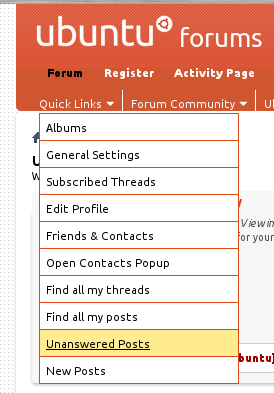
Click the link Quick Links on the right of the screen, above the threads. It will open a drop-down list.
Click Unanswered Posts in the drop-down list.
Picture Guide
Step 1

Step 2
Advanced Search:
Click the link Advanced Search on top of the screen (this is visible in any page of the forums). It will open a drop-down list.
Under Search Options, there's a box Find Threads with. There you can select At Most in the drop-down list. In the text box right of the drop-down list, you can enter a 0 (this should be the default).
Click the Search Now button at the bottom of the screen.
Subpages
UnansweredPostsTeam/FindingPosts (last edited 2013-12-03 13:28:10 by g189094)