FindingPosts
|
Size: 786
Comment:
|
Size: 1291
Comment:
|
| Deletions are marked like this. | Additions are marked like this. |
| Line 1: | Line 1: |
| There are several search methods that can be used to find unanswered posts. The most common are listed below. | #title UA Team 'Searching for unanswered posts' |
| Line 3: | Line 3: |
| == Unanswered Posts (Preferred) == [http://ubuntuforums.org/search.php?do=process&replyless=1&replylimit=0&dontcache=1&searchdate=1&beforeafter=before Unanswered Posts][[BR]] Finds all unanswered topics that haven't been posted to in more than 24 hours. This gives the other forum teams a chance to answer them before we post away. It also prioritizes older posts to make sure they get answered. |
<<Include(UnansweredPostsTeam/Header)>> <<BR>> |
| Line 7: | Line 6: |
| == All Unanswered Posts == [http://ubuntuforums.org/search.php?do=process&replyless=1&replylimit=0&dontcache=1 All Unanswered Posts][[BR]] Finds all unanswered posts regardless of time or forum location. If you are also on the Beginner team, then this link is for you. |
||<tablestyle="float:right; font-size: 0.9em; width:30%; background:#F1F1ED; background-repeat: no-repeat; background-position: 98% 0.5ex; margin: 1em 0em 0em 0em; padding: 2em;"><<TableOfContents>>|| = Basic Search = To search for unanswered posts, you can follow these steps: * Go to the main page of the [[http://ubuntuforums.org/|Ubuntu Forums]] * Click the link '''Quick Links''' on the right of the screen, above the threads. It will open a drop-down list. * Click '''Unanswered Posts''' in the drop-down list. == Picture Guide == === Step 1 === {{attachment:UATeam-Step1.png}} === Step 2 === {{attachment:UATeam-Step2.png}} == Advanced Search: == * Click the link '''Advanced Search''' on top of the screen (this is visible in any page of the forums). It will open a drop-down list. * Under ''Search Options'', there's a box '''Find Threads with'''. There you can select '''At Most''' in the drop-down list. In the text box right of the drop-down list, you can enter a '''0''' (this should be the default). * Click the '''Search Now''' button at the bottom of the screen. '''Subpages''' <<Navigation(children, 1)>> ---- CategoryUnansweredPostsTeam |

|
Basic Search
To search for unanswered posts, you can follow these steps:
Go to the main page of the Ubuntu Forums
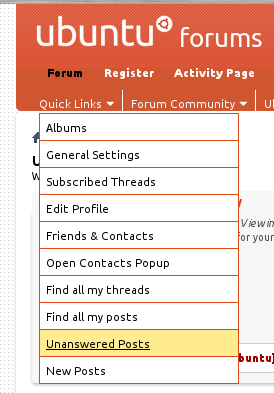
Click the link Quick Links on the right of the screen, above the threads. It will open a drop-down list.
Click Unanswered Posts in the drop-down list.
Picture Guide
Step 1

Step 2
Advanced Search:
Click the link Advanced Search on top of the screen (this is visible in any page of the forums). It will open a drop-down list.
Under Search Options, there's a box Find Threads with. There you can select At Most in the drop-down list. In the text box right of the drop-down list, you can enter a 0 (this should be the default).
Click the Search Now button at the bottom of the screen.
Subpages
UnansweredPostsTeam/FindingPosts (last edited 2013-12-03 13:28:10 by g189094)