Issue11
|
Size: 4975
Comment:
|
← Revision 26 as of 2008-08-06 16:31:50 ⇥
Size: 8682
Comment: converted to 1.6 markup
|
| Deletions are marked like this. | Additions are marked like this. |
| Line 1: | Line 1: |
| {{{ WORK IN PROGRESS }}} |
= Ubuntu Weekly Newsletter - Issue #11 = |
| Line 5: | Line 3: |
| = Ubuntu Weekly Newsletter - Issue # = Ubuntu Weekly Newsletter - Issue # for the week of MONTH, DAY - DAY+7 YEAR |
Ubuntu Weekly Newsletter - Issue #11 for the week of August 20 - 26, 2006 |
| Line 13: | Line 9: |
| == General Community News == | * X.org breakage in 6.06 * Distro sprint in Germany * Backports are back * Upstart unveiled * Security updates * Updates to Ubuntu 6.06 * New apps in Edgy * Kubuntu updates * In the press * Features of the Week: Thunar |
| Line 15: | Line 20: |
| === Distro Sprint === | == X.org breakage in 6.06 == This week a number of users got bitten by an X update to 6.06 that caused them to see a "Linux Blue Screen of Death". You can read more about [[http://www.ubuntu.com/UpgradeIssue|the issue]] and [[http://www.ubuntu.com/FixForUpgradeIssue|the fix]] on ubuntu.com. Mark Shuttleworth also has an excellent [[http://www.markshuttleworth.com/archives/54|blog post]] about the issue and the changes to QA to prevent this kind of thing from happening again. == Distro Sprint == |
| Line 19: | Line 28: |
| On the Thursday local IT consultancy company CC GmBH, who run Kubuntu on all their desktops, invited us to their offices and cooked us a South African dinner in their impressive kitchen. The dinner was commented on as "the best food we've ever had at our conferences". | On the Thursday local IT consultancy company CC GmbH, who run Kubuntu on all their desktops, invited us to their offices and cooked us a South African dinner in their impressive kitchen. The dinner was commented on as "the best food we've ever had at our conferences". |
| Line 24: | Line 33: |
| Scruptious food photos: http://www.flickr.com/photos/sfllaw/ |
Scrumptious food photos: http://www.flickr.com/photos/sfllaw/sets/72157594245857785/ |
| Line 30: | Line 39: |
| Paul Sladen's fridge report: | Fridge report: |
| Line 33: | Line 42: |
| === Backports Open for Business === | == Backports Open for Business == |
| Line 35: | Line 44: |
| Backports reopened thanks to Colin Watson adding support in our archive manager Soyuz. | Backports have been reopened this week, thanks to Colin Watson adding support in our archive manager Soyuz. |
| Line 47: | Line 57: |
| == Upstart unveiled == Scott James Remnant unveiled his new [[https://wiki.ubuntu.com/ReplacementInit|init replacement]], upstart, this week. Sounds exciting, you say! Rather watch grass grow, would you? Fear not, Scott has told all in a long [[http://www.netsplit.com/blog/work/canonical/upstart.html|blog post]], including about why you should care, the design, what upstart does currently and why not initng/launchd/SMF/something else. Upstart is currently only in universe, but as Scott explains in his blog post, upstart isn't quite ready for replacing sysvinit quite yet, but expect it go live in Edgy within a few weeks. |
|
| Line 49: | Line 63: |
| none | There were no security announcements this week. |
| Line 53: | Line 67: |
| There were three updates to X.org this week, backporting various patches as well as dealing with the breakage mentioned above. Yaboot was also updated, to fix booting with XFS. There were also a whole lot of backports, as mentioned above. |
|
| Line 55: | Line 75: |
| Don't forget quick installation notes, enable extra repository, package name, use g-a-i where possible, etc... | Matthew Garret uploaded a new version of '''X.org''' this week, which enables compositing by default. Quinn Storm, of compiz.net, has also begun working with the Ubuntu team to work on '''compiz''' in the Ubuntu repos. |
| Line 57: | Line 77: |
| === Digital Photography === | Oliver Grawert has uploaded a new version of '''ltfsd''', which enables local device support, otherwise known as being able to plug a usb stick into the thin client and have it show up on your desktop. Ubuntu's LTSP has also been updated to use this new code. |
| Line 59: | Line 79: |
| * dcraw has been updated to 8.31 to improve the camera RAW file support with new cameras. * UFRaw has been updated to 0.9.1. |
Brandon Holtsclaw uploaded '''Amarok 1.4.2''', which adds DAAP support, MTP media devices (devices that are part of Microsoft's Plays''For''Sure use this, including players from Creative and others), custom last.fm stations and more. |
| Line 62: | Line 81: |
| == Ubuntu == | Hubert Figuiere has uploaded two digital photography apps, dcraw, which has been updated to 8.31 to improve the camera RAW file support with new cameras and UFRaw has been updated to 0.9.1. As always, this is only a small fraction of cool and rocking new apps uploaded to Edgy in a single week. If you think we missed anything, please [[https://wiki.ubuntu.com/UbuntuWeeklyNewsletter/Ideas|let us know]]. |
| Line 66: | Line 87: |
| Kubuntu Edgy has seen some great new things this week, including new artwork, systems tools and more. |
|
| Line 68: | Line 91: |
| Ken Wimer the Kubuntu Edgy artist in chief has been busy working on new artwork. The O2 theme has a definite purple feel to it is looking lovely. | Ken Wimer, the Kubuntu Edgy artist in chief, has been busy working on new artwork. The O2 theme has a definite purple feel to it is looking lovely. |
| Line 72: | Line 95: |
| https://wiki.kubuntu.org/EdgyEft/Knot2/Kubuntu?action=AttachFile&do=get&target=desktop.png | {{https://wiki.kubuntu.org/EdgyEft/Knot2/Kubuntu?action=AttachFile&do=get&target=desktop.png}} |
| Line 97: | Line 120: |
| == Edubuntu == == Xubuntu == |
|
| Line 103: | Line 122: |
| New Bugs: # [[BR]] Closed Bugs: # === Infamous Bugs === |
* Open (14478) (+258 over last week) * Unconfirmed (7678) * Unassigned (9746) * All bugs ever reported (51631) |
| Line 118: | Line 137: |
| == Feature Of The Week - ??? == | An interesting trivia question was spotted today on Washingpost.com: {{attachment:washpost.png}} Source: http://www.washingtonpost.com/wp-dyn/content/article/2006/08/25/AR2006082501540.html And the buzz continues. Technorati.com, which indexes over over 52 million blogs lists Ubuntu as its fifth most popular search: {{attachment:technoratibuzz.png}} You can search for Ubuntu related blog posts at http://www.technorati.com == Feature Of The Week - Thunar File Manager == Thunar is the new lean and fast Xfce file manager. The first stable release will be included in Xfce 4.4.0 but it is available, in beta form, in Xubuntu 6.06. To install Thunar on any other flavour of Ubuntu, you can install it from '''Applications > Add/Remove''' and select it from the applications listed in the '''System Tools''' section. Of course, you can also enter '''sudo apt-get install thunar''' in your terminal and install it as well. Visit http://thunar.xfce.org/index.html for updates, screenshots, a feature list, and information about ways you can contribute to the project. {{http://ubuntu-ca.org/Thunar.png}} |
| Line 140: | Line 176: |
| * anyone else that contributes | * Hubert Figuiere * Jonathan Riddell |
| Line 145: | Line 182: |
| This document is maintained by the Ubuntu Marketing Team. Please feel free to contact us regarding any concerns or suggestions by either sending an email to ubuntu-marketing@lists.ubuntu.com or by using any of the other methods on the [https://wiki.ubuntu.com/MarketingTeam Ubuntu Marketing Team Contact Information Page]. | This document is maintained by the Ubuntu Marketing Team. Please feel free to contact us regarding any concerns or suggestions by either sending an email to ubuntu-marketing@lists.ubuntu.com or by using any of the other methods on the [[https://wiki.ubuntu.com/MarketingTeam|Ubuntu Marketing Team Contact Information Page]] |
Ubuntu Weekly Newsletter - Issue #11
Ubuntu Weekly Newsletter - Issue #11 for the week of August 20 - 26, 2006
You can always find this and other Ubuntu Weekly Newsletter Issues at: https://wiki.ubuntu.com/UbuntuWeeklyNewsletter
In This Issue
- X.org breakage in 6.06
- Distro sprint in Germany
- Backports are back
- Upstart unveiled
- Security updates
- Updates to Ubuntu 6.06
- New apps in Edgy
- Kubuntu updates
- In the press
- Features of the Week: Thunar
X.org breakage in 6.06
This week a number of users got bitten by an X update to 6.06 that caused them to see a "Linux Blue Screen of Death". You can read more about the issue and the fix on ubuntu.com. Mark Shuttleworth also has an excellent blog post about the issue and the changes to QA to prevent this kind of thing from happening again.
Distro Sprint
The Canonical distro team and a couple of community developers met for a week's hacking in Wiesbaden in Germany. Much feature work was done as we came to the Edgy feature freeze.
On the Thursday local IT consultancy company CC GmbH, who run Kubuntu on all their desktops, invited us to their offices and cooked us a South African dinner in their impressive kitchen. The dinner was commented on as "the best food we've ever had at our conferences".
Our chefs with Mark and Matt: http://static.flickr.com/92/224474985_f130cd7833.jpg?v=0
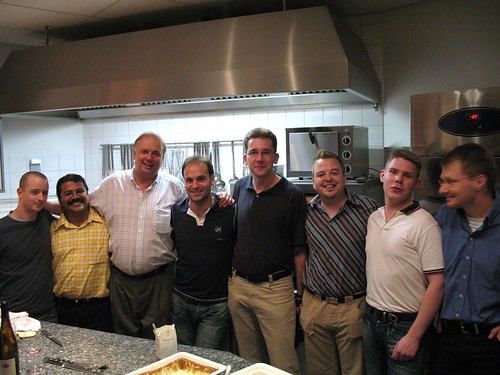
Scrumptious food photos: http://www.flickr.com/photos/sfllaw/sets/72157594245857785/
Our office for the week: http://www.flickr.com/photos/jriddell/221138809/
Fridge report: http://fridge.ubuntu.com/node/517
Backports Open for Business
Backports have been reopened this week, thanks to Colin Watson adding support in our archive manager Soyuz.
Backported packages:
- ktorrent
- libtheora alpha7 (and dev package too)
- kbarcode 2.0.3-1ubuntu2
- nexuiz
- Gcin 1.2.0
- mplayerplug-in
- k3b
- Dia 0.95
- RSIBreak 0.7.1
Upstart unveiled
Scott James Remnant unveiled his new init replacement, upstart, this week. Sounds exciting, you say! Rather watch grass grow, would you? Fear not, Scott has told all in a long blog post, including about why you should care, the design, what upstart does currently and why not initng/launchd/SMF/something else. Upstart is currently only in universe, but as Scott explains in his blog post, upstart isn't quite ready for replacing sysvinit quite yet, but expect it go live in Edgy within a few weeks.
Security Updates
There were no security announcements this week.
Ubuntu 6.06 LTS Updates
There were three updates to X.org this week, backporting various patches as well as dealing with the breakage mentioned above.
Yaboot was also updated, to fix booting with XFS.
There were also a whole lot of backports, as mentioned above.
New Apps In Edgy
Matthew Garret uploaded a new version of X.org this week, which enables compositing by default. Quinn Storm, of compiz.net, has also begun working with the Ubuntu team to work on compiz in the Ubuntu repos.
Oliver Grawert has uploaded a new version of ltfsd, which enables local device support, otherwise known as being able to plug a usb stick into the thin client and have it show up on your desktop. Ubuntu's LTSP has also been updated to use this new code.
Brandon Holtsclaw uploaded Amarok 1.4.2, which adds DAAP support, MTP media devices (devices that are part of Microsoft's PlaysForSure use this, including players from Creative and others), custom last.fm stations and more.
Hubert Figuiere has uploaded two digital photography apps, dcraw, which has been updated to 8.31 to improve the camera RAW file support with new cameras and UFRaw has been updated to 0.9.1.
As always, this is only a small fraction of cool and rocking new apps uploaded to Edgy in a single week. If you think we missed anything, please let us know.
Kubuntu
Kubuntu Edgy has seen some great new things this week, including new artwork, systems tools and more.
New Artwork
Ken Wimer, the Kubuntu Edgy artist in chief, has been busy working on new artwork. The O2 theme has a definite purple feel to it is looking lovely.
https://wiki.kubuntu.org/Artwork/Incoming/Kubuntu-Edgy-Ideas-Feedback

System Settings
Simon Edwards has reorganised the layout of System Settings based on ideas from Usability Ellen.
http://www.kdedevelopers.org/node/2220
Power Management Applet
The kde-guidance package has gained a new power management applet in Edgy. This replaces the klaptopdaemon used in previous versions of Kubuntu. Try it out and let us know of your experiences.
http://www.kdedevelopers.org/blog/57 https://wiki.kubuntu.org/KubuntuPowerManagementFeedback
New artwork coming soon.
HWDB Client
We have added a KDE version of the HWDB client. This programme uploads anonymous information about your computer to our database at http://hwdb.ubuntu.com which can then be used in bug reports and helps us know more about our target hardware.
http://www.kdedevelopers.org/node/2261
New artwork for this also coming soon.
Bug Stats
- Open (14478) (+258 over last week)
- Unconfirmed (7678)
- Unassigned (9746)
- All bugs ever reported (51631)
In The Press
Tips on keeping your Ubuntu Linux server secure
Computerworld published an excerpt from The Official Ubuntu Book by Benjamin Mako Hill, Jono Bacon, Corey Burger, Jonathan Jesse and Ivan Krstic:
"In general, Ubuntu Server is a very secure platform. The Ubuntu Security Team, the team that produces all official security updates, has one of the best turnaround times in the industry. Ubuntu ships with a no open ports policy, meaning that after you install the machine -- be it an Ubuntu desktop or a server -- no applications will be accepting connections from the Internet by default. Like Ubuntu desktops, Ubuntu Server uses the sudo mechanism for system administration, eschewing the root account. And finally, security updates are guaranteed for at least 18 months after each release (five years for some releases, like Dapper), and are free."
Read more at http://www.computerworld.com/action/article.do?command=viewArticleBasic&articleId=9002691&pageNumber=1
An interesting trivia question was spotted today on Washingpost.com:
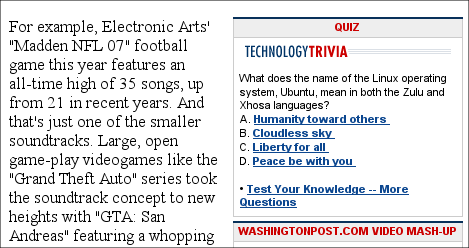
Source: http://www.washingtonpost.com/wp-dyn/content/article/2006/08/25/AR2006082501540.html
And the buzz continues. Technorati.com, which indexes over over 52 million blogs lists Ubuntu as its fifth most popular search:
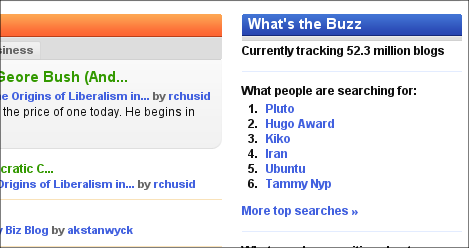
You can search for Ubuntu related blog posts at http://www.technorati.com
Feature Of The Week - Thunar File Manager
Thunar is the new lean and fast Xfce file manager. The first stable release will be included in Xfce 4.4.0 but it is available, in beta form, in Xubuntu 6.06. To install Thunar on any other flavour of Ubuntu, you can install it from Applications > Add/Remove and select it from the applications listed in the System Tools section. Of course, you can also enter sudo apt-get install thunar in your terminal and install it as well. Visit http://thunar.xfce.org/index.html for updates, screenshots, a feature list, and information about ways you can contribute to the project.

Additional News Resources
As always you can find more news and announcements at:
and
Conclusion
Thank you for reading the Ubuntu Weekly Newsletter. See you next week!
Credits
The Ubuntu Weekly Newsletter is brought to you by:
- Corey Burger
- John Little
- Hubert Figuiere
- Jonathan Riddell
- And many others
Feedback
This document is maintained by the Ubuntu Marketing Team. Please feel free to contact us regarding any concerns or suggestions by either sending an email to ubuntu-marketing@lists.ubuntu.com or by using any of the other methods on the Ubuntu Marketing Team Contact Information Page
UbuntuWeeklyNewsletter/Issue11 (last edited 2008-08-06 16:31:50 by localhost)