HowToWritePlugins
|
Size: 3535
Comment: page was renamed from UbuntuTweak/Plugins
|
Size: 5381
Comment:
|
| Deletions are marked like this. | Additions are marked like this. |
| Line 3: | Line 3: |
| ||<<TableOfContents>>|| |
|
| Line 5: | Line 7: |
| Ubuntu Tweak Plugin is a simple python script which use the API from Ubuntu Tweak. It is easy to write it then integrate with Ubuntu Tweak. | Plugins are simple python scripts which use the API from Ubuntu Tweak. They are easy to write and well integrated with Ubuntu Tweak. |
| Line 7: | Line 9: |
| Currently the API is not stable yet, but I hope you can start to write something and get some feedback to me. So I can improve Ubuntu Tweak. | Currently the API is not stable yet, but I hope you can start to write something and give some feedback to me so I can improve Ubuntu Tweak. |
| Line 9: | Line 11: |
| == Prerequisites == | |
| Line 10: | Line 13: |
| == Overview == t As you can see of the screenshot, it consists of two parts: 1. Tweaks, 2. Admins (And Jantor will be added soon) |
* Add the following PPA and upgrade to 0.6.0 (WARNING: this is not a completed version and will lack some features): https://launchpad.net/~tualatrix/+archive/next * Python * PyGObject: the old PyGtk is not supported |
| Line 14: | Line 17: |
| If your plugin is doing some tweaks, you should add it to "Tweaks", if it is doing some other tasks (backup, update and so on), it can be put under "Admins" | === Tips === * To test plugins more quickly, use this command to load from terminal: ubuntu-tweak -m "ClassName" == Get Started == As you can see from the screenshot, Ubuntu Tweak consists of four main parts: "Overview", "Tweaks", "Admins" and "Janitor". The "Overview" page is the place to show some quick informations and tips, it is called "Clip". Each clip shows only one kind of information, such as "Hardware Info", "Desktop Info". Users can manage the clips which he/she want to see when start with Ubuntu Tweak, and developer can write the extension of Clip. If your plugin is making configuration changes (for example by exposing keys in GConf), you should add it to 'Tweaks'. If it is doing some other task (such as backups, updates and so on), it should be put under 'Admins'. {{attachment:Ubuntu Tweak 0.6.0.png}} |
| Line 18: | Line 34: |
| {{attachment:Ubuntu Tweak 0.6.0.png}} | === Example 1 === |
| Line 20: | Line 36: |
| In the first example, I will add some options that deal with bluetooth file sharing. | |
| Line 21: | Line 38: |
| == Example 1 == | If you've run Ubuntu Tweak 0.6 before, two folders will be created under $HOME/.config/ubuntu-tweak, they are "tweaks", "admins". These are the user plugin folders. |
| Line 23: | Line 40: |
| In the first example, I will add a tweaks to do something of bluetooth. If you've ran Ubuntu Tweak 0.6 before, some folder will be created under $HOME/.config/ubuntu-tweak, they are "tweaks", "admins". These are the user plugin folders. Create a file named "bluetoothsettings.py" under $HOME/.config/ubuntu-tweak/tweaks/, fill with these contents: |
Create a file named "[[attachment:bluetoothsettings.py]]"(or click to download it) and put it into $HOME/.config/ubuntu-tweak/tweaks/, then fill it with the following: |
| Line 32: | Line 45: |
| from gi.repository import Gtk, GConf | from gi.repository import Gtk, GConf #Don't support PyGtk |
| Line 34: | Line 47: |
| from ubuntutweak.gui.containers import TablePack from ubuntutweak.modules import TweakModule from ubuntutweak.factory import WidgetFactory |
from ubuntutweak.gui.containers import TablePack # TablePack is a container to pack any numbers of widgets from ubuntutweak.modules import TweakModule # Subclass this Module then it will become a plugin of Ubuntu Tweak from ubuntutweak.factory import WidgetFactory # Use to create the setting related widget easily |
| Line 41: | Line 54: |
| __icon__ = 'bluetooth' __category__ = 'system' |
__icon__ = 'bluetooth' # The icon name, currently don't support path to image __category__ = 'system' # the category |
| Line 51: | Line 64: |
| # WidgetFactory will return a tuple of widgets | |
| Line 55: | Line 69: |
| backend=GConf, | backend=GConf, # GSettings will support in the future |
| Line 78: | Line 92: |
Now save the file, open Ubuntu Tweak, and you see what has been added? Yes, the Bluetooth Settings! {{attachment:BluetoothSettings-01.png}} Click it! See what you have done with just a few lines of code? A complete Bluetooth tweaking feature is almost there. Each option automatically has a "Reset" button on the right side, so that the user can reset that option to its default value. {{attachment:BluetoothSettings-02.png}} I'm not good at the API design, so if you have some suggestions, please tell me, let's make it better. You can find my contact information here: http://blog.ubuntu-tweak.com/about |
Contents |
Intro
Plugins are simple python scripts which use the API from Ubuntu Tweak. They are easy to write and well integrated with Ubuntu Tweak.
Currently the API is not stable yet, but I hope you can start to write something and give some feedback to me so I can improve Ubuntu Tweak.
Prerequisites
Add the following PPA and upgrade to 0.6.0 (WARNING: this is not a completed version and will lack some features): https://launchpad.net/~tualatrix/+archive/next
- Python
PyGObject: the old PyGtk is not supported
Tips
- To test plugins more quickly, use this command to load from terminal:
ubuntu-tweak -m "ClassName"
Get Started
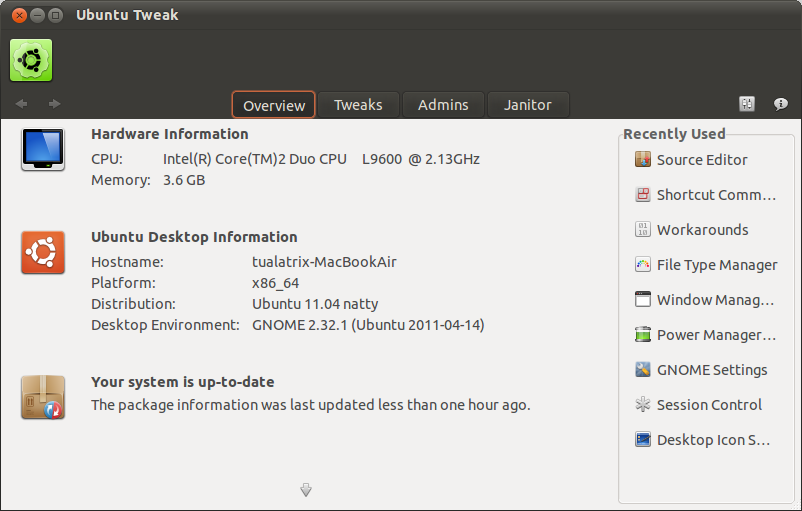
As you can see from the screenshot, Ubuntu Tweak consists of four main parts: "Overview", "Tweaks", "Admins" and "Janitor".
The "Overview" page is the place to show some quick informations and tips, it is called "Clip". Each clip shows only one kind of information, such as "Hardware Info", "Desktop Info". Users can manage the clips which he/she want to see when start with Ubuntu Tweak, and developer can write the extension of Clip.
If your plugin is making configuration changes (for example by exposing keys in GConf), you should add it to 'Tweaks'. If it is doing some other task (such as backups, updates and so on), it should be put under 'Admins'.
Let's start with an example.
Example 1
In the first example, I will add some options that deal with bluetooth file sharing.
If you've run Ubuntu Tweak 0.6 before, two folders will be created under $HOME/.config/ubuntu-tweak, they are "tweaks", "admins". These are the user plugin folders.
Create a file named "bluetoothsettings.py"(or click to download it) and put it into $HOME/.config/ubuntu-tweak/tweaks/, then fill it with the following:
# Your name, email and other copyright information

from gi.repository import Gtk, GConf #Don't support PyGtk

from ubuntutweak.gui.containers import TablePack # TablePack is a container to pack any numbers of widgets
from ubuntutweak.modules  import TweakModule # Subclass this Module then it will become a plugin of Ubuntu Tweak
from ubuntutweak.factory import WidgetFactory # Use to create the setting related widget easily

class BluetoothSettings(TweakModule):
    __title__ = _('Bluetooth Settings')
    __desc__ = _('Tweak some hidden bluetooth settings')
    __icon__ = 'bluetooth' # The icon name, currently don't support path to image
    __category__ = 'system' # the category

    __author__ = 'Your Name <your@mail.com>'
    __url__ = 'Your home page'
    __url_title__ = 'The title of Home page'

    def __init__(self):
        TweakModule.__init__(self)

        # WidgetFactory will return a tuple of widgets
        box = TablePack(_("Bluetooth Options"), (
                    WidgetFactory.create("CheckButton",
                                         label=_('Share Public directory over Bluetooth'),
                                         key="/desktop/gnome/file_sharing/bluetooth_enabled",
                                         backend=GConf, # GSettings will support in the future
                                         enable_reset=True),
                    WidgetFactory.create("CheckButton",
                                         label=_("Whether to notify about newly received files"),
                                         key="/desktop/gnome/file_sharing/bluetooth_notify",
                                         backend=GConf,
                                         enable_reset=True),
                    WidgetFactory.create("CheckButton",
                                         label=_("Whether to allow Bluetooth clients to write files."),
                                         key="/desktop/gnome/file_sharing/bluetooth_allow_write",
                                         backend=GConf,
                                         enable_reset=True),
                    WidgetFactory.create('ComboBox',
                                         label=_('When to accept files sent over Bluetooth'),
                                         key='/desktop/gnome/file_sharing/bluetooth_accept_files',
                                         enable_reset=True,
                                         backend=GConf,
                                         texts=[_('Always'), _('Bonded'), _('Ask')],
                                         values=["always", "bonded", "ask"]),
            ))

        self.add_start(box, False, False, 0)
Now save the file, open Ubuntu Tweak, and you see what has been added? Yes, the Bluetooth Settings!
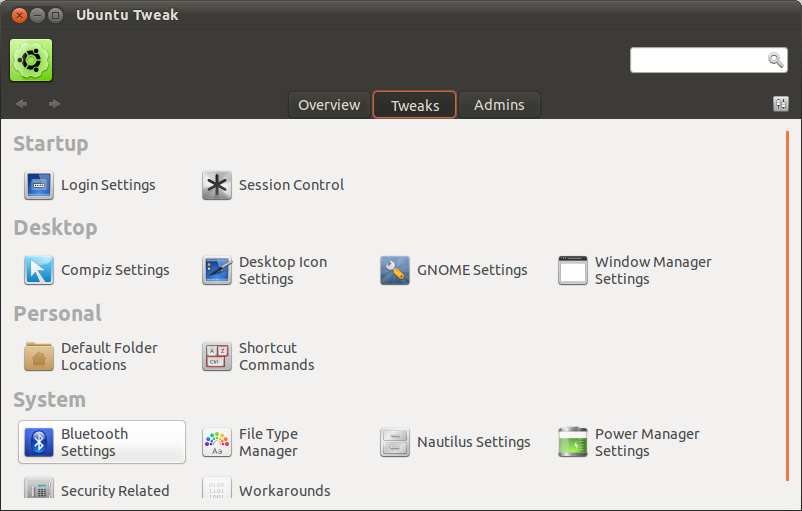
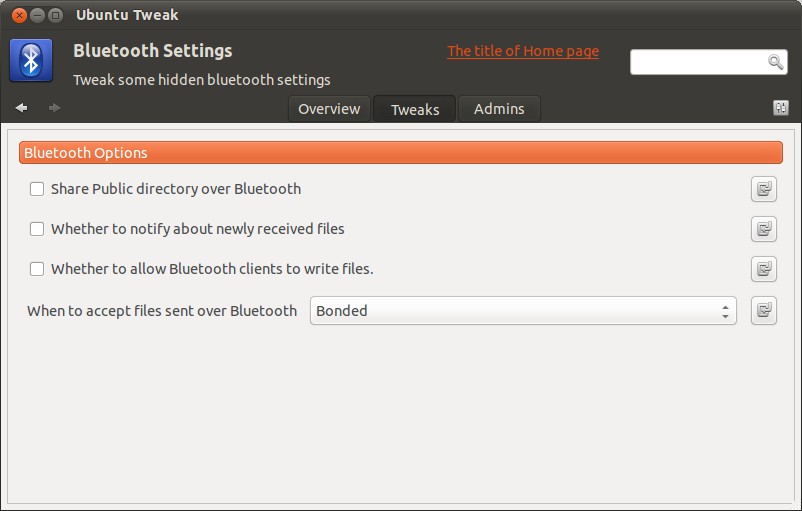
Click it! See what you have done with just a few lines of code? A complete Bluetooth tweaking feature is almost there.
Each option automatically has a "Reset" button on the right side, so that the user can reset that option to its default value.
I'm not good at the API design, so if you have some suggestions, please tell me, let's make it better. You can find my contact information here: http://blog.ubuntu-tweak.com/about
UbuntuTweak/HowToWritePlugins (last edited 2011-11-15 00:49:32 by 64)