Mixer
|
Size: 810
Comment:
|
← Revision 4 as of 2008-08-06 16:40:54 ⇥
Size: 897
Comment: converted to 1.6 markup
|
| Deletions are marked like this. | Additions are marked like this. |
| Line 5: | Line 5: |
| In your system's audio mixer (Applications -> Sound & Video -> Volume Control) you can adjust various volume levels: | In your system's audio mixer (Applications -> Sound & Video -> Volume Control, or right click on speaker in panel) you can adjust various volume levels: |
| Line 7: | Line 7: |
| attachment:mixer.png | {{attachment:mixer.png}} |
| Line 11: | Line 11: |
| attachment:mixer_shaded.png | {{attachment:mixer_shaded.png}} |
| Line 17: | Line 17: |
| Some soundcards also offer the ability to further amplify the microphone input, by way of a Mic Boost. In the mixer, go into the Edit menu and choose Preferences. Find "Mic Boost" in the list and click the tickbox next to it. | Some soundcards also offer the ability to further amplify the microphone input, by way of a Mic Boost. In the mixer, go into the Edit menu and choose Preferences. Find "Mic Boost" in the list and click the tickbox next to it: {{attachment:mic_boost.png}} |
| Line 21: | Line 23: |
| attachment:mic_boost.png | {{attachment:mic_boost_switch.png}} |
Audio Mixer details
Levels
In your system's audio mixer (Applications -> Sound & Video -> Volume Control, or right click on speaker in panel) you can adjust various volume levels:
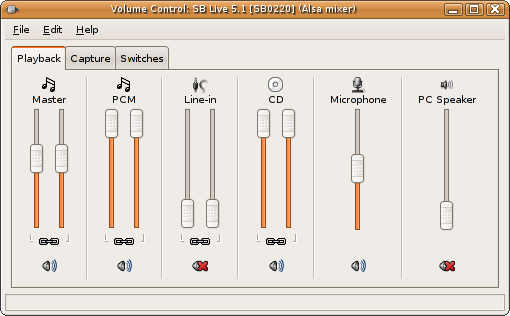
Of particular interest here are the microphone settings:
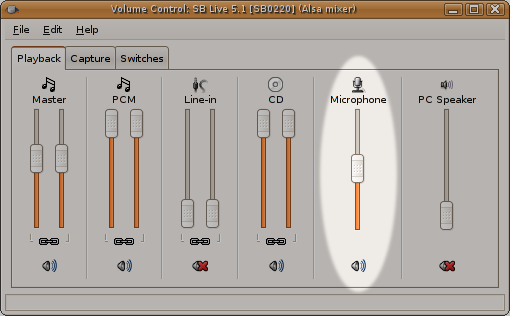
Below the volume slider is a mute button. If it has a red cross in it, your microphone is muted.
Mic Boost
Some soundcards also offer the ability to further amplify the microphone input, by way of a Mic Boost. In the mixer, go into the Edit menu and choose Preferences. Find "Mic Boost" in the list and click the tickbox next to it:
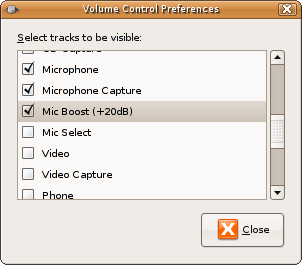
This should now give you an extra option in the "Switches" tab of the mixer:
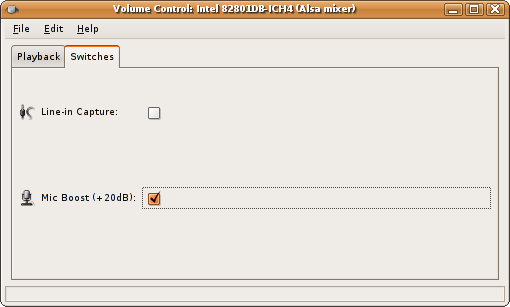
By enabling this, you may be able to correct for a quiet microphone.
UbuntuDeveloperSummitMountainView/Participate/Mixer (last edited 2008-08-06 16:40:54 by localhost)