USRjabberServer
Differences between revisions 3 and 4
|
Size: 238
Comment:
|
Size: 528
Comment:
|
| Deletions are marked like this. | Additions are marked like this. |
| Line 3: | Line 3: |
| 0. Open the "My Settings" screen. | 0. Open the "My Settings" screen: |
| Line 5: | Line 5: |
| 0. Select "Network". 0. Change the "Server:" setting. 0. Click the check mark. 0. Click the X. |
0. Select "Network": {{attachment:usr_jabber2.png}} 0. Change the "Server:" setting: {{attachment:usr_jabber3.png}} 0. Click the check mark: {{attachment:usr_jabber4.png}} 0. Click the X: {{attachment:usr_jabber5.png}} That's it! When you visit your network neighbourhood, you should now see the other users who are connected to the same server as you are. |
Setting the Jabber Server on Ubuntu Sugar Remix
- Open the "My Settings" screen:
- Select "Network":
- Change the "Server:" setting:
- Click the check mark:
- Click the X:

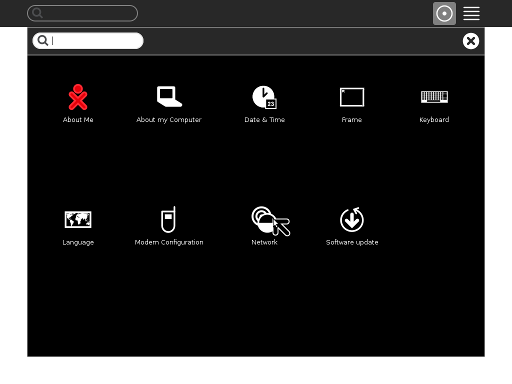
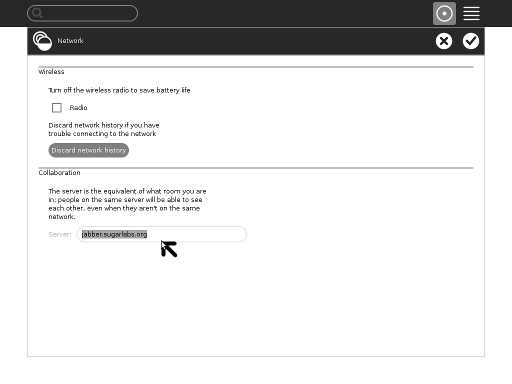
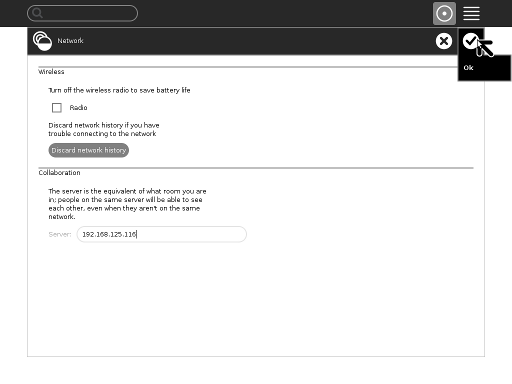
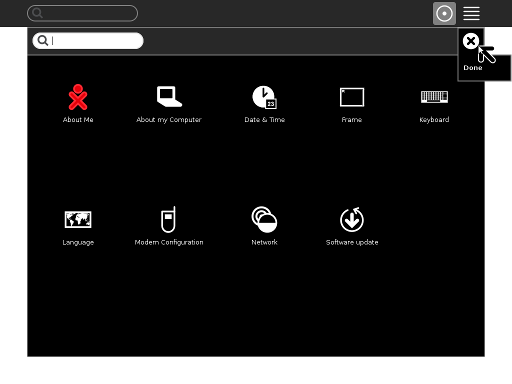
That's it! When you visit your network neighbourhood, you should now see the other users who are connected to the same server as you are.
USRjabberServer (last edited 2010-10-14 14:51:21 by 158)