TimeAndDate
|
Size: 3170
Comment:
|
Size: 6076
Comment: + details of settings sensitivity
|
| Deletions are marked like this. | Additions are marked like this. |
| Line 1: | Line 1: |
| ##||<tablestyle="margin:0 auto;" style="border:none;">“What time is it Eccles?”<<BR>>“Um, just a minute, I got it written down here on a piece of paper.”|| ##||<style="border:none;text-align:right;">— ''[[http://www.youtube.com/watch?v=VSSGiA4f5cs|The Goon Show]]''|| |
||<tablestyle="margin:0 auto;" style="border:none;">“What time is it, Eccles?”<<BR>>“Um, just a minute, I got it written down here on a piece of paper.”|| ||<style="border:none;text-align:right;">— ''[[http://www.youtube.com/watch?v=VSSGiA4f5cs|The Goon Show]]''|| |
| Line 13: | Line 13: |
| ||Find out the weather outside||yes||-|| | ||Find out the weather outside||yes||- (handled by [[https://launchpad.net/weather-indicator|Weather Indicator]])|| |
| Line 17: | Line 17: |
| ||Find out the weather somewhere else||yes||-|| | ||Find out the weather somewhere else||yes||- (handled by [[https://launchpad.net/weather-indicator|Weather Indicator]])|| |
| Line 35: | Line 35: |
| The “Clock Preferences”, “Time and Date Settings”, and “Time & Date” windows should be merged into a single “Time & Date” window. |
|
| Line 37: | Line 39: |
| ||<:style="border:none;">{{attachment:settings-time-date.jpg}}{{attachment:settings-clock.jpg}}|| | ||<tablestyle="clear:both;float:left;margin: 0 1em 1em 0;" style="border:none;">{{attachment:settings-time-date.jpg}}|| The window should have two tabs, “Time & Date” and “Clock”. Inside the “Time & Date” tab, all controls should be insensitive by default, except for the “Unlock to change these settings” button. Activating the button should open a Policy``Kit alert with the primary text “To change time or date settings, you need to authenticate.”. If you authenticate successfully, the lock button’s caption should change to “Lock to prevent further changes”, and all the other controls should become sensitive. The time zone map and associated controls should be exactly the same as [[used in the Ubuntu installer]]. The “Time:” and “Date:” controls should be sensitive only when “Set the time: Manually” is selected. To avoid unnecessary disruption, any change to the system time should be applied only when both the “Time:” and “Date:” fields are unfocused (or when the window is closed). ||<tablestyle="clear:both;"style="border:none;">|| ||<tablestyle="clear:both;float:left;margin: 0 1em 1em 0;" style="border:none;">{{attachment:settings-clock.jpg}}|| Inside the “Clock” tab, the “Show a clock in the panel” checkbox should be sensitive only if you have at least one Gnome panel or Unity menu bar. The remainder of the controls in the tab should be sensitive only if you have at least one Gnome panel or Unity menu bar ''and'' “Show a clock in the panel” is checked. The “Include week numbers” checkbox and the “Week begins on:” radio buttons should be sensitive only when “Monthly calendar” is checked. The “Coming events from Evolution Calendar” checkbox should be sensitive only when Evolution is installed. The “Choose Locations…” button should be sensitive only when “Time in other locations” is checked. ||<tablestyle="clear:both;"style="border:none;">|| ||<tablestyle="clear:both;float:left;margin: 0 1em 1em 0;" style="border:none;">{{attachment:settings-locations.jpg}}|| Activating “Choose Locations…” should open and focus the “Locations” dialog. In the dialog, the pseudo-location “UTC” should be present by default, as a hint that it is available (remembering that “Time in other locations” as a whole is off by default). activating the “+” button should add, scroll to, and begin editing the “Location” cell of, a new row in the table. |
| Line 45: | Line 82: |
| The contents of the menu should depend on the “In the clock menu, show:” settings. | The contents of the menu should depend on the “In the clock menu, show:” settings. In particular: |
| Line 47: | Line 84: |
| ''Needs to be specified in more detail.'' | * The date item should always be present, but it should be sensitive (and have an icon) only if Evolution is installed. |
| Line 54: | Line 91: |
| == Unresolved Issues == | == Future work == * Provide an API for calendar applications other than Evolution. == Unresolved issues == |
“What time is it, Eccles?” |
The Gnome clock applet should be replaced by a clock menu. Like the applet before it, the menu should optionally show a monthly calendar, coming events from your Evolution calendar, and/or the time at other locations. Unlike the applet, it should not show weather or a world map; but it should let you add an event or set a timer directly from the menu. The three windows for setting time, date, and clock options should also be consolidated into a single window.
Use cases
These use cases are not necessarily to be satisfied by the same software. But most of them are currently satisfied by the Gnome clock applet, so we should explicitly include, separate, or exclude them.
Use case |
Gnome clock applet |
Clock menu |
Find out the time |
yes |
yes |
Find out the date |
yes |
yes |
Find out the weather outside |
yes |
- (handled by Weather Indicator) |
Find out sunrise/sunset |
yes |
- |
Change how the time/date is presented |
yes |
yes |
Find out the time/date somewhere else |
yes |
yes |
Find out the weather somewhere else |
yes |
- (handled by Weather Indicator) |
Insert the current time or date into a document |
yes |
- |
Change the time or date |
yes |
yes |
Create an event (e.g. appointment) for a particular date or time |
- |
yes |
See upcoming events |
yes |
- |
Set a countdown timer |
- |
yes |
Learn that today is Talk Like a Pirate Day |
- |
- |
When it's __:__ here, what time will it be in ______? |
- |
- |
Support for different calendar systems (such as Hijri, which is lunar based) |
- |
- |
Support docking applications that dynamically create events (such as Islamic prayer time calculations) |
- |
- |
For each of these:
- Variation: user is not sighted
Other use cases:
- Computer learns of change of geographic location (time zone etc)
Time & Date settings
The “Clock Preferences”, “Time and Date Settings”, and “Time & Date” windows should be merged into a single “Time & Date” window.
|
↓ |


The window should have two tabs, “Time & Date” and “Clock”.
Inside the “Time & Date” tab, all controls should be insensitive by default, except for the “Unlock to change these settings” button. Activating the button should open a PolicyKit alert with the primary text “To change time or date settings, you need to authenticate.”. If you authenticate successfully, the lock button’s caption should change to “Lock to prevent further changes”, and all the other controls should become sensitive.
The time zone map and associated controls should be exactly the same as used in the Ubuntu installer.
The “Time:” and “Date:” controls should be sensitive only when “Set the time: Manually” is selected.
To avoid unnecessary disruption, any change to the system time should be applied only when both the “Time:” and “Date:” fields are unfocused (or when the window is closed).

Inside the “Clock” tab, the “Show a clock in the panel” checkbox should be sensitive only if you have at least one Gnome panel or Unity menu bar.
The remainder of the controls in the tab should be sensitive only if you have at least one Gnome panel or Unity menu bar and “Show a clock in the panel” is checked.
The “Include week numbers” checkbox and the “Week begins on:” radio buttons should be sensitive only when “Monthly calendar” is checked.
The “Coming events from Evolution Calendar” checkbox should be sensitive only when Evolution is installed.
The “Choose Locations…” button should be sensitive only when “Time in other locations” is checked.
|

Activating “Choose Locations…” should open and focus the “Locations” dialog.
In the dialog, the pseudo-location “UTC” should be present by default, as a hint that it is available (remembering that “Time in other locations” as a whole is off by default).
activating the “+” button should add, scroll to, and begin editing the “Location” cell of, a new row in the table.
The menu
|
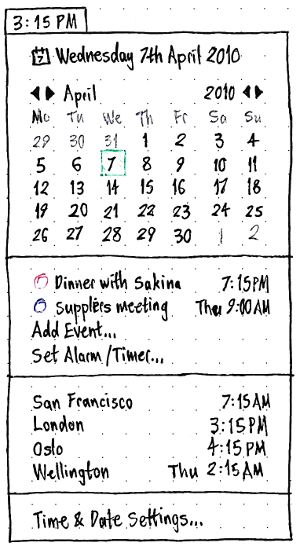
The title of the menu should depend on the “In the clock, show:” settings.
The contents of the menu should depend on the “In the clock menu, show:” settings. In particular:
- The date item should always be present, but it should be sensitive (and have an icon) only if Evolution is installed.
For an upcoming event:
if it is today, just the time should be shown (e.g. “3:55 PM”)
if it is later this week, the day and time should be shown (e.g. “Wed 3:55 PM”)
if it is after this week, the day, date, and time should be shown (e.g. “Wed 21 Apr 3:55 PM”).
Future work
- Provide an API for calendar applications other than Evolution.
Unresolved issues
Setting the timezone automatically by checking geoip.ubuntu.com. That is, connect to the Internet in Prague and your timezone is automatically changed to that location. This is already done automatically in the installer.
TimeAndDate (last edited 2017-02-01 18:31:49 by mpt)