TimeAndDate
|
⇤ ← Revision 1 as of 2010-05-14 08:59:53
Size: 2714
Comment: moved from private wiki
|
Size: 2914
Comment:
|
| Deletions are marked like this. | Additions are marked like this. |
| Line 25: | Line 25: |
| ||Support for different calendar systems (such as Hijri, which is lunar based)||-||-|| ||Support docking applications that dynamically create events (such as Islamic prayer time calculations)||-||-|| |
The Gnome clock applet should be replaced by a clock menu. Like the applet before it, the menu should optionally show a monthly calendar, coming events from your Evolution calendar, and/or the time at other locations. Unlike the applet, it should not show weather or a world map; but it should let you add an event or set a timer directly from the menu. The three windows for setting time, date, and clock options should also be consolidated into a single window.
Use cases
These use cases are not necessarily to be satisfied by the same software. But most of them are currently satisfied by the Gnome clock applet, so we should explicitly include, separate, or exclude them.
Use case |
Gnome clock applet |
Clock menu |
Find out the time |
yes |
yes |
Find out the date |
yes |
yes |
Find out the weather outside |
yes |
- |
Find out sunrise/sunset |
- |
- |
Change how the time/date is presented |
yes |
yes |
Find out the time/date somewhere else |
yes |
yes |
Find out the weather somewhere else |
yes |
- |
Insert the current time or date into a document |
yes |
- |
Change the time or date |
yes |
yes |
Create an event (e.g. appointment) for a particular date or time |
- |
yes |
See upcoming events |
yes |
- |
Set a countdown timer |
- |
yes |
Learn that today is Talk Like a Pirate Day |
- |
- |
When it's __:__ here, what time will it be in ______? |
- |
- |
Support for different calendar systems (such as Hijri, which is lunar based) |
- |
- |
Support docking applications that dynamically create events (such as Islamic prayer time calculations) |
- |
- |
For each of these:
- Variation: user is not sighted
Other use cases:
- Computer learns of change of geographic location (time zone etc)
Time & Date settings
|
↓ |


The menu
|
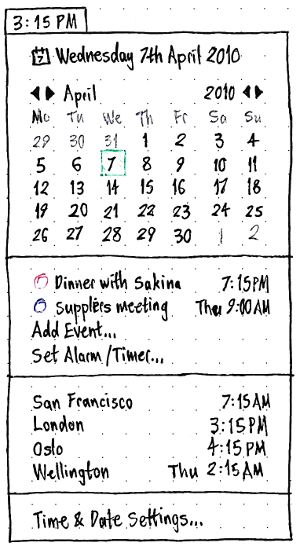
The title of the menu should depend on the “In the clock, show:” settings.
The contents of the menu should depend on the “In the clock menu, show:” settings.
Needs to be specified in more detail.
For an upcoming event:
if it is today, just the time should be shown (e.g. “3:55 PM”)
if it is later this week, the day and time should be shown (e.g. “Wed 3:55 PM”)
if it is after this week, the day, date, and time should be shown (e.g. “Wed 21 Apr 3:55 PM”).
TimeAndDate (last edited 2017-02-01 18:31:49 by mpt)