EnableProposed


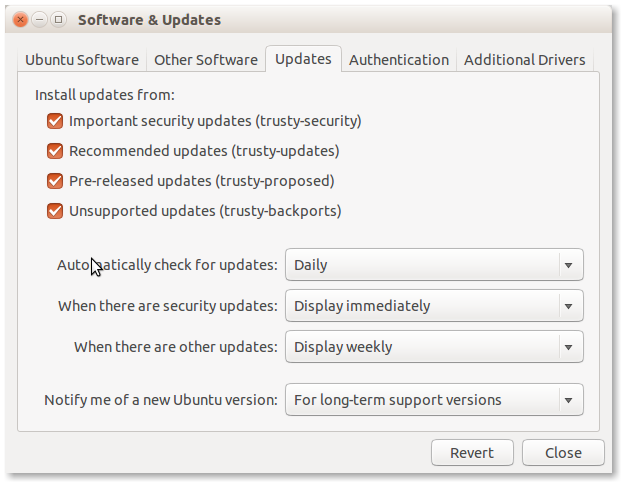
To enable the proposed archive for Ubuntu 11.10 go to Applications→Ubuntu Software Center→Edit→Software Sources→Updates and ensure that oneiric-proposed is ticked.
Click to zoom
Or you can modify the software sources manually by adding the following line to /etc/apt/sources.list:
deb http://archive.ubuntu.com/ubuntu/ oneiric-proposed restricted main multiverse universe
Replace "oneiric" with "natty", "maverick", "lucid", or "hardy" depending on which release you are on.
Selective upgrading from -proposed
After enabling the -proposed archive as shown above, you can configure apt to allow selective installs of packages from it instead of upgrading all of your packages to the -proposed versions.
Create the file /etc/apt/preferences with this content:
Package: *
Pin: release a=oneiric-security
Pin-Priority: 990

Package: *
Pin: release a=oneiric-updates
Pin-Priority: 900

Package: *
Pin: release a=oneiric-proposed
Pin-Priority: 400
With this preference file in place, Update Manager, Synaptic and Aptitude won't ask for upgrades from the -proposed repositories.
If you want to see the oneiric-proposed packages under the 'Upgradable Packages' listing, run Aptitude as follows
sudo aptitude -t oneiric-proposed
In aptitude, you should first update the package listings ('u' key), mark any of the packages you want to upgrade ('+' key), and finally install them ('g' key). After this, if you run Aptitude without options again, the rest of oneiric-proposed upgradable packages will remain hidden.
Alternatively, you can install a package from -proposed by using
sudo aptitude install packagename/oneiric-proposed
This method uses a higher priority to install packages.
If you use another release of Ubuntu, replace oneiric by your release name everywhere.
Enable Apport
When running proposed it is recommend that you re-enable Apport bug filing to capture and report crashes. In the event that you end up reporting a crash about a proposed package please tag the bug as proposed-pkg so we can distinguish it from other crash reports.
You can enable Apport on a stable system with:
gconftool -s /apps/update-notifier/show_apport_crashes --type bool true
... or if you use Kubuntu edit /usr/share/kubuntu-default-settings/kde-profile/default/share/config/adept_notifierrc and set Addept=true:
[General]
Adept=true
Hardy, Intrepid, Jaunty and Karmic (and maybe latest release) also need Apport to be enabled in /etc/default/apport, edit this file and change enabled to 1.
sudo nano /etc/default/apport
Once Apport is enabled you need to start the process do that with the following command.
sudo /etc/init.d/apport start
For Karmic and newer releases
sudo service apport start
To test that Apport is now running, enter the following command to cause a simple crash and generate a crash file in /var/crash:
sh -c 'kill -SEGV $$'
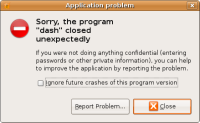
This should notify about the crash and offer you to submit it to Launchpad. Click on 'Report' and verify that the details look complete (package name and version, has a (broken) stack trace, etc.). Please do not actually send it to Launchpad, though, since it is not a genuine bug.
Click to zoom

Installation testing using -proposed
Sometimes you may be asked to test a netboot installer image from oneiric-proposed. The images may be found here (replace "i386" with your architecture as necessary):
http://archive.ubuntu.com/ubuntu/dists/oneiric-proposed/main/installer-i386/
In order to install successfully from these images, you will normally need to tell the installer to fetch its own components from -proposed as well, which is not the default. To do this, add the following boot parameter:
apt-setup/proposed=true
You must make sure that the mirror you are installing from contains packages from -proposed. All official mirrors will do so; if you operate your own mirror or use a site-local mirror, it may need to be modified to pull from -proposed. Make sure that you do not simply use a loopback mount of a CD or DVD image as an installation source; this is one of the cases where such mirrors will not work, since they do not contain the updated kernel packages required by the new installer.
Uploading your hardware profile
To help us track the hardware test coverage, please upload your hardware profile for the system you will run proposed on using the hardware testing tool, found in the System -> Administration menu or with the command checkbox-gtk.
You can see your submitted information at https://launchpad.net/people/+me/+hwdb-submissions
Register your participation
We have set up an improvised way of tracking -proposed archive coverage using the bug tracker in Launchpad (but we are designing a more automated solution). To register your participation please select the appropriate bug for your architecture here and add a comment using the template in the description. Thanks!
Verifying Stable Release Updates (SRU) bugs
For extra points please help us verify the fixes to the proposed updates.
You don't have to be very technical to do this kind of testing, simply read how to perform a Stable Release Update verification, read the Stable Release Update procedure and choose the packages you want to test from the Stable Release Update report.