UbuntuMobile-apps
|
Size: 4573
Comment: Changed image
|
Size: 4607
Comment: converted to 1.6 markup
|
| Deletions are marked like this. | Additions are marked like this. |
| Line 1: | Line 1: |
| [[Include(Testing/Cases/Header)]] | <<Include(Testing/Cases/Header)>> |
| Line 4: | Line 4: |
| ||<tablestyle="float:right; font-size: 0.9em; background:#F1F1ED;margin: 0 0 1em 1em;" style="padding:0.5em;">'''Contents'''[[BR]][https://wiki.ubuntu.com/Testing/Cases/UMEScreenshots?action=AttachFile&do=get&target=main-screen.png https://wiki.ubuntu.com/Testing/Cases/UMEScreenshots?action=AttachFile&do=get&target=main-screen-tn.png][[BR]][[TableOfContents(2)]]|| | ||<tablestyle="float:right; font-size: 0.9em; background:#F1F1ED;margin: 0 0 1em 1em;" style="padding:0.5em;">'''Contents'''<<BR>>[[https://wiki.ubuntu.com/Testing/Cases/UMEScreenshots?action=AttachFile&do=get&target=main-screen.png|{{https://wiki.ubuntu.com/Testing/Cases/UMEScreenshots?action=AttachFile&do=get&target=main-screen-tn.png}}]]<<BR>><<TableOfContents(2)>>|| |
| Line 12: | Line 12: |
| [https://wiki.ubuntu.com/Testing/Cases/UMEdesktop-apps-browser : Browser Test Cases] | [[https://wiki.ubuntu.com/Testing/Cases/UMEdesktop-apps-browser|: Browser Test Cases]] |
| Line 17: | Line 17: |
| [https://wiki.ubuntu.com/Testing/Cases/UMEdesktop-apps-media : Media Player Test Cases] | [[https://wiki.ubuntu.com/Testing/Cases/UMEdesktop-apps-media|: Media Player Test Cases]] |
| Line 22: | Line 22: |
| [https://wiki.ubuntu.com/Testing/Cases/UMEdesktop-apps-plugin : Media Player Plugin Test Cases] | [[https://wiki.ubuntu.com/Testing/Cases/UMEdesktop-apps-plugin|: Media Player Plugin Test Cases]] |
| Line 29: | Line 29: |
| [https://wiki.ubuntu.com/Testing/Cases/UMEdesktop-apps-office : Office Document Viewer Test Cases] | [[https://wiki.ubuntu.com/Testing/Cases/UMEdesktop-apps-office|: Office Document Viewer Test Cases]] |
| Line 32: | Line 32: |
| UME IM/Chat Client supports protocols for AIM, Windows Live Messenger, Yahoo Messenger, QQ (Most popular IM in Asia), Jabber, ICQ, and MySpace IM.[[BR]] Features - [[BR]] Multiple IM sessions at once[[BR]] Buddy notifications[[BR]] |
UME IM/Chat Client supports protocols for AIM, Windows Live Messenger, Yahoo Messenger, QQ (Most popular IM in Asia), Jabber, ICQ, and MySpace IM.<<BR>> Features - <<BR>> Multiple IM sessions at once<<BR>> Buddy notifications<<BR>> |
| Line 38: | Line 38: |
| [https://wiki.ubuntu.com/Testing/Cases/UMEdesktop-apps-im : IM/Chat Test Cases] | [[https://wiki.ubuntu.com/Testing/Cases/UMEdesktop-apps-im|: IM/Chat Test Cases]] |
| Line 41: | Line 41: |
| UME Email Client supports POP3 (POP3 before SMTP, APOP, TLS), IMAP4, SMTP (Plain auth, CRAM-MD5, DIGEST-MD5, TLS), GnuPG, RSS [[BR]] Featuring - [[BR]] Off line mode[[BR]] Address book[[BR]] Spell check[[BR]] Auto-colored mail quotes[[BR]] HTML email formatting[[BR]] Search[[BR]] |
UME Email Client supports POP3 (POP3 before SMTP, APOP, TLS), IMAP4, SMTP (Plain auth, CRAM-MD5, DIGEST-MD5, TLS), GnuPG, RSS <<BR>> Featuring - <<BR>> Off line mode<<BR>> Address book<<BR>> Spell check<<BR>> Auto-colored mail quotes<<BR>> HTML email formatting<<BR>> Search<<BR>> |
| Line 51: | Line 51: |
| [https://wiki.ubuntu.com/Testing/Cases/UMEdesktop-apps-email : Email Client Test Cases] | [[https://wiki.ubuntu.com/Testing/Cases/UMEdesktop-apps-email|: Email Client Test Cases]] |
| Line 56: | Line 56: |
| [https://wiki.ubuntu.com/Testing/Cases/UMEdesktop-apps-camera : Camera Test Cases] | [[https://wiki.ubuntu.com/Testing/Cases/UMEdesktop-apps-camera|: Camera Test Cases]] |
| Line 61: | Line 61: |
| [https://wiki.ubuntu.com/Testing/Cases/UMEdesktop-apps-rss : RSS Reader Test Cases] | [[https://wiki.ubuntu.com/Testing/Cases/UMEdesktop-apps-rss|: RSS Reader Test Cases]] |
| Line 66: | Line 66: |
| [https://wiki.ubuntu.com/Testing/Cases/UMEdesktop-apps-clock : Clock Test Cases] | [[https://wiki.ubuntu.com/Testing/Cases/UMEdesktop-apps-clock|: Clock Test Cases]] |
| Line 71: | Line 71: |
| [https://wiki.ubuntu.com/Testing/Cases/UMEdesktop-apps-calculator : Calculator Test Cases] | [[https://wiki.ubuntu.com/Testing/Cases/UMEdesktop-apps-calculator|: Calculator Test Cases]] |
| Line 76: | Line 76: |
| [https://wiki.ubuntu.com/Testing/Cases/UMEdesktop-apps-pim : PIM Test Cases] | [[https://wiki.ubuntu.com/Testing/Cases/UMEdesktop-apps-pim|: PIM Test Cases]] |
| Line 81: | Line 81: |
| [https://wiki.ubuntu.com/Testing/Cases/UMEdesktop-apps-vnc : Remote desktop Test Cases] | [[https://wiki.ubuntu.com/Testing/Cases/UMEdesktop-apps-vnc|: Remote desktop Test Cases]] |
| Line 86: | Line 86: |
| [https://wiki.ubuntu.com/Testing/Cases/UMEdesktop-apps-ebook : E-book Reader Test Cases] | [[https://wiki.ubuntu.com/Testing/Cases/UMEdesktop-apps-ebook|: E-book Reader Test Cases]] |
| Line 91: | Line 91: |
| [https://wiki.ubuntu.com/Testing/Cases/UMEdesktop-apps-notepad : Notepad Test Cases] | [[https://wiki.ubuntu.com/Testing/Cases/UMEdesktop-apps-notepad|: Notepad Test Cases]] |
Contents |
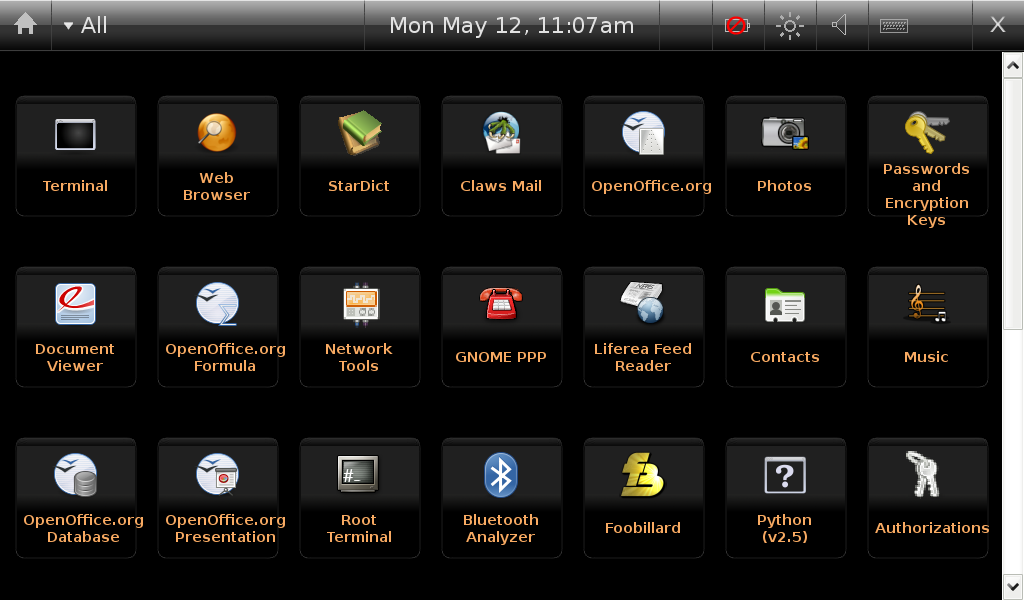
Ubuntu Mobile Applications
Browser
Ubuntu Mobile Edition (UME) includes a default web browser. IT is based on Firefox, and should provide users with a consistent experience to the desktop version. The test cases listed here are merely a guideline for available features. Please explore all areas of the UME Browser not simply the areas detailed below.
Media Player
UME includes a media player. This player handles multiple Audio, Video, and Image formats. The media experience should be feature rich and highly functional. Playback of all available formats should be smooth and high quality.
Media Player Plugin
Along with the Media Player applet, UME also contains a browser plugin so supported media formats integrated into a web site are played natively in the browser window. The quality of the playback should be equal to that of the stand alone media player and integration should be seamless.
: Media Player Plugin Test Cases
Office Document Viewer
UME Document Viewer supports the following document formats: MS Word (.doc), OpenOffice (.odf), Excel (.xls), PowerPoint (.ppt), and PDF file reading met in UME by the addition of a PDF Viewer that is compatible with current Adobe Acrobat standards.
: Office Document Viewer Test Cases
IM / Chat
UME IM/Chat Client supports protocols for AIM, Windows Live Messenger, Yahoo Messenger, QQ (Most popular IM in Asia), Jabber, ICQ, and MySpace IM.
Features -
Multiple IM sessions at once
Buddy notifications
Private secure conversation
Standalone Email client
UME Email Client supports POP3 (POP3 before SMTP, APOP, TLS), IMAP4, SMTP (Plain auth, CRAM-MD5, DIGEST-MD5, TLS), GnuPG, RSS
Featuring -
Off line mode
Address book
Spell check
Auto-colored mail quotes
HTML email formatting
Search
Anti-phishing protection
Camera application
UME Camera application allows the Display/record video from camera, take snapshot with camera, save as JPEG, and Adjust camera settings
RSS reader
UME RSS Reader allows the user to search through feeds, and media management for downloading videos/podcasts
Clock
UME Clock supports Digital/analog mode, time/date setting, Support regional setting, Alarm, Can sync with NTP, Dual timezone display, and Full screen mode (for use when docked)
Calculator
UME Calculator supports Basic calculating, memory function, and clipboard
PIM
UME PIM application suite includes Calendar, Time, Contacts, Notes, Appointments, and Task List
Remote desktop client
UME Remote desktop client supports VNC client, RDP client, Support for screen scaling and panning, and Stylus to Mouse click conversion
E-book reader
The UME E-book reader allow for the opening and navigation of e-book files.
Notepad
UME Notepad allow for the creation and editing of simple text documents.
Testing/Cases/UbuntuMobile-apps (last edited 2008-10-08 18:08:17 by bismuth)