UMEdesktop
|
Size: 7445
Comment:
|
Size: 3386
Comment:
|
| Deletions are marked like this. | Additions are marked like this. |
| Line 1: | Line 1: |
| [[Include(Testing/Cases/Header)]] | <<Include(Testing/Cases/Header)>> |
| Line 3: | Line 3: |
| == Summary == | ||<tablestyle="float:right; font-size: 0.9em; background:#F1F1ED;margin: 0 0 1em 1em;" style="padding:0.5em;">'''Contents'''<<BR>>[[https://wiki.ubuntu.com/Testing/Cases/UMEScreenshots?action=AttachFile&do=get&target=main-screen.png|{{https://wiki.ubuntu.com/Testing/Cases/UMEScreenshots?action=AttachFile&do=get&target=main-screen-tn.png}}]]<<BR>><<TableOfContents(2)>>|| = Introduction = |
| Line 5: | Line 6: |
| Basic test of the UME desktop. Can be performed or mobile hardware or in Xnest on a development machine. | Welcome to the Ubuntu MID Edition testing wiki. The pages linked within are designed to guide you through the process of setting up an environment, testing the features, and reporting bugs. As always, feel free to update these pages with any clarifications/additional information that you find useful along the way. Happy Hunting. |
| Line 7: | Line 8: |
| == Environment Setup == | = Getting Started = |
| Line 9: | Line 10: |
| '''Launch the UME environment''' - launch 'hildon-desktop' ''' Outside the target, in a shell enter: # xhost +SI:localuser:root Inside the target terminal: # ume-xephyr-start this script does the following: # apt-get install xserver-xephyr # export DISPLAY=:0 # /etc/init.d/dbus start # xinit /etc/X11/xinit/xinitrc -- /usr/bin/Xephyr :2 -host-cursor -screen 1024x600x32 -dpi 96 -ac |
== Environment == The first part of preparation, is to get a working environment up and running. There are a couple different ways. To learn more about getting your environment up and running visit:<<BR>> [[https://wiki.ubuntu.com/Testing/Cases/UMEinstall| Environment Setup]] |
| Line 25: | Line 16: |
| === General Distribution Characteristics === | This is a comprehensive test case suite designed to confirm compliance with all project requirements. Most of these tests can be performed on mobile hardware or in Xnest/Xephyr on a development machine. |
| Line 27: | Line 18: |
| * Moblin Compliance to version 1.0 | The cases have been split into three categories; Basic Feature, Advanced Feature, and Compliance Testing. |
| Line 29: | Line 20: |
| * Applications and other UI elements must be consistent with the MID application design guide | === Basic Feature Testing === |
| Line 31: | Line 22: |
| * Built for a 32-bit platform | The Basic Feature set are designed to cover the main applications included with Ubuntu MID Edition. They should be run as often as possible to ensure all baseline functionality is working.<<BR>> [[https://wiki.ubuntu.com/Testing/Cases/UMEdesktop-basic| Basic Functionality Testing]] |
| Line 33: | Line 25: |
| * Licensing terms for all components | === Advanced Feature Testing === Advanced feature testing covers functionality that is hidden or not used as often as the basic feature set. These cases often require advanced knowledge of the underlying system or access to system resouces that are not commonly used.<<BR>> [[https://wiki.ubuntu.com/Testing/Cases/UMEdesktop-advanced-features| Advanced Feature Testing]] |
| Line 35: | Line 29: |
| * List of known non-open source components that will be included. | === Compliance Testing === Compliance testing ensures that Ubuntu MID Edition conforms to all project requirements. These include basic system versioning to the inclusion of licensing information in the delivered builds. Compliance is important to the success of Ubuntu MID Edition and is a vital requirement for many of companies implementing it.<<BR>> [[https://wiki.ubuntu.com/Testing/Cases/UMEdesktop-compliance| Compliance Testing]] |
| Line 37: | Line 33: |
| === Kernel === | |
| Line 39: | Line 34: |
| * Use kernel version 2.6.21 or later | == Reporting Bugs == |
| Line 41: | Line 36: |
| * Enable tickless idle | All bugs discovered in Ubuntu MID Edition should be logged against the main project:<<BR>> [[https://bugs.launchpad.net/ubuntu-mobile/| Ubuntu MID Edition]] |
| Line 43: | Line 39: |
| === Device Drivers === | There is some information that, when included, can make the triage team and developers work much easier. Please paste the following template into your bug reports submitted against Ubuntu MID Edition, and try to provide as much of the information as you can. |
| Line 45: | Line 41: |
| * WLAN Support | {{{ Build Version/Date: Environment used for testing: |
| Line 47: | Line 45: |
| * WiMax Support | Summary: |
| Line 49: | Line 47: |
| * WWAN Support | |
| Line 51: | Line 48: |
| * SDIO Support | Steps to Reproduce: |
| Line 53: | Line 50: |
| * Touchscreen Support | |
| Line 55: | Line 51: |
| * GPS Support | Expected result: |
| Line 57: | Line 53: |
| * BlueTooth Support | |
| Line 59: | Line 54: |
| * Graphics – support x.org 7.1 or newer plus x11 2d driver, mesa 3d driver, agpgart kernel module, DRM kernel module and kernel frame buffer driver | Actual result:}}} |
| Line 61: | Line 56: |
| * Video Decode Acceleration | |
| Line 63: | Line 57: |
| * USB Client Support * Poulsbo chipset support (PCI IDs) * HD Audio – kernel patch to support chipset and ALSA codec driver * USB Camera Support === Bluetooth Profiles === * Support the Generic Access Profile * Support the Service Discovery Profile * Support the Hands Free Profile (HFP) Used by VIOP * Support the Generic Object Exchange Profile (GOEP) * Support the Advanced Audio Distribution Profile (A2DP) * Support the Human Interface Device Profile (HID) * Support the Headset Profile (HSP) === Power and Thermal Management === * ACPI 2.0 support, including support for the new C6 idle state * Thermal Management Optimizations === Footprint === * Platform memory 192MB * Use a maximum of 500MB === Performance (Excludes BIOS Times) === * With platform in Hibernate state, time from user pressing power on button to desktop UI being fully responsive <= 16 sec * Time from user pressing sleep button to platform going to S3 state (not just display going blank) <= 7 sec * With platform in S3 state, time from user pressing wake-up button to desktop UI being fully responsive <= 7 sec * When the platform is Cold booted (i.e. when device probe, etc is required), the time from user pressing power on button to desktop UI being fully responsive <= 37 sec === User Interface === * Include a MID-optimized user interface framework * MID-optimized master user interface * Ability to brand and theme the user interface === Media Infrastructure === * Include the Helix media framework * Include GStreamer === Codec Support === * Support MPEG1/MPEG2 layer 3 decode * Support PCM inside WAV decoder * Support Dolby Digital/AC3 decode * Support Advanced Audio Coding (also known as MPEG-2 Part 7, and also MPEG-4 Part 3) decode * Support Windows Media Audio (WMA) decode * Support Ogg Theora decode (Vorbis?) * Support Real Audio decode * Support Musepack decode * Support FLAC decode * Support BSAC decode (MPEG4 audio codec used in T-DMB) === Video Decode === * WMV 9 Support * MPEG-1 Support * MPEG-2 Support * Line-21 Support * Real Video Support * Ogg Theora (ogg) * VC1 Support * MPEG-4 Support * MPEG-4 Part 10 (AVC, H.264) * MJPEG Support * H-263 Support * AVS Support * VP-6 Support * VP-7 Support * WMV 7 Support * WMV 8 Support * DV Support * HDV Support * H.261 Support === Video Encode === * MPEG-4 Part 10 (AVC, H.264) * MJPEG Support * H-263 Support * H.261 Support === Codec Support - A/V Splitters === * MPEG TS/PS/ES Support * AVI splitter Support * ASF splitter (container for WMV) Support * MP4 splitter Support === Codec Support - Media File Formats === * MP4/3GPP Support * ASF Support * AVI Support * Xvid media format Support * Apple quicktime containers (MOV) Support * DivX media format (version; 3, 4, 5 and 6) Support * Flash video 7/8/9 (swf) Support * Ogg media (ogm) Support * Real Media (Ram, ra and rpm) Support === Codec Support - Speech Codecs for Video Conferencing === * GSM AMR-WB Support * GSM Full rate (FR) Support * G.723.1 Support * G.729 Support * G.711 Support * G.726 Support * G.722 Support * Voice detection and echo cancellation Support * GSM-AMR Support * GSM-AMR WB+ Support * G.728 Support === Imaging Support === * JPEG decode * BMP decode * GIF decode * PNG decode * JPEG encode * BMP encode * GIF encode * PNG encode === DRM === * Real Helix DRM Support * WM DRM Support * OMA DRM v2.0 Support === System Configuration & Utilities === * Software update mechanism tailored for MID * Power Management * Network Manager * Touchscreen calibration * Screen brightness * User theming customization * Font size / screen size * Hardware button configuration * Volume Controls * System Information * Date & Time settings === Core Applications and Plug-ins === * Include an MID-optimized browser * Include an MID-optimized media player * Include Flash Movie Player, comparable to Adobe Flash Player version 9 * Include Adobe Acrobat Reader * Include a Java Run-time Environment * Media player plug-in === Additional Applications === * IM / Chat supporting AIM Windows Live Messenger Yahoo Messenger QQ (Most popular IM in Asia) Jabber ICQ MySpace IM Featuring: Multiple IM sessions at once Buddy notifications Private secure conversation * Standalone Email client supporting POP3 (POP3 before SMTP, APOP, TLS) IMAP4 SMTP (Plain auth, CRAM-MD5, DIGEST-MD5, TLS) GnuPG RSS Featuring: Off line mode Address book Spell check Auto-colored mail quotes HTML email formatting Search Anti-phishing protection * Video conferencing * Office document viewer supporting: MS Word (.doc) OpenOffice (.odf) Excel (.xls) PowerPoint (.ppt) * Casual games * Camera application Display/record video from cam Take snapshot with cam, save as JPEG Adjust camera settings * RSS reader Search through feeds Media management for downloading videos/podcasts * Clock Digital/analog mode time/date setting Support regional setting Alarm Can sync with NTP Dual timezone display Full screen mode (for use when docked) * Calculator Basic calculating memory function clipboard support * PIM Calendar Time Contacts Notes Appointments Task List * Remote desktop client VNC client RDP client Support for screen scaling and panning Stylus to Mouse click conversion * E-book reader === Localization === * Support English (US) === Documentation === * Deliver updated Documentation * Licensing terms for all documentation * List of any proprietary documentation which cannot be made public. |
== Summary == Thank you for your interest in Ubuntu MID Edition testing. We hope you decide to contribute to the project. As always, if you have any questions or comments, feel free to visit the mobile team over on ''Freenode #ubuntu-mobile''. |
Contents |
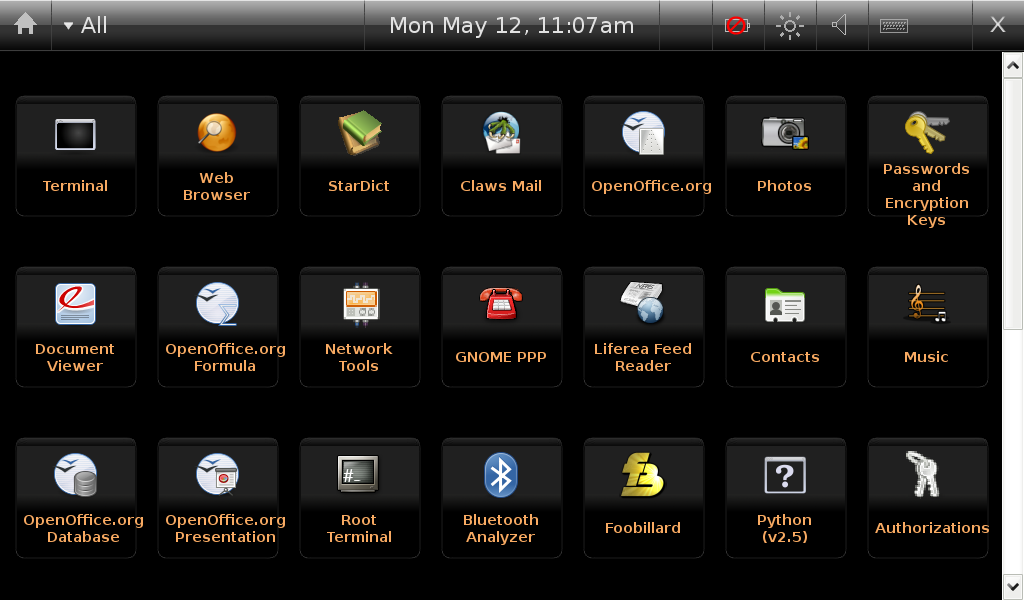
Introduction
Welcome to the Ubuntu MID Edition testing wiki. The pages linked within are designed to guide you through the process of setting up an environment, testing the features, and reporting bugs. As always, feel free to update these pages with any clarifications/additional information that you find useful along the way. Happy Hunting.
Getting Started
Environment
The first part of preparation, is to get a working environment up and running. There are a couple different ways. To learn more about getting your environment up and running visit:
Environment Setup
Test Cases
This is a comprehensive test case suite designed to confirm compliance with all project requirements. Most of these tests can be performed on mobile hardware or in Xnest/Xephyr on a development machine.
The cases have been split into three categories; Basic Feature, Advanced Feature, and Compliance Testing.
Basic Feature Testing
The Basic Feature set are designed to cover the main applications included with Ubuntu MID Edition. They should be run as often as possible to ensure all baseline functionality is working.
Basic Functionality Testing
Advanced Feature Testing
Advanced feature testing covers functionality that is hidden or not used as often as the basic feature set. These cases often require advanced knowledge of the underlying system or access to system resouces that are not commonly used.
Advanced Feature Testing
Compliance Testing
Compliance testing ensures that Ubuntu MID Edition conforms to all project requirements. These include basic system versioning to the inclusion of licensing information in the delivered builds. Compliance is important to the success of Ubuntu MID Edition and is a vital requirement for many of companies implementing it.
Compliance Testing
Reporting Bugs
All bugs discovered in Ubuntu MID Edition should be logged against the main project:
Ubuntu MID Edition
There is some information that, when included, can make the triage team and developers work much easier. Please paste the following template into your bug reports submitted against Ubuntu MID Edition, and try to provide as much of the information as you can.
Build Version/Date:
Environment used for testing:

Summary:


Steps to Reproduce:


Expected result:


Actual result:
Summary
Thank you for your interest in Ubuntu MID Edition testing. We hope you decide to contribute to the project. As always, if you have any questions or comments, feel free to visit the mobile team over on Freenode #ubuntu-mobile.
Testing/Cases/UMEdesktop (last edited 2009-02-05 16:26:15 by port-213-160-23-156)