LiveCDInstall
Summary
Install from the Live CD using one of 3 partitioning methods.
Screenshots of the differing Ubiquity installers.
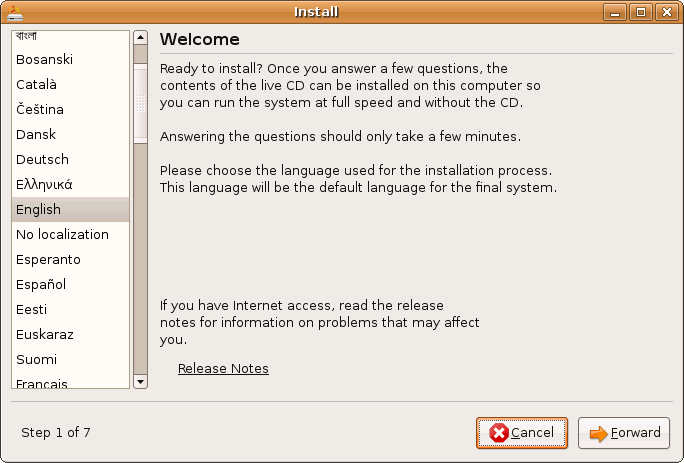
![https://wiki.ubuntu.com/Testing/Cases/LiveCDInstall?action=AttachFile&do=get&target=uu1-tn.png][https://wiki.ubuntu.com/Testing/Cases/LiveCDInstall?action=AttachFile&do=get&target=uu2.png](https://wiki.ubuntu.com/Testing/Cases/LiveCDInstall?action=AttachFile&do=get&target=uu1-tn.png][https://wiki.ubuntu.com/Testing/Cases/LiveCDInstall?action=AttachFile&do=get&target=uu2.png)
![https://wiki.ubuntu.com/Testing/Cases/LiveCDInstall?action=AttachFile&do=get&target=uu2-tn.png][https://wiki.ubuntu.com/Testing/Cases/LiveCDInstall?action=AttachFile&do=get&target=uu3.png](https://wiki.ubuntu.com/Testing/Cases/LiveCDInstall?action=AttachFile&do=get&target=uu2-tn.png][https://wiki.ubuntu.com/Testing/Cases/LiveCDInstall?action=AttachFile&do=get&target=uu3.png)
![https://wiki.ubuntu.com/Testing/Cases/LiveCDInstall?action=AttachFile&do=get&target=uu3-tn.png][https://wiki.ubuntu.com/Testing/Cases/LiveCDInstall?action=AttachFile&do=get&target=uu4.png](https://wiki.ubuntu.com/Testing/Cases/LiveCDInstall?action=AttachFile&do=get&target=uu3-tn.png][https://wiki.ubuntu.com/Testing/Cases/LiveCDInstall?action=AttachFile&do=get&target=uu4.png)
![https://wiki.ubuntu.com/Testing/Cases/LiveCDInstall?action=AttachFile&do=get&target=uu4-tn.png][https://wiki.ubuntu.com/Testing/Cases/LiveCDInstall?action=AttachFile&do=get&target=uu5.png](https://wiki.ubuntu.com/Testing/Cases/LiveCDInstall?action=AttachFile&do=get&target=uu4-tn.png][https://wiki.ubuntu.com/Testing/Cases/LiveCDInstall?action=AttachFile&do=get&target=uu5.png)
![https://wiki.ubuntu.com/Testing/Cases/LiveCDInstall?action=AttachFile&do=get&target=uu5-tn.png][https://wiki.ubuntu.com/Testing/Cases/LiveCDInstall?action=AttachFile&do=get&target=uu6(m-a).png](https://wiki.ubuntu.com/Testing/Cases/LiveCDInstall?action=AttachFile&do=get&target=uu5-tn.png][https://wiki.ubuntu.com/Testing/Cases/LiveCDInstall?action=AttachFile&do=get&target=uu6(m-a).png)
![https://wiki.ubuntu.com/Testing/Cases/LiveCDInstall?action=AttachFile&do=get&target=uu6(m-a)-tn.png][https://wiki.ubuntu.com/Testing/Cases/LiveCDInstall?action=AttachFile&do=get&target=uu7.png](https://wiki.ubuntu.com/Testing/Cases/LiveCDInstall?action=AttachFile&do=get&target=uu6(m-a)-tn.png][https://wiki.ubuntu.com/Testing/Cases/LiveCDInstall?action=AttachFile&do=get&target=uu7.png)
Procedure
- Boot from the Live CD (or continue on from the Live CD test)
- Click the install icon on the desktop
- Select your language, location, and keyboard layout
Select one of the following partitioning methods: Guided auto-resize (Dual boot option), Guided erase disk (Ubuntu only install), Guided largest continuous free space, Manual partitioning (Create the partitioning your way). See [:Testing/InstallMethods:InstallMethods] for details.
Depending on your existing disk contents, the auto-resize option may not appear.
Test the migration assistant feature if you have an existing OS installed. See ["../MigrationAssistant"] for instructions (currently only on Ubuntu and Edubuntu)
Complete the install and reboot to verify that the system works as expected using the appropriate test: ["../UbuntuDesktop"], ["../KubuntuDesktop"], ["../EdubuntuDesktop"], ["../XubuntuDesktop"]