GettingStarted
|
Size: 199
Comment:
|
Size: 3282
Comment:
|
| Deletions are marked like this. | Additions are marked like this. |
| Line 1: | Line 1: |
| ## page was renamed from Testing/Automation/LDTP <<Include(Testing/Header)>> ||<tablestyle="float:right; font-size: 0.9em; width:40%; background:#F1F1ED; margin: 0 0 1em 1em;" style="padding:0.5em;"><<TableOfContents>>|| |
|
| Line 2: | Line 5: |
| Scratch page for LDTP deployment in Ubuntu. | == Available tests == * [/OpenAllApplications]. It tries to open every application in Ubuntu after a clean installation to check for crashes in an early stage. * [/UpdateSystem]. Set of test cases related to the Update Manager application. * [/GeditChains]. It opens gedit text editor and saves several strings comparing them to some available oracles. == Testing Package == The python package 'ubuntutesting' will contain classes and modules to make the writing of new tests easier to the community. Also it will separate the things that need to be maintain, from the test cases themselves. * Link to the latest python documentation of the module: http://people.ubuntu.com/~ara/ldtp/doc/testing_module_doc/ * [/HowToUseTestingLibrary] * [/HowToExtendTestingLibrary] * [/TestingPackageDocumentation] - Please add anything that would be nice to have here. == PPA packages == === LDTP === If you need to run the tests in Hardy you can use the packages available at https://launchpad.net/~apulido/+archive that contains the latest upstream version of LDTP. Intrepid universe packages are already sync with this upstream version, nevertheless, if you want to run the Gedit UTF-8 test, you will need the PPA version. === Desktop Testing Library === There are PPA packages for Intrepid. To install the library: 1. Add the following lines to your /etc/apt/source.lists: {{{ deb http://ppa.launchpad.net/apulido/ubuntu intrepid main deb-src http://ppa.launchpad.net/apulido/ubuntu intrepid main }}} 1.#2 $ sudo apt-get update 1. $ sudo apt-get install desktop-testing-library === Ubuntu Desktop Tests === There are PPA packages for Intrepid. To install the tests: 1. Add the following lines to your /etc/apt/source.lists: {{{ deb http://ppa.launchpad.net/apulido/ubuntu intrepid main deb-src http://ppa.launchpad.net/apulido/ubuntu intrepid main }}} 1.#2 $ sudo apt-get update 1. $ sudo apt-get install ubuntu-desktop-tests == Integration with Checkbox == * [/IntegrationCheckbox] - Progress on running LDTP tests (and provide reports) with checkbox (https://launchpad.net/checkbox). |
| Line 6: | Line 59: |
| 1. Run existing Evolution LDTP tests in the hw-test harness 1. Incorporate further tests |
1. Write the testing library documentation and a tutorial on how to write tests for Ubuntu using the library 1. Write documentation about how to extend the library 1. Extend the coverage. |
| Line 10: | Line 64: |
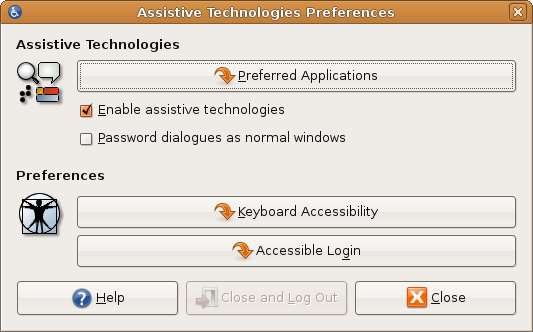
* Some of the applications does not have the correct accessibility information, which it is used by LDTP to recognize the objects. A list of this applications can be found at ../AtspiBlockers == Links to test cases == * http://www.go-evolution.org/Automation_using_LDTP * http://ldtp.freedesktop.org/wiki/Projects_using_LDTP == Links to documentation == * http://ldtp.freedesktop.org/wiki/ == How to enable GNOME Assitive Technologies == * Enable the Assistive Technologies (System -> Preferences -> Assistive Technologies) {{attachment:assistive.png}} * Restart your GNOME session (log out and log in again) |


Available tests
[/OpenAllApplications]. It tries to open every application in Ubuntu after a clean installation to check for crashes in an early stage.
[/UpdateSystem]. Set of test cases related to the Update Manager application.
[/GeditChains]. It opens gedit text editor and saves several strings comparing them to some available oracles.
Testing Package
The python package 'ubuntutesting' will contain classes and modules to make the writing of new tests easier to the community. Also it will separate the things that need to be maintain, from the test cases themselves.
Link to the latest python documentation of the module: http://people.ubuntu.com/~ara/ldtp/doc/testing_module_doc/
[/TestingPackageDocumentation] - Please add anything that would be nice to have here.
PPA packages
LDTP
If you need to run the tests in Hardy you can use the packages available at https://launchpad.net/~apulido/+archive that contains the latest upstream version of LDTP. Intrepid universe packages are already sync with this upstream version, nevertheless, if you want to run the Gedit UTF-8 test, you will need the PPA version.
Desktop Testing Library
There are PPA packages for Intrepid. To install the library:
- Add the following lines to your /etc/apt/source.lists:
deb http://ppa.launchpad.net/apulido/ubuntu intrepid main
deb-src http://ppa.launchpad.net/apulido/ubuntu intrepid main
- $ sudo apt-get update
- $ sudo apt-get install desktop-testing-library
Ubuntu Desktop Tests
There are PPA packages for Intrepid. To install the tests:
- Add the following lines to your /etc/apt/source.lists:
deb http://ppa.launchpad.net/apulido/ubuntu intrepid main
deb-src http://ppa.launchpad.net/apulido/ubuntu intrepid main
- $ sudo apt-get update
- $ sudo apt-get install ubuntu-desktop-tests
Integration with Checkbox
[/IntegrationCheckbox] - Progress on running LDTP tests (and provide reports) with checkbox (https://launchpad.net/checkbox).
Next steps
- Write the testing library documentation and a tutorial on how to write tests for Ubuntu using the library
- Write documentation about how to extend the library
- Extend the coverage.
Blockers and open questions
Some of the applications does not have the correct accessibility information, which it is used by LDTP to recognize the objects. A list of this applications can be found at ../AtspiBlockers
Links to test cases
Links to documentation
How to enable GNOME Assitive Technologies
Enable the Assistive Technologies (System -> Preferences -> Assistive Technologies)
- Restart your GNOME session (log out and log in again)
Testing/Automation/Mago/GettingStarted (last edited 2009-09-14 21:58:30 by 67)