SystemSettings
|
Size: 1934
Comment: initial overview
|
Size: 4284
Comment: phone overview design is now settled on a single wireframe, hooray
|
| Deletions are marked like this. | Additions are marked like this. |
| Line 3: | Line 3: |
| Ubuntu contains System Settings on PC (`gnome-control-center`), based on [[https://live.gnome.org/SystemSettings|my original design in 2008]]. It will soon include some form of system settings interface on phone and tablet. | Ubuntu contains System Settings on PC (`gnome-control-center`), based on [[https://live.gnome.org/SystemSettings|my original design from 2008]]. Ubuntu will soon also have some form of system settings interface on phone and tablet. |
| Line 5: | Line 5: |
| In line with the goal of [[http://www.ubuntu.com/devices/phone/operators-and-oems|a convergence device]] — not to mention, ordinary learnability and efficiency — these settings will be shared across form factors whenever practical. However, some settings will only ever make sense on one or two form factors. | In line with the goal of [[http://www.ubuntu.com/devices/phone/operators-and-oems|a convergence device]] — not to mention, ordinary learnability and efficiency — these settings, and their categories, will be shared across form factors whenever practical. However, some settings will only ever make sense on one or two form factors. |
| Line 7: | Line 7: |
| This is an incomplete index of Ubuntu designs for System Settings — some of them implemented, some not. It includes other things, such as version information, that for want of a better position, are presented inside the System Settings UI in at least one form factor. | <<TableOfContents()>> |
| Line 9: | Line 9: |
| ||'''PC'''||'''Phone'''|| ||[[https://docs.google.com/a/canonical.com/document/d/1aHvJ-iIw-59bXTYBmIhQqEx0za2h9jpFE_RhZ2VOvJc/edit?authkey=CJO5wPkH&hl=en_GB|Display]]||''TBD''|| ||[[Power#settings|Power]]||''TBD''|| ||[[Networking#settings-window|Network]]||''TBD''|| ||[[TimeAndDate#settings|Time & Date]]||''TBD''|| ||[[https://live.gnome.org/Design/SystemSettings/Proposals/LoginItems|Login Items]]|| - || ||[[SoftwareAndUpdatesSettings|Software & Updates]]||''TBD''|| ||[[Printing#settings|Printing]]||''TBD''|| ||[[SecurityPrivacySettings|Security & Privacy]], including [[ErrorTracker#settings|Diagnostics]]||''TBD''|| ||[[https://docs.google.com/a/canonical.com/document/d/1Vb1jUVLoHXBK9drley6Vd5bYGguBbCTEWVcZz7R-LFI/edit?authkey=CNmT_aoF|Sound]]||''TBD''|| ||[[StartupSettings|Startup]]|| - || ||[[TextEntry#settings|Text Entry]]|| ||[[TouchpadSettings|Touchpad]]|| - || ||[[https://docs.google.com/a/canonical.com/document/d/1ILTJDiDCd25Npt2AmgzF8aOnZZECxTfM0hvsbWT2BxA/edit#|Universal Access]]||''TBD''|| ||[[UserAccounts|User Accounts]]||''TBD''|| |
== Settings categories == This is an index of Ubuntu designs for System Settings. It does not yet include all settings panels included on the PC. It does include other things — such as version information — that, for want of a better position, are presented inside the System Settings UI in at least one form factor. ||'''PC'''||'''Phone'''||'''Tablet'''|| ||[[AboutThisDevice#PC|About This Computer]]||[[AboutThisDevice#Phone|About This Phone]], including [[AboutThisDevice#phone-storage|Storage]]||''TBD''|| ||[[https://docs.google.com/a/canonical.com/document/d/1ILTJDiDCd25Npt2AmgzF8aOnZZECxTfM0hvsbWT2BxA/edit#|Universal Access]]||Accessibility||''TBD''|| ||''TBD''||[[Appearance#Phone|Background]]||''TBD''|| || - ||[[Brightness#Phone|Brightness]]||''TBD''|| ||[[https://docs.google.com/a/canonical.com/document/d/1aHvJ-iIw-59bXTYBmIhQqEx0za2h9jpFE_RhZ2VOvJc/edit?authkey=CJO5wPkH&hl=en_GB|Display]]|| - ||''TBD''|| ||[[Power#PC|Power]]||[[Power#Phone|Battery]]||''TBD''|| ||[[TextEntry|Language & Text]]||Language, Keyboard & Text ''TBD''||''TBD''|| ||[[Networking#settings-window|Network]], including [[Networking#flight-mode|Flight Mode]]||Flight Mode ''TBD'', [[Networking#Phone|Cellular]], Wi-Fi ''TBD''||''TBD''|| ||[[https://live.gnome.org/Design/SystemSettings/Proposals/LoginItems|Login Items]]|| - || - || ||[[https://docs.google.com/a/canonical.com/document/d/1UwAQTXgEyZSD3di6fAUS0W18rKxh8TXb1TwsmkgbGG0/edit|Online Accounts]]||[[OnlineAccounts#phone-settings|Accounts]]||''TBD''|| || - ||[[PhoneApp#Settings|Phone]], including SIM services|| - || ||[[Printing#settings|Printing]]|| - ||''TBD''|| ||[[SecurityAndPrivacySettings#PC|Security & Privacy]]||[[SecurityAndPrivacySettings#Phone|Security & Privacy]], including [[Location#Phone|Location]]||''TBD''|| ||[[SoftwareAndUpdatesSettings|Software & Updates]]||''TBD''||''TBD''|| ||[[https://docs.google.com/a/canonical.com/document/d/1Vb1jUVLoHXBK9drley6Vd5bYGguBbCTEWVcZz7R-LFI/edit?authkey=CNmT_aoF|Sound]]||[[Sound#Phone|Sound]]||''TBD''|| ||[[StartupSettings|Startup]]|| - || - || ||[[TimeAndDate#PC|Time & Date]]||[[TimeAndDate#Phone|Time & Date]]||''TBD''|| ||[[TouchpadSettings|Touchpad]]|| - || - || ||[[UserAccounts|User Accounts]]|| - ||''TBD''|| ||Voice ''TBD''||''TBD''||''TBD''|| == PC settings interface == ''should be documented here eventually, for testability and comparison purposes'' <<Anchor(phone)>> == Phone settings interface == ||<tablestyle="float:left;margin:0 1em 1em 0" style="border:none">{{attachment:phone-settings.png}}|| ''access point TBD'' Whenever the search field is not empty, the rest of the System Settings main screen should consist only of those items matching the contents of the field. For example, if the search field contains “wallpa”, only the “Backgrounds” panel should remain. The search field should empty itself if you have switched to other apps for at least five minutes. <<Anchor(phone-flight-mode)>> Like the other System Settings icons, the “Flight Mode” and “Orientation Lock” icons should represent their modes’ current state. Whenever you toggle Flight Mode in either direction, its icon should become a spinner until all connections have stopped or resumed as appropriate. All other items in the main screen should act as [[http://design.ubuntu.com/apps/building-blocks/page-stack|page stacks]], regardless of whether they are list items (like “About This Phone”) or grid items (like “Sounds”). ||<tablestyle="clear:both" style="border:none">|| == Reset Settings == ''TBD'' == Tablet settings interface == ''TBD'' |
MatthewPaulThomas, Canonical Design
Ubuntu contains System Settings on PC (gnome-control-center), based on my original design from 2008. Ubuntu will soon also have some form of system settings interface on phone and tablet.
In line with the goal of a convergence device — not to mention, ordinary learnability and efficiency — these settings, and their categories, will be shared across form factors whenever practical. However, some settings will only ever make sense on one or two form factors.
Contents
Settings categories
This is an index of Ubuntu designs for System Settings. It does not yet include all settings panels included on the PC. It does include other things — such as version information — that, for want of a better position, are presented inside the System Settings UI in at least one form factor.
PC |
Phone |
Tablet |
About This Phone, including Storage |
TBD |
|
Accessibility |
TBD |
|
TBD |
TBD |
|
- |
TBD |
|
- |
TBD |
|
TBD |
||
Language, Keyboard & Text TBD |
TBD |
|
Network, including Flight Mode |
Flight Mode TBD, Cellular, Wi-Fi TBD |
TBD |
- |
- |
|
TBD |
||
- |
Phone, including SIM services |
- |
- |
TBD |
|
Security & Privacy, including Location |
TBD |
|
TBD |
TBD |
|
TBD |
||
- |
- |
|
TBD |
||
- |
- |
|
- |
TBD |
|
Voice TBD |
TBD |
TBD |
PC settings interface
should be documented here eventually, for testability and comparison purposes
Phone settings interface
|
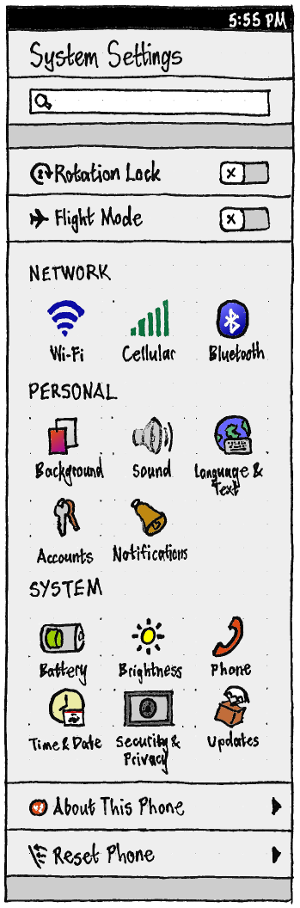
access point TBD
Whenever the search field is not empty, the rest of the System Settings main screen should consist only of those items matching the contents of the field. For example, if the search field contains “wallpa”, only the “Backgrounds” panel should remain. The search field should empty itself if you have switched to other apps for at least five minutes.
Like the other System Settings icons, the “Flight Mode” and “Orientation Lock” icons should represent their modes’ current state. Whenever you toggle Flight Mode in either direction, its icon should become a spinner until all connections have stopped or resumed as appropriate.
All other items in the main screen should act as page stacks, regardless of whether they are list items (like “About This Phone”) or grid items (like “Sounds”).
Reset Settings
TBD
Tablet settings interface
TBD
SystemSettings (last edited 2016-10-18 10:13:02 by mpt)