StartupSettings
This is a living specification for a Startup panel to configure Grub2 in System Settings.
“Startup” settings panel
The “System” category of System Settings should include a “Startup” panel.
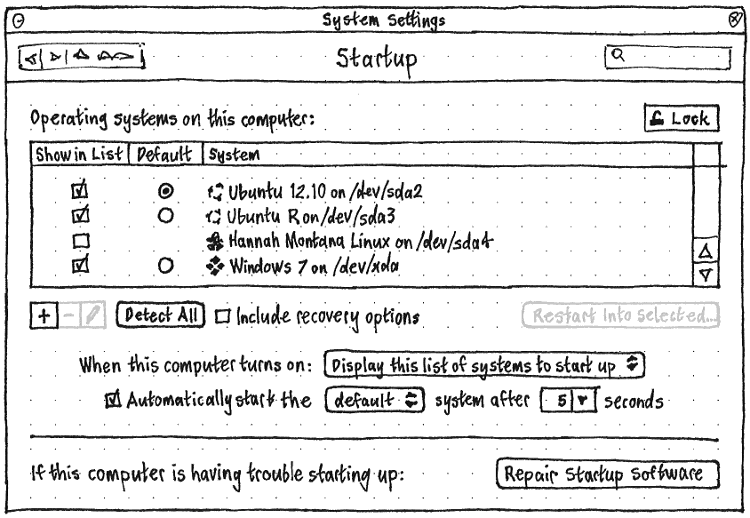
Whenever the panel is locked (as it should be by default), all controls except the “Unlock” button should be insensitive.
Whenever “When this computer turns on:” is set to “Use existing custom configuration”, all other controls except the “Unlock” button should be insensitive.
“Operating systems on this computer”
The “Operating systems on this computer” list should show the union of those currently listed in /boot/grub/grub.cfg — whether commented out or not — and those found the last time os-prober was run (if at all) since the panel was opened. Any system that is in the list, but that os-prober can’t find, should have a  icon.
icon.
Every system in the list should have a “Show in List” checkbox, which should be checked if the system is in grub.cfg and not commented out. (Checking it should add the system to to grub.cfg, or if it is there commented, uncomment it.)
Only those for which that checkbox is currently checked should have a “Default” radio button (which sets GRUB_DEFAULT). If the selected “Default” radio button disappears (because the item is removed, or unchecked for “Show in List”), the next one should become selected. All the radio buttons should be insensitive whenever the “Automatically start the” menu is set to “last used”.
The “+” button (with accessible label “Add”) should open the “Add System” dialog. The “–” and Edit buttons should be sensitive whenever a system is selected in the list. The “–’ button (with accessible label “Remove”) should remove the selected item from the list, while the Edit button (with accessible label “Change Details”) should open the “Change System” dialog.
“Detect All” should run os-prober and repopulate the list accordingly, with new items being checked for “Show in List” by default. (So if you then close the settings panel, it should be equivalent to running update-grub.)
“Include recovery options” should show the recovery options in the list (GRUB_DISABLE_LINUX_RECOVERY=false), with “Show in List” checked and insensitive for each of them.
“When this computer turns on”
The “When this computer turns on:” menu should have three options: “Display this list of systems to start up”, “Start up automatically unless Shift is pressed”, and “Use existing custom configuration”.
The “Automatically start the” menu should have two options, “default” and “last used”.
The “seconds” combo box should have options “2”, “5”, “10”, “60”, and the current GRUB_HIDDEN_TIMEOUT or GRUB_TIMEOUT value if that is a different positive number.
Both the “Automatically start the” menu and the “seconds” combo box should be insensitive whenever the “Automatically start” checkbox is present but unchecked.
The initial states of these controls, and of the “Automatically start” checkbox, should reflect the contents of grub.cfg as follows. If the contents of grub.cfg does not match any of these possibilities, then “When this computer turns on:” should be set to “Use existing custom configuration”, and the rest of the panel should be insensitive.
Whenever “When this computer turns on:” is set to “Display this list of systems to start up”, GRUB_HIDDEN_TIMEOUT should not be set, and:
Whenever “Automatically start” is checked, GRUB_TIMEOUT should be set to the “seconds” value.
Otherwise, whenever “Automatically start” is unchecked, GRUB_TIMEOUT should be set to -1.
Otherwise, whenever “When this computer turns on:” is set to “Start up automatically unless Shift is pressed”, then “Automatically start” should be a static label, not a checkbox, and GRUB_HIDDEN_TIMEOUT should be set to the “seconds” value.
In either case, whenever “Automatically start the” is set to “last used”, GRUB_SAVEDEFAULT=true should be set. Otherwise, “Automatically start the” should be set to “default”.
“Add System” dialog
TBD
“Change System” dialog
TBD