SoftwareCenter
|
Size: 20450
Comment: + apt-url and the whitelist
|
Size: 20593
Comment: + Software Sources
|
| Deletions are marked like this. | Additions are marked like this. |
| Line 6: | Line 6: |
| * Packages affected: `aptoncd`, `gdebi`, `gnome-app-install`, `synaptic`, `computer-janitor`, `computer-janitor-gtk`, `update-manager` | * Packages affected: `aptoncd`, `computer-janitor`, `computer-janitor-gtk`, `gdebi`, `gnome-app-install`, `software-properties-gtk`, `synaptic`, `update-manager` |
| Line 17: | Line 17: |
| In Ubuntu 9.04, there are four graphical utilities promoted for installing and removing software. For installing and uninstalling graphical applications you can use “Add/Remove Applications“ or the more technical “Synaptic Package Manager”, though the former warns you to use the latter “for more complicated needs”. For installing and uninstalling other software, you must use Synaptic. For installing downloaded `.deb` packages, you use `gdebi`. For installing updates, the usual route is Update Manager, but it instructs you to run Synaptic if it encounters conflicts. And for removing no-longer-needed software, you use Computer Janitor. This redundancy increases the amount of interface people have to learn, wastes space on the Ubuntu CD, and fragments development effort. Having multiple sanctioned graphical methods of installing software also makes people more likely to think that unsanctioned methods (such as Ultamatix or third-party Web sites) are also safe, when they are not. Meanwhile, the descriptions of available software are often technical gibberish. And many software project and vendor Web sites either provide command-line installation instructions (dulling users to malicious terminal commands from other sources) or `.tar.gz` downloads that are difficult to install and near-impossible to update. | In Ubuntu 9.04, there are at least four graphical utilities promoted for installing and removing software. For installing and uninstalling graphical applications you can use “Add/Remove Applications“ or the more technical “Synaptic Package Manager”, though the former warns you to use the latter “for more complicated needs”. For installing and uninstalling other software, you must use Synaptic. For installing updates, the usual route is Update Manager, but it instructs you to run Synaptic if it encounters conflicts. For configuring where these utilities look for software, you use “Software Sources”. For installing downloaded `.deb` packages, you use `gdebi`. And for removing no-longer-needed software, you use Computer Janitor. This redundancy increases the amount of interface people have to learn, wastes space on the Ubuntu CD, and fragments development effort. Having multiple sanctioned graphical methods of installing software also makes people more likely to think that unsanctioned methods (such as Ultamatix or third-party Web sites) are also safe, when they are not. Meanwhile, the descriptions of available software are often technical gibberish. And many software project and vendor Web sites either provide command-line installation instructions (dulling users to malicious terminal commands from other sources) or `.tar.gz` downloads that are difficult to install and near-impossible to update. |
| Line 55: | Line 55: |
| 1. In Ubuntu 10.04, replace Synaptic, Gdebi, and (if appropriate) Update Manager with an expanded App``Center. This will likely involve: | 1. In Ubuntu 10.04, replace Synaptic, Software Sources, Gdebi, and (if appropriate) Update Manager with an expanded App``Center. This will likely involve: |
Launchpad entry: software-library
Created: 2005-08-29 by MatthewPaulThomas
Packages affected: aptoncd, computer-janitor, computer-janitor-gtk, gdebi, gnome-app-install, software-properties-gtk, synaptic, update-manager
There will be a single graphical interface for package management in Ubuntu, currently codenamed AppCenter. (The final name, like much of the design, will be partly dependent on user testing.) This will combine the human-readable approach of Add/Remove Applications, the power of Synaptic, and the ease of use of Update Manager. Having a single interface will make handling software easier, socially improve security, hopefully free space on the CD, and provide a prominent showcase for Ubuntu and partner software. The implementation will be based on Add/Remove Applications (gnome-app-install).
Contents
Rationale
In Ubuntu 9.04, there are at least four graphical utilities promoted for installing and removing software. For installing and uninstalling graphical applications you can use “Add/Remove Applications“ or the more technical “Synaptic Package Manager”, though the former warns you to use the latter “for more complicated needs”. For installing and uninstalling other software, you must use Synaptic. For installing updates, the usual route is Update Manager, but it instructs you to run Synaptic if it encounters conflicts. For configuring where these utilities look for software, you use “Software Sources”. For installing downloaded .deb packages, you use gdebi. And for removing no-longer-needed software, you use Computer Janitor. This redundancy increases the amount of interface people have to learn, wastes space on the Ubuntu CD, and fragments development effort. Having multiple sanctioned graphical methods of installing software also makes people more likely to think that unsanctioned methods (such as Ultamatix or third-party Web sites) are also safe, when they are not. Meanwhile, the descriptions of available software are often technical gibberish. And many software project and vendor Web sites either provide command-line installation instructions (dulling users to malicious terminal commands from other sources) or .tar.gz downloads that are difficult to install and near-impossible to update.
Instead, there should be one obvious mechanism for installing, removing, and updating software in Ubuntu, with a self-evident name and an interface a grandmother can use. There should be a coordinated system for developers and enthusiasts to improve the usefulness of descriptions and other metadata for software packages. The software updates interface should be honed to maximize the voluntary installation of updates across the millions of computers on which Ubuntu is installed. And projects and vendors whose software is packaged for Ubuntu should be encouraged to provide links to their software’s presence in AppCenter, instead of command-line installation instructions.
If Linux has an Achilles heel, from the point of view of a Windows user, it's installing new software. Be prepared to enter a new world in which Windows Update is a model of simplicity by comparison, and in which you may feel as if you need a Ph.D. in physics merely to install new applications or updates. |
First there is the Add/Remove Applications program, which is designed to allow you to Add and Remove Applications. Second, there is the Synaptic Package Manager, which allows you to Manage Packages (in a manner that is uniquely synaptic, apparently) or Applications as some might call them, by allowing you to Add and Remove them. Finally there is Software Sources, which, if Wine’s installation instructions are any indication, provides Sources of Software, filling a glaring gap in Ubuntu Linux by allowing you to Add and Remove Applications. |
Roadmap
This roadmap is a DRAFT and may change radically in the near future.
October 2009
For October 2009, we have four major goals.
- Include in Ubuntu 9.10 a simple and fun interface for finding, installing, and removing software. This will likely involve:
- A new name.
- A highly graphical “main entrance” or “front page”, that allows browsing software by category and subcategory, and perhaps includes featured and/or popular applications.
- Fast and error-tolerant search.
Attractive, informative, and easy-to-understand presentation of individual software packages within the interface (with this presentation also being used for apt: URL links to graphical applications).
- Interactive demonstration of how to launch the software you’ve just installed.
- The ability to continue browsing available software, and queue up installation/removal requests, while other changes are being made.
Better security than the current installation mechanism (i.e. use of PolicyKit instead of gksudo).
Increase use of apt: links by Ubuntu enthusiasts, software projects, and ISVs, replacing terminal commands or standalone downloads. This will likely involve:
A redirector Web service (e.g. redirecting from http://apt.ubuntu.com/package-name to apt:package-name), with helpful handling of error cases, to better cater for people who are not running Ubuntu when they follow the link (and to better cater for forums and other CMSes that do not allow direct apt: links).
- Prominent and highly understandable information on ubuntu.com about how to get your software (whether Free or non-Free) packaged for Ubuntu.
An apt: evangelism campaign for projects that already have their software packaged in the Ubuntu repositories.
- Fine-tune the interface presented when software updates are available. This may involve:
- When updates are presented automatically, collapsing the list of updates by default, concentrating instead on the existence of updates and the choice to install them now or later.
Presentation of the new better descriptions of security updates.
Establish a system within Launchpad for registered users to suggest a better description, category, keywords, and/or screenshot for a software package, and for the package maintainer to incorporate those changes into a new version of the package, so that end users can find the software more easily later.
April 2010
In Ubuntu 10.04, replace Synaptic, Software Sources, Gdebi, and (if appropriate) Update Manager with an expanded AppCenter. This will likely involve:
The ability to see, install, and uninstall non-graphical software (programming utilities, fonts, database software, etc) within AppCenter if desired.
Opening AppCenter for all apt: links, not just those of graphical applications.
- Handling of package conflicts and other error cases.
A collapsed view of AppCenter that shows only available updates, but is expandable to perform other tasks if desired.
Establish a system within Launchpad to store ratings and reviews of Ubuntu software (whether in official repositories or in participating PPAs), for use in a future version of AppCenter.
October 2010
Integrate the ratings and review mechanism from Launchpad into AppCenter. This will likely involve:
An interface within AppCenter for rating and reviewing software that is installed now (or that has been installed recently).
A mechanism for reporting, and staff for moderating, inappropriate reviews (e.g. those that use offensive language).
Establish a mechanism for establishing and conveying a trust level for software in PPAs, and for easily adding PPAs within AppCenter.
Provide the ability to purchase software from within AppCenter.
April 2011
Improve sharing and tracking of software within AppCenter. For example:
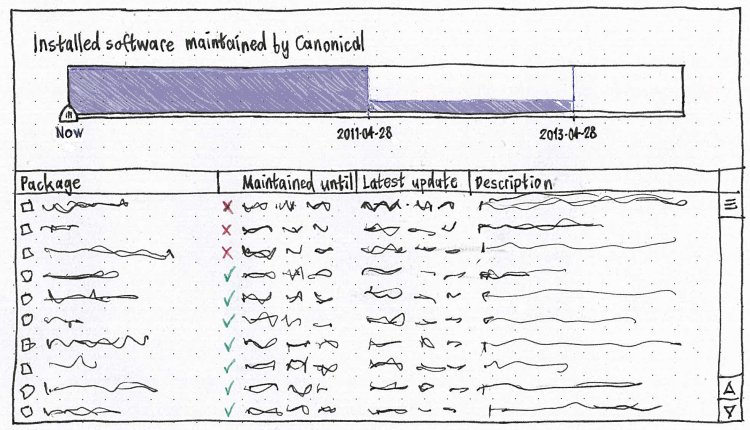
- Overviews of installed software by license, cost, or maintenance timetable.
- Discovering software by what your friends have installed.
- Downloading a package once for installing on many computers.
Incorporating AptOnCD.
- A visible history of past installations/removals/purchases, including the ability to undo specific changes.
- Investigate and, if appropriate, implement specialized interfaces for browsing and installing particular classes of package:
- fonts
- screensavers
Windows applications, etc.
Eventual scope
This is a laundry list of desired features, for the purpose of designing an interface for version 1.0 that will scale to include those features later. It is not a list of features scheduled for 1.0.
You should be able to:
find software by: [idea 18315]
- name
purpose (e.g. “wireframe” → Dia)
category and subcategory (e.g. Games: Card Games) [idea 14857]
name of competitor (e.g. “excel” → OpenOffice.org Spreadsheet, Gnumeric, KSpread)
misspelling (e.g. “pigeon” → Pidgin)
- needed right now (by MIME type, codec, font, etc)
- vendor?
class (debug vs. non-debug, applications vs. not [idea 3144], etc)
habit (people who installed X also installed Y (previously suggested by Enrico Zini))
- suite (software for Java developers, software for film makers)
what’s new [idea 13762]
whether it was recently installed or removed [idea 16953]
- find software sources (Launchpad PPAs)
- and know how trusted each PPA is
- get information about software
- what it does
what people think of it (ratings and reviews) [UserReviewsInSynaptic] [idea 18729]
what it looks like (screenshots or short videos) [idea 15774]
what the current version number is [idea 13036]
- whether it is installed by default in Ubuntu
whether it’s installed right now [idea 19068]
if it’s installed, how to launch it [idea 16216]
if it’s not installed, how much there is to download, including dependencies [idea 4613]
- whether it’s localized into your native language
- what it costs
- what its license is
- who provides updates for it, and for how long
- who provides tech support for it, and for how long
- how many of your friends have it installed already
- whether you have it installed already (and if so, how to find it)
- … all in your native language
- install software
purchasing commercial software [idea 18538]
- quickly
- unpack — and maybe even install — downloaded packages while downloading the rest
download a package only once when installing it over a LAN [idea 19265]
- asynchronously (browse and select more stuff while other stuff is installing)
pausing if you need to use your bandwidth for something else [idea 16643]
- downloading it once for multiple computers (subsuming APTonCD)
- read about updates while they are installing
using PolicyKit to install/uninstall/etc, but not needing authorization to update package lists
- get an overview of installed software
- how much is maintained for how long
- how much receives tech support from whom, and for how long
- how much is under which license
even applications you installed from a .deb or compiled yourself [idea 18408]
- upgrade to the next version of Ubuntu
- know why you should upgrade
- without breaking PPAs
- insert an Ubuntu CD in Ubuntu and get an understandable result
User stories
Joel wants to install Skype. He goes to skype.com, finds the "Download for Ubuntu" button, and clicks it. He doesn't know what a “package” is, let alone a “.deb” or a “repository”.
- Melatie runs an accounting business that is far too small to have its own IT manager. She has a support contract for the Ubuntu software on the office PCs, and she knows that this doesn’t cover all the available software, so she wants to keep track of exactly what software is installed that isn’t covered.
- Sam is a college student who has recently migrated from to Windows XP to Ubuntu because he was fed up with adult sites installing spyware on his computer. The reason he had so much trouble with spyware was that XP kept on popping up balloons in the corner of the screen to tell him about security updates, but he closed them because that was the easiest thing to do. A few weeks after he installs Ubuntu, there is an important security update to Firefox.
Ladina works as a developer at a molecular biology lab where she is not a sysadmin. She is having a bit of trouble with Biopython, and wants an easy way of seeing which version of python-biopython is installed and where its files are.
- Helen is happily using Ubuntu 10.04 when it tells her that Ubuntu 10.10 has been released. Before she upgrades, she has some basic questions. What will the upgrade do? How long will it take? How much will it cost? Will she lose any of her files? What should she do if something goes wrong?
Design scratchpad
Access
Idea #12193: Add/Remove and Synaptic should be strongly displayed to new users
- direct
"Add/Remove..." is currently at the bottom of the "Applications" menu in Ubuntu, and in the "Accessories" category in Ubuntu Netbook Remix.
- apt: links
- codec search
font search [idea 15333]
Initial appearance
Dynamically filtered view of programs or packages:
Show: [Programs installable :^] Containing: [______________]
- Menu choices are:
- Programs available (default when invoked manually)
- Programs already installed
- Packages available
- Packages installed
- Security updates (search field replaced by "Updates available" text)
- All updates
- Changes to be made
- Items in the list have iconic pull-down menus that look like menus, not checkboxes.
- Recommendations and suggestions are shown as children of an item in the list (recommendations selected by default, suggestions not).
- Multi-level undo.
- Updates are aggregated by source package, with packages hidden inside an expander.
Incorporate PackageMaintainednessPresentation, including its “Future work”
Implementation
http://www.packagekit.org/ ? Isn't this reinventing the wheel?
Code
Data preservation and migration
Unresolved issues
- Need to make clear which packages are
- currently subject to CVE vulnerabilities
OpenPrinting: “To make installing printer drivers not provided by the Linux distributions easier for users, and to make providing printer drivers easier for the printer manufacturers, we have introduced a new concept of distribution-independent printer driver packages.”
- While installing, the window should be reducible (or perhaps reduce by default) to show only install progress.
- The “You need to restart the computer” alert could be merged into the main window.
Need to explain the ramifications of removing ubuntu-desktop (or its future equivalent).
- How do distinguish security updates from other updates?
- Popularity measurements are skewed by default installs.
- How can we reduce/eliminate the lag between an update being published and its description being available?
- Warn about trying to install updates while running on battery?
http://www.enricozini.org/2007/debtags/package-managers.html
- Check for security updates every day. But check for non-security updates only (a) a week after the last check or (b) when security updates are available, whichever is earlier. [mac_v]
http://www.finette.co.uk/blog/index.php/2009/04/on-rating-mechanisms/
- If you have Wine installed, there could be a separate category for “Installed Windows Programs”. However, it’s important to communicate that Windows programs are installed just for you, whereas all the other programs are installed for everyone on the system.
Whether an update will require a restart should be presented before you choose to install it.
- There should be a history of changes made recently.
- We should collect statistics on how many people install updates how quickly. [Oli Warner]
- Should the two classes of update, security vs. other, be reconsidered? Maybe critical vs. non-critical. [mac_v]
Trying to open an .exe file should, if Wine is not installed, invite you to open AppCenter to find equivalent software instead.
- Upstreams or other interested parties should be able to get an RSS feed of the reviews/ratings people publish about applications. [Lars Wirzenius]
“Also a permalink on the description page, would be pretty nice. You want to suggest a package to someone? You just have to copy paste the (apt url) application link into your IM or blog post.” [Stefano Forenza]
idea 19653: “Most users switching over from Windows associate "Add/Remove" only with removing software, and believe that new software needs to be purchased at a retailer ...”
Idea #19882: Problem With Restricted Software Installation Warning
Idea #14025: Better distinction between installed/uninstalled apps in Add/Remove Applications
SoftwareCenter (last edited 2019-04-28 16:57:10 by mpt)