SoftwareCenter
|
Size: 5581
Comment: + jockey
|
Size: 5442
Comment: + mockups
|
| Deletions are marked like this. | Additions are marked like this. |
| Line 3: | Line 3: |
| * Launchpad entry: UbuntuSpec:foo | * Launchpad entry: UbuntuSpec:software-library |
| Line 5: | Line 5: |
| * Contributors: MatthewPaulThomas * Interested: JorgeBernal RobertStoffers * Packages affected: `aptoncd`, `gnome-app-install`, `gnome-language-selector`, `jockey`, `synaptic`, `update-manager` * Related: ThirdPartyApt |
* Packages affected: `aptoncd`, `gnome-app-install`, `synaptic`, `update-manager` |
| Line 12: | Line 9: |
| There should be a ''single'' graphical interface for package management in Ubuntu, combining the power of Synaptic, the human-readable approach of Add/Remove Programs, and the ease of use of the Update Manager, Language Selector, and Hardware Drivers. Having a single interface will make handling software easier, socially improve security, and provide a prominent showcase for Ubuntu and partner software. | There should be a single graphical interface for package management in Ubuntu, combining the power of Synaptic, the human-readable approach of Add/Remove Programs, and the ease of use of Update Manager. Having a single interface would make handling software easier, socially improve security, hopefully free space on the CD, and provide a prominent showcase for Ubuntu and partner software. The implementation might be based on Add/Remove Programs, Synaptic, or packagekit-gnome, whichever allows for quickest development. |
| Line 14: | Line 11: |
| {{attachment:software-manager.jpg}} | ||{{attachment:software-library.png}}||{{attachment:software-updates.png}}|| |
| Line 18: | Line 15: |
| In Ubuntu there are at least four graphical tools promoted for software management. For installing and uninstalling programs that have a `.desktop` file, you can use `synaptic` or `gnome-app-install`, though the latter warns you to use Synaptic instead "for more complicated needs". For installing and uninstalling programs that don't have a `.desktop` file, you must use `synaptic`. For installing downloaded `.deb` packages, you use `gdebi`. For installing updates, you can use `synaptic` or `update-manager`, but the latter instructs you to run `synaptic` if it encounters conflicts. For installing and uninstalling language support, you use `language-selector`. And for installing and uninstalling hardware drivers, you use `jockey`. | In Ubuntu there are at least four graphical tools promoted for software management. For installing and uninstalling programs that have a `.desktop` file, you can use `synaptic` or `gnome-app-install`, though the latter warns you to use Synaptic instead "for more complicated needs". For installing and uninstalling programs that don't have a `.desktop` file, you must use `synaptic`. For installing downloaded `.deb` packages, you use `gdebi`. And for installing updates, you can use `synaptic` or `update-manager`, but the latter instructs you to run `synaptic` if it encounters conflicts. |
| Line 22: | Line 19: |
| Instead, there should be one awesome tool for software management, with an obvious name and an interface your grandmother can use. | Instead, there should be one awesome tool for general software management, with an obvious name and an interface your grandmother can use. |
| Line 36: | Line 33: |
| * Screenshots of available packages? | * screenshots of applications * (eventually) ratings and reviews |
| Line 39: | Line 37: |
* ''Incorporate PackageMaintainednessPresentation, including its “Future work”'' |
|
| Line 96: | Line 96: |
| * Need to make clear which packages are: * supported by Canonical for 5 years * supported by Canonical for 3 years * supported by the Ubuntu community * not supported at all |
* Need to make clear which packages are |
Launchpad entry: software-library
Created: 2005-08-29 by MatthewPaulThomas
Packages affected: aptoncd, gnome-app-install, synaptic, update-manager
Summary
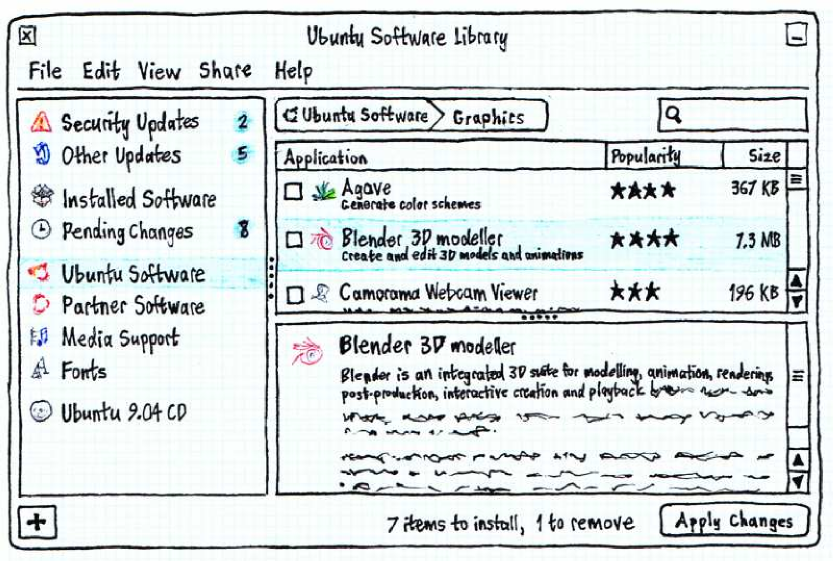
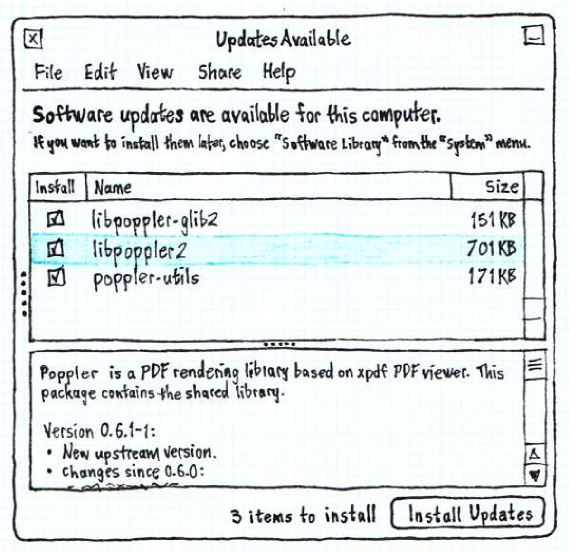
There should be a single graphical interface for package management in Ubuntu, combining the power of Synaptic, the human-readable approach of Add/Remove Programs, and the ease of use of Update Manager. Having a single interface would make handling software easier, socially improve security, hopefully free space on the CD, and provide a prominent showcase for Ubuntu and partner software. The implementation might be based on Add/Remove Programs, Synaptic, or packagekit-gnome, whichever allows for quickest development.
|
|
Rationale
In Ubuntu there are at least four graphical tools promoted for software management. For installing and uninstalling programs that have a .desktop file, you can use synaptic or gnome-app-install, though the latter warns you to use Synaptic instead "for more complicated needs". For installing and uninstalling programs that don't have a .desktop file, you must use synaptic. For installing downloaded .deb packages, you use gdebi. And for installing updates, you can use synaptic or update-manager, but the latter instructs you to run synaptic if it encounters conflicts.
This redundancy causes people to encounter multiple interfaces for the same tasks, wastes space on the Ubuntu CD, and divides development effort. And having multiple sanctioned graphical methods of installing software makes people more likely to think that unsanctioned methods (such as Ultamatix or third-party Web sites) are also safe, when they are not.
Instead, there should be one awesome tool for general software management, with an obvious name and an interface your grandmother can use.
Use cases
Joel wants to install Skype. He goes to skype.com, downloads the .deb package (for "Xandros, MEPIS, Ubuntu, other Debian-based distros"), and double-clicks it. He doesn't know what a repository is.
- Sam is a college student who has recently migrated from to Windows XP to Ubuntu because he was fed up with adult sites installing spyware on his computer. The reason he had so much trouble was that though XP kept on popping up balloons in the corner of the screen to tell him about security updates, he closed them because that was the easiest thing to do. A few weeks after he installs Ubuntu, there is an important security update to Firefox.
Ladina works as a developer at a molecular biology lab where she is not a sysadmin. She is having a bit of trouble with Biopython, and wants an easy way of seeing which version of python-biopython is installed and where its files are.
- Helen is happily using Ubuntu 10.04, when she hears from a workmate that Ubuntu 10.10 has been released. She is interested in upgrading, as long it's free, and as long as she can first read a summary of what's new.
Scope
- screenshots of applications
- (eventually) ratings and reviews
Design
Incorporate PackageMaintainednessPresentation, including its “Future work”
Invocation
- "Add/Remove Software…" should be an item in the System menu. This should open Software Library, showing "Programs available" by default.
- Every week (?) by default, Ubuntu should check for security updates. When updates are available, if you are an admin, Software Manager should open behind all other windows (so as not to steal focus) but requesting attention, showing "Updates" by default and with the source pane collapsed. (This handles Sam's use case; there is no balloon that can be ignored, and the easiest way to get rid of the window is to click "Install Updates".)
- apt: links
- codec search
- font search
Window layout
Software Library should have three panes, like an e-mail program: the sources pane, the package/program list, and the package/program pane. There should also be a menu bar, a bar at the top containing filter/search controls, and a bar at the bottom containing summary info and an action button.
...
Menus
Braindump
Dynamically filtered view of programs or packages:
Show: [Programs installable :^] Containing: [______________]
- Menu choices are:
- Programs available (default when invoked manually)
- Programs already installed
- Packages available
- Packages installed
- Security updates (search field replaced by "Updates available" text)
- All updates
- Changes to be made
- Items in the list have iconic pull-down menus that look like menus, not checkboxes.
- Recommendations and suggestions are shown as children of an item in the list (recommendations selected by default, suggestions not).
- Multi-level undo.
- Updates are aggregated by source package, with packages hidden inside an expander.
Implementation
Code
Data preservation and migration
Unresolved issues
- Screenshots?
- Need to make clear which packages are
- currently subject to CVE vulnerabilities
SoftwareCenter (last edited 2019-04-28 16:57:10 by mpt)