Comments
|
Size: 25140
Comment:
|
Size: 25526
Comment: accordion used on the items of the list
|
| Deletions are marked like this. | Additions are marked like this. |
| Line 212: | Line 212: |
| * I don't like the use of accordion for categories, but my take is that the accordion paradigm would be nice to have for the list items themselves (the packages). That means the details for a package would just be shown expanding the clicked item itself and when the user is done reading he could just scroll down without the need to click anywhere else to see the following items. |
Your comments on the design of the Ubuntu Software Store (codenamed “AppCenter”) are welcome here. Please sign your name with each comment. Thanks!
Make it more intuitive to install new themes... Appearance / Themes Tab should have something near the [install...] button that either directs them to synaptic community themes... or directs them to a website or location with a central repository of all ubuntu themes. This central repo for themes could be integrated into the SoftwareStore. Idea for SoftwareStore and Theme Integration —mj
What is the relationship between AppCenter and PackageKit? Aren't they both trying to solve the same problems? Is this just another case of http://en.wikipedia.org/wiki/Not_Invented_Here syndrome, or do they serve drastically different purposes? [unsigned comment by Endolith]
PackageKit is an API for installing software. AppCenter will likely use PackageKit for some things. —mpt
I´ve got an Idea related to the AppCenter and the new project UbuntuOne. Maybe it ís a good idea to combine those projects with the possibilty of saving all installed apps within a UbuntuOne-account and its webspace. So when the user adds a programm via the AppCenter it could be saved in it and in UbuntuOne. The Advantage of it could be, that when the user is on another Ubuntu PC he could synchronize those 2 (or more) Computers and all it´s installed apps. (It just has to save the softwarelist in the Ubuntu-One, the rest could be done by the AppCenter) If i put this idea a little further it could also synchronize the settings of the programms in the home folder of the user and on Ubuntu-One. [unsigned comment by Stefan Buchholz]
- That is a good idea, thanks. We plan to do something similar -- not store the applications themselves in your Ubuntu One account, but store your access credentials to private software archives. —mpt
What isn't mentioned in this specification is how AppCenter will handle devel libraries. While making things easier for users it shouldn't come at the cost of developers who often need to get the devel libraries of packages and use synaptic to do it. This should be added as a use case/User story to the spec. [Luc-Ace]
- Yes I agree. I think the best solution for this would be to have an option in the view-section in the menu bar that's called "view libraries". [Jean-Philippe Green]
- Could "Hardware drivers" be replaced too? Greg Auger (fluteflute)
- It’s likely that the Software Store will eventually make it easy for you to see which proprietary packages you have installed. For choosing between (for example) a proprietary driver and the Free alternative, I think it would make more sense to have driver selectors in the “Display” settings and in the “Wireless” section of the “Network” settings. —mpt
Synaptic has an option to browse repositories files by "origin". For now PPA origin is the same under ppa.launchpad.net/main(or universe or ..) . It would be great if one using the AppCenter could browse the PPA origins independently and be able to discover which files are in a certain PPA. A cli implementation of this is described here http://ubuntuforums.org/showpost.php?p=6882449&postcount=43 -- gourgi
Could it be called something more international? 'AppCenter' is US English, AppCentre would be Standard English, but would confuse Americans. -- liam-intermedia-online 2009-07-30 22:08:44
Yes, AppCenter was just a codename. It now has a brand name: the Ubuntu Software Store. —mpt
I think it's a very good idea : for myself i have a similar project based on packagekit using Qt4.5 and DBus, but it is not very advanced for the moment but it will be soon. You could take some idea for design at : http://modern-os.projects.servhome.org/img_viewer.php?image=projects/interface/package-man.png its a mockup i've made months ago, and i will yet improve it cause i'm already working on a second mockup more precise and then taking a look about whzt i can do in Qt with DBus. Regards, TheBootroo, ModernOS Projects Team.
I have a small proposal for the AppCenter Right now, it pops out a window each time I click on update It shpuld be better to display the loading bar inside the app like this http://img36.imageshack.us/img36/6358/pantallazojpb.png the buttons would be replaced by that bar when u click on update --artir
- At the time of writing, the "application panel" section says that the search function should be "disabled". Assuming this means "present but greyed out", it should have a tooltip explaining why and at least hinting how to get it back - for example, "search is disabled when viewing a package". Interface elements that are mysteriously disabled can frustrate users.
- It would be good (and somebody may already have thought of this) if the centre could incorporate installing/removing languages. I seem to have loads I don't need. Getting rid of them so they don't appear in the update manager is more complicated than it could be. Of course, if apps, themes etc are going to be here, it's the obvious place anyway. Op
I suggest making the application list more hierarchical in the way you see it in the desktop menu. Eg. "Games->Strategy games". This would make it easier to find wanted applications since there quite a few to choose from in each category. I'm no package expert, but I guess debtags and/or .desktop files should be able to provide this information. -Gunnar


Suggestion: Basic Mode
One of the main issues with introducing new computer users and those familiar with other OS's to linux is that it is difficult to figure out what apps to use. I was thinking about a program that is basically "Ubuntu for my Nana". A visible text box labeled "What do you want to do?". The newbie could type 'write a letter' and a window pops up suggesting programs to use, separated into apps installed and programs to install from the repositories. Each would carry a short description, crowd-sourced rating (5 stars) and a usability rating (how technical is it to use) and the ability to rate the app. Clicking on the app would launch or install and launch.
This idea led me to the AppCenter Project. It's aims to have search based on usage and "competing" apps would be great, if they can handle plain language input. I propose a "Basic Mode" option for the AppsCenter as a default (or option to tell ubuntu how new the user is) with the following adaptation;
- It would not display dev, libs or extraneous packages.
- Have a limited amount of available apps appropriate for the level of user (Category for New Users). I.e a users typing in "look at a web page" is highly unlikely to want to install lynx.
- Easy to understand application descriptions, which may require separate descriptions from "Advanced mode".
- It would refer to them as as application as the project name suggests, rather than packages.
- It would have a higher level of help/tool-tips to walk newbies through the basics and introduce linux terms and concepts.
- Integrate into the task bar or program menu. -- tris_r
Suggestion: Hardware Requirements
i think it would be very useful, if the information on the required hardware would also be available for each package/program, especially for commercial programs, to prevent users to buy apps that prop wont run well anyways.
I haven't thought a lot about this but i think this should be done in 2 ways:
- officially supported hardware, given by the designers/ubuntu.
- user tested/reviewed
if a user happens not to have the officially supported hardware and decides to takes the risk, and buy/install the package anyways. he/she should be able to review this, so that other users with similar hardware can be informed. In fact i think this should be a default filter(/color system) on all software available. This will prevent a lot of frustration, (and will also clearly point out to users, if its time to get a new system :P)
filter/color system:
- green: hardware is officially supported and users agree
- orange: hardware is not officially supported, but users say it works fine.
- red: hardware is not officially supported and users agree that it doesn't run.
- the darkness of the color might be able to vary if users generally agree / disagree...
- (maybe add truly not working/unsupported hardware category)
- (maybe also filter programs on how well it seems supported...)
- (colours should prop be changed :P... )
I know that the user review might be difficult to implement, cause if something is not working it may not always be easy to determine the cause... but if you just collect a lot of user/hardware data... this should be possible :P
For this to work some of the user hardware profiles should be send with each review... but i don't think this will be much of a problem as long as the users are informed... considering that reviews are optional anyways, i don't think many users would not review because of this...
if a program does not meet the requirements, advice should be given (also based on user reviews...):
- you internet connection isn't fast enough.
- your video card sucks
- buy a new pc!
- your processor isn't fast enough to guarantee a good user experience.
- your screen is to small
and there should be a default help support/user wiki/link to launchpad/bugtracker... thingy... to help users on there way (though this is already somewhere in the spec...)
other penny: also.. i sometimes like my software more up-to-date than the most recent 4 months old ubuntu release, and for some games its essential to always have the latest versions anyways... so i think each program should have a switch to the official PPA if available, or do it by default if its necessary (games)...
never updated a wiki like this before, hope i didn't break to many guildlines :P -- phonixor
Suggestion: Warnings when upgrading important and required packages
I suggest putting a serious-looking warning when any of the following occurs:
- A user adds a repository that includes packages with "Priority: important" or "Priority: required"
- A user upgrades a package with "Priority: important" or "Priority: required"
- A user upgrades a package which depends on a package with "Priority: important" or "Priority: required"
User story
Hugo moved to Linux a few months ago. He's starting to get comfortable with Linux, but would like to upgrade to the newest version of his favourite program, which isn't yet available in the official archives. He looks around online, and finds a guide that explains how to get the latest version.
Currently, the story continues like this: He follows the guide, and his system won't boot any more. It turns out that somewhere along the way, Python got upgraded to a new version that isn't compatible with the scripts included in Ubuntu.
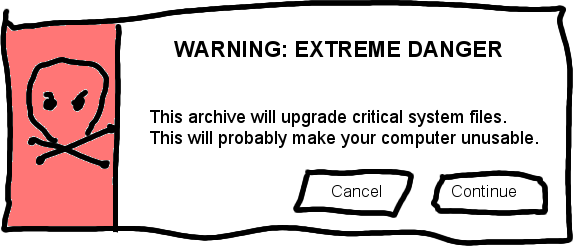
I propose the story continue like this: He follows the guide, until he reaches a warning sign with a skull-and-crossbones image. Seeing the warning, he decides to ask a more-expert friend, who talks him back from the brink.
Importance
I've seen at least two people fall into this trap a few months after installing Linux. It's probably dumb luck that it didn't happen to me when I was a newbie. Working your way back from this can be days or weeks of work for an expert, and means a mandatory reinstall for a newbie.
Suggested implementation
When the user attempts to add a repository, AppCenter should download it, scan for lines matching "^Priority: (important|required)", and display a warning like this if necessary:
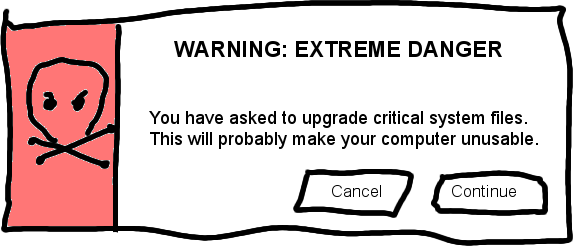
When the user attempts to install a new package, AppCenter should examine the .dpkg file, and any dependencies, for priorities of "important" or "required", and display a warning like this if necessary:
Note that it's necessary to include both warnings, in case the user adds the repository from e.g. the command-line.
I recommend buttons marked "cancel" and "continue" rather than "yes" and "no" to a question, because users could potentially be panicked by the serious icon, misread the question, and click the wrong thing.
Related issues
This is arguably part of a larger issue currently being discussed in ubuntu-devel-discuss. That discussion may well lead to a blueprint.
Something like this idea may well be included in a future version of the TerminalRun Firefox extension.
I'll try to update this page when there's news about either of the above.
Suggesting applications to install based on file type
As per this idea, AppCenter could suggest an application to install on demand based on file format, like how the web search function in Windows is supposed to work (but doesn't). For this to be an option it would need to keep a list of all the MIME types supported by each application and whether the file format can opened or saved. The "Open With->find application" option in Nautilus could launch AppCenter in this mode and open the file after installing the app. This would also make other useful options viable, like filtering for applications by media type and displaying a list of MIME types supported by an application. --Gaz Davidson
Every package which contains program, already contained all supported MIME types in .desktop files, but this files are listed in data.tar.gz file. This files should be contained in control.tar.gz file in some sub directory, and all information about MIME types should be stored in /var/lib/dpkg/info database and dpkg or apt should manage this files and put it in right folder on your system. Storing .desktop files in some known place would also make other useful options like run application after installation or displaying icon of the program when it installing.
Suggesting other names
@techwizrd on Identi.ca was talking about the name, ruminating about other options. I semi-jokingly supplied some alternatives, and he indicated that he liked AppBazaar and AppLibrary and that I should suggest them here. Greg Grossmeier (@greg) also replied to me, saying that he, too, liked AppLibrary: (paraphrased) "It implies free. And libraries are very popular and loved by many." Either name is better than AppStore or SoftwareStore, primarily because of the confusion with Apple's Store, Android's Market, Blackberry, Palm, and WindowsMobile's whatever. Let's have Ubuntu be different. Library is probably easier to translate and more of an internationally recognizable term, plus it's separate from Bazaar, which is already a Canonical product. --Colin Dean
:I agree, we need a name that is unique but can be easily identified as a central-repository of applications and is "free-of-charge". "AppStore" or any name with "Store" in it suggests "money" or "pay" and will greatly confuse the regular users (ie users who are not like you and me who takes the extra effort to check what the heck it is). AppLibrary is a good choice, although it sounds like "libraries" (ie "libs"). Why not AppRepo or AppRepository? Or better yet, stick to the codename "AppCenter". --JC John Sese Cuneta
How about Emporium? It's simple, and pretty unique. I never saw an app using it before. The definition of the word from wikipedia is "Emporium (medieval Latin from Greek emporos = 'merchant') is a term used for a store selling a wide variety of goods, and for marketplaces or trading centres in ancient cities." --Amr Hassan
I think a better name would be "Software Center". That would clearly indicate that it deals with everything you want to do with your software. That is going to be important, since the SoftwareStore is also going to replace the update-manager, and it wouldn't be logical to have a 'store' manage your updates, a "Software Center" however, would let you handle all things related to software, which is also the goal of this application. --Elco
:I agree with the "Software Center" (or "Software Centre" ;)) name. Is clear and it's not confusing, because It implies most of the applications are free but, if It is the case, there can be paid applications too. "Store" implies that most of the software is paid and is based in that you need to get your credit card ready just to open the "Store" (this is indeed true for the Apple "App Store"). Market is also heavily connected with the idea that you need to pay for what is on it. About "Emporioum", although I like the idea as being original and exclusive (in the sense that only Ubuntu is going to have an “Emporioum”), it's strange, archaic and not intuitive, nobody is going connect the idea of “Software Emporium” with “the place where I can go to install software” so I don't think is the best option. Finally, regarding library, there are two things already named like that and none of them is related to what this application is going to do. The first, as already someone said, is used in Linux as “a collection of subroutines... that provides services to independent programs” so is confusing to name the place where you got new software like that. The second thing is the institution that holds a large collection of different books that you can borrow and this concept is also confusing since you don't “borrow” software, specially free software. Of course this type of library also can be just the collection of books (in this case will be a collection of software) included that the person owns in his/her house or office, but I think most people associate “library” with the “public library” or the library of an institution. Just my opinion --Alberto O. aka Camahueto
I also think the name really needs to be changed for all the reasons detailed above. "Store" implies paid for applications which, presumably, none of the software will be. "Software Center" seems like a good name. -- Matthew
I do agree with SoftwareCenter. Having the word store in the name isn't good because it's not really true. The word Sofware is also better than App because "App" is a word widely used by Apple and could be confused with AppStore. SoftwareCenter is a more unique name that really tells what it does. [Jean-Philippe Green]
The name will be changed to Software Center! Read about the progress here: https://bugs.launchpad.net/ubuntu/+source/software-store/+bug/436648 [Jean-Philippe Green]
Performance
Loading and parsing database from /var/lib/dpkg/status takes more time, to decrease it, is possible to save all data in sqlite database.
Menu naming
About This Version should ideally be shortened to About in an application that deals with versions of other software. --PaulSladen
Sub-menu item $Name_of_Package Help... is unnecessarily verbose and could be shortened; after all, it lives under a menu called Help below a title bar showing $Name_of_Package. --PaulSladen
Problem: Bug tracker
In the main page, is said to report bugs using Launchpad, but when I tried to access LP, I was told that software-store was not using LP as its bug tracker. However, I am not able to make it open, because of a bug in /usr/lib/libxapian.so.15 : my system says that file's too short.
--Claudio
Porting Software Store to SmartPM and others?
Smart is currently being developed as a "replacement for APT, DPKG, APT-RPM, RPM..." etc... Is it possible to port the Software Store to SmartPM or other interfaces such as RPM? --RobertXu
Suggestion: Handling a broken apt cache
If something is broken, just fix it! It should "just work". The Handling broken alert should not exist, why have I to select "Repair" to install something? If I want to install something and the system is broken, fix it quietly and install the package. If a problem occurs and the package can not be installed, then show an alert with the problem.
Suggestion: UI design
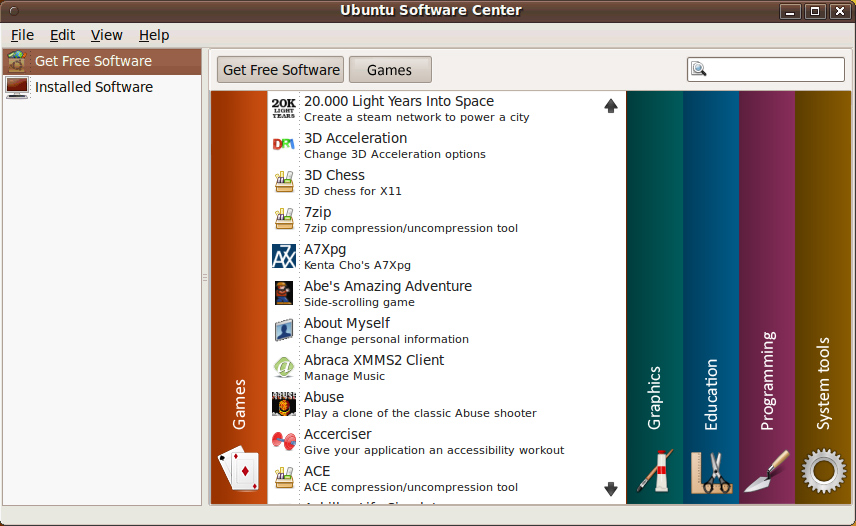
I have a suggestion for the Software Center UI. I know that I'm walking on thin ice here since Matthew is a interface designer 
With the current design, you can't switch between "departments" without going to the main department screen. I know it's a tiny thing, but I find kind of annoying. I suggest something like this:

You could argue that this UI would be unfamiliar or too complex for many users, but with everything being animated with Clutter, I'm sure the animations will make it easy to understand. This "accordion" concept also is very common on flash websites. These mockups doesn't include all departments represented in Ubuntu Software Center.
I tried (and failed) to created a small flash demo to show it in action. I could not change the "mouseover" to a "click" command. This means the demo has a rollover effect rather than a CLICK TO CHANGE DEPARTMENT as I intended! software_center_accordion_ui.swf
-- MadsRH
- Of course, this is a interesting approach. However I see three problems with this approach: The first one is - what the user should do, if you have more then 4 categories? In this case he has to scroll along the "accordeon". This might be a problem, because you never see all categories at once. The second problem is, that you are wasting space for the list of installable applications. The last problem is, that it brings a lot of clutter in the application list, that distracts the user from the thing he want to do: selecting an application to install. -- xfuser4
- I don't like the use of accordion for categories, but my take is that the accordion paradigm would be nice to have for the list items themselves (the packages). That means the details for a package would just be shown expanding the clicked item itself and when the user is done reading he could just scroll down without the need to click anywhere else to see the following items.
Suggestion: Hide certain programs on "Installed Software" page
I noticed that the "Installed Software" page contains programs such as Authorizations and GDebi Package Installer, which are installed by default in order for the system to work properly. Either such programs should be hidden, or there should be a warning when trying to remove them so the system continues to work properly. If users want to replace these programs, then they should have enough knowledge of Ubuntu to get Synaptic and change the programs that way. There aren't many crucial programs listed, but I fear that new users will look through this page, wanting to free up space on their computer, and remove programs that they don't recognize. Maybe a good alternative would be to have the "Installed Software" page show user-installed software only? --ddecator
Reviews
FixerDave 2009-10-30: At first blush in Ubuntu 9.10, well, sorry, but I don’t like this new Software Centre. It looks pretty, and it works, no question about that. But, I have some issues with it:
First, no ratings. I like the ratings. Being able to sort by ratings is a good thing. I remember especially liking the ratings back when I was first experimenting with Ubuntu. They really help.
Second, it’s slow as it starts installing right away. I’d rather pick my list and then let it go. Oh, and the checkbox and info pane approach is much easier than this follow-the-link idea.
Third, because it starts whilst I’m searching the lists, it keeps asking for my password, over and over, nearly every time I find something I want to install.
Fourth, again remembering being a new user, I kind of liked being able to watch the terminal screen scroll by. It "connected" me with the install which later on made using apt-get a lot less intimidating.
I’m trying to keep an open mind here, but on the surface it seems like quite a regression from what was. From an "experienced" perspective, it gets in the way. But, even from a "new user" perspective, I think it takes away some really useful stuff. It looks pretty but I’m installing AddRemove now.
SoftwareCenter/Comments (last edited 2011-08-06 01:48:37 by nttkyo389203)