PPA_Testing
|
Size: 4935
Comment: converted to 1.6 markup
|
Size: 4915
Comment:
|
| Deletions are marked like this. | Additions are marked like this. |
| Line 3: | Line 3: |
| ||<tablestyle="float:right; font-size: 0.9em; width:40%; background:#F1F1ED; margin: 0 0 1em 1em;" style="padding:0.5em;">'''Contents'''<<BR>><<TableOfContents>>|| | ||<tablestyle="float:right; font-size: 0.9em; width:40%; background:#F1F1ED; margin: 0 0 1em 1em;" style="padding:0.5em;"><<TableOfContents>>|| |


SRU Verification is the process of testing packages from the -proposed repository, that have been updated to fix bugs. These packages need testing to ensure that the package continues to function as designed and that the bug is fixed. It is also important to ensure no regression has been introduced by the fix. More information about the process can be found at Stable Release Update page. To find out how to enable -proposed look at the Enable Proposed page.
How to find bugs needing verification
There are many ways to find bugs needing SRU verification: by viewing the SRU To Do or Pending Ubuntu SRUs or by querying Launchpad for the bug tag verification-needed or by looking at bugs which the SRU verification team is subscribed.
The Pending Ubuntu SRUs are generated by parsing the changelogs of the packages in -proposed repository. By clicking on changelog bugs entry you will be taken to the Launchpad bug report (if it exists). Some bugs resolved by -proposed packages require specific hardware and these can be identified by the hw-specific tag in Launchpad or by the (hw) next to the bug number at the Pending Ubuntu SRUs page.
Identifying how to test
The first step in identifying how to test, is determining the release or releases of Ubuntu affected by the particular bug. This can be done by looking at the bug report and determining the release affected by the bug.
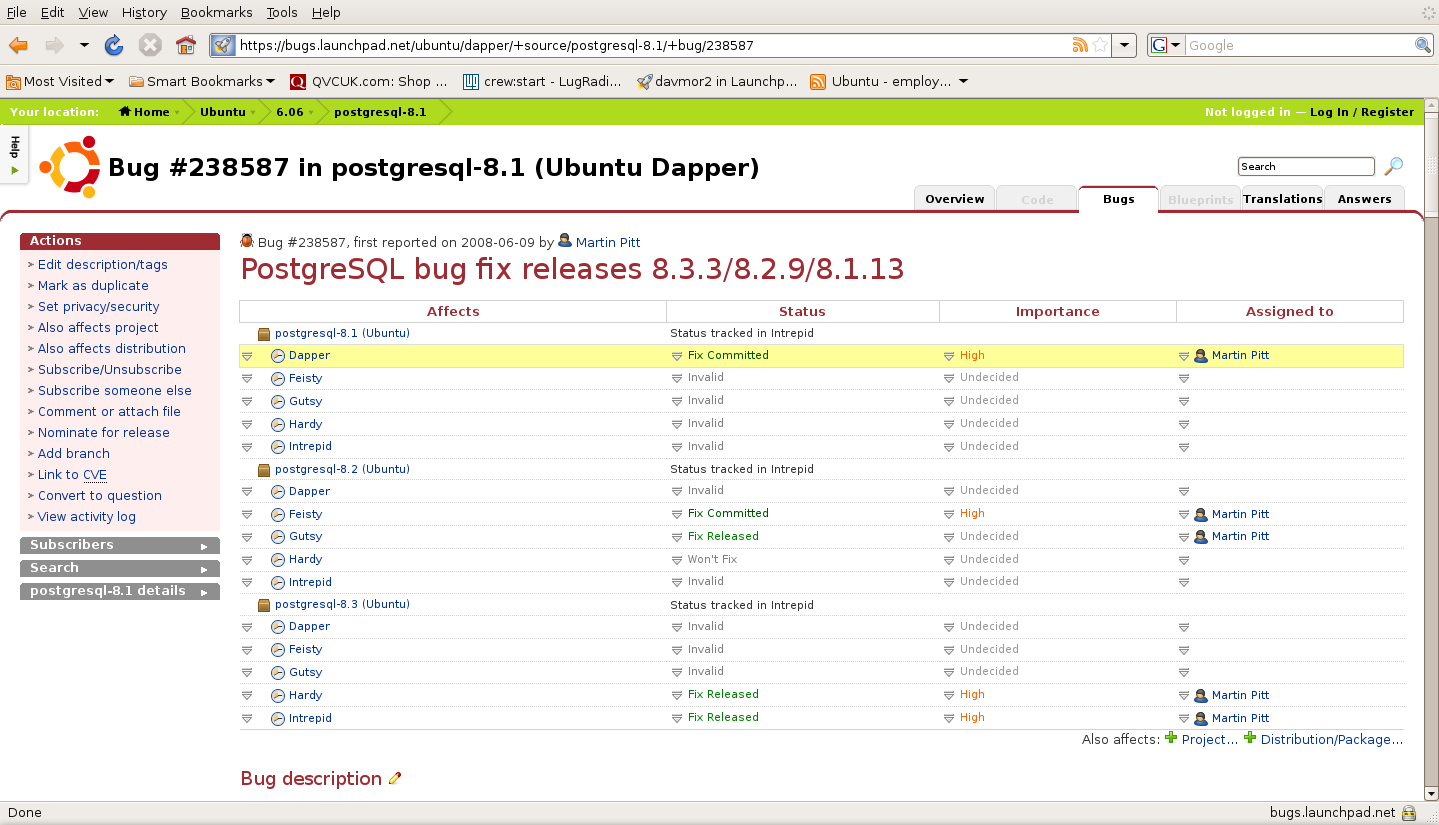
In the example below the Postgresql8.1 bug affects the Dapper, Feisty, Gutsy and Hardy releases of Ubuntu and should be verified in each one.
Click to zoom
Alternatively, at the Pending Ubuntu SRUs page there are sections for each release of Ubuntu that is currently supported.
In addition to knowing the release or releases of Ubuntu affected you also need to have detailed steps to recreate the bug. These can be found in the "TEST CASE" section at the end of the bug's description. Bug 172264 has an example of what the test case will look like.
How to perform the test
After booting into the affected release of Ubuntu the following steps should be taken:
- Ensure that your system is up to date by installing all available updated packages from the -updates and -security repositories
- Verify that you do not have the proposed package installed by checking the package version using 'dpkg -l PKGNAME | cat'
- Recreate the bug using the steps identified in the "TEST CASE"
- Modify your '/etc/apt/sources.list' file to include the -proposed repository
deb http://archive.ubuntu.com/ubuntu/ hardy-proposed main restricted universe
- Execute 'sudo apt-get update'
- Install the proposed package via 'sudo apt-get install PKGNAME' or 'sudo apt-get install PKGNAME=VERSION-NUM'
- Verify that you installed the correct package version using 'dpkg -l PKGNAME | cat'
- Reboot the system
- Try to recreate the bug using the steps identified in the "TEST CASE"
- Use the software installed by the package in common ways
Updating the bug report
Include: Nothing found for "[[Anchor"!
This section has moved to https://canonical-sru-docs.readthedocs-hosted.com/en/latest/howto/standard/ and https://canonical-sru-docs.readthedocs-hosted.com/en/latest/howto/regression/#howto-report-regression
Autopkgtest Regressions
See: https://canonical-sru-docs.readthedocs-hosted.com/en/latest/howto/autopkgtest-failure/
Expected resolution for reported autopkgtest failures
See: https://canonical-sru-docs.readthedocs-hosted.com/en/latest/howto/autopkgtest-failure/
Removal of updates
This section has moved to https://canonical-sru-docs.readthedocs-hosted.com/en/latest/explanation/non-standard-processes/#removal-of-languishing-updates
Regressions
This section has moved to https://canonical-sru-docs.readthedocs-hosted.com/en/latest/howto/regression/#howto-report-regression
Testing for Regressions
(defunct section removed)
Documentation for Special Cases
This section has moved to https://documentation.ubuntu.com/sru/en/latest/reference/package-specific/
See the announcement: https://lists.ubuntu.com/archives/ubuntu-devel/2025-June/043391.html
Kernel
This section has moved to https://documentation.ubuntu.com/sru/en/latest/reference/package-specific/#kernel
Landscape
This section has moved to https://documentation.ubuntu.com/sru/en/latest/reference/package-specific/#landscape
Snapd
This section has moved to https://documentation.ubuntu.com/sru/en/latest/reference/package-specific/#snapd
Snapcraft
This section has moved to https://documentation.ubuntu.com/sru/en/latest/reference/package-specific/#snapcraft
Ubuntu-image
This section has moved to https://documentation.ubuntu.com/sru/en/latest/reference/package-specific/#ubuntu-image
Docker.io group
This section has moved to https://documentation.ubuntu.com/sru/en/latest/reference/package-specific/#docker-io-group
gce-compute-image-packages
This section has moved to https://documentation.ubuntu.com/sru/en/latest/reference/package-specific/#gce-compute-image-packages
google-compute-engine
This section has moved to https://documentation.ubuntu.com/sru/en/latest/reference/package-specific/#google-compute-engine
google-compute-engine-oslogin
This section has moved to https://documentation.ubuntu.com/sru/en/latest/reference/package-specific/#google-compute-engine-oslogin
google-guest-agent
This section has moved to https://documentation.ubuntu.com/sru/en/latest/reference/package-specific/#google-guest-agent
google-osconfig-agent
This section has moved to https://documentation.ubuntu.com/sru/en/latest/reference/package-specific/#google-osconfig-agent
curtin
This section has moved to https://documentation.ubuntu.com/sru/en/latest/reference/package-specific/#curtin
walinuxagent
This section has moved to https://documentation.ubuntu.com/sru/en/latest/reference/package-specific/#walinuxagent
GNOME
This section has moved to https://documentation.ubuntu.com/sru/en/latest/reference/package-specific/#gnome
OpenStack
This section has moved to https://documentation.ubuntu.com/sru/en/latest/reference/package-specific/#openstack
Certbot
This section has moved to https://documentation.ubuntu.com/sru/en/latest/reference/package-specific/#certbot
cloud-init
This section has moved to https://documentation.ubuntu.com/sru/en/latest/reference/package-specific/#cloud-init
DPDK
This section has moved to https://documentation.ubuntu.com/sru/en/latest/reference/package-specific/#dpdk
ubuntu-release-upgrader and python-apt
This section has moved to https://documentation.ubuntu.com/sru/en/latest/reference/package-specific/#ubuntu-release-upgrader-and-python-apt
apt and python-apt
This section has moved to https://documentation.ubuntu.com/sru/en/latest/reference/package-specific/#apt-and-python-apt
rax-nova-agent
This section has moved to https://documentation.ubuntu.com/sru/en/latest/reference/package-specific/#rax-nova-agent
livecd-rootfs
This section has moved to https://documentation.ubuntu.com/sru/en/latest/reference/package-specific/#livecd-rootfs
fwupd and fwupdate
This section has moved to https://documentation.ubuntu.com/sru/en/latest/reference/package-specific/#fwupd-and-fwupdate
snapd-glib
This section has moved to https://documentation.ubuntu.com/sru/en/latest/reference/package-specific/#snapd-glib
netplan.io
This section has moved to https://documentation.ubuntu.com/sru/en/latest/reference/package-specific/#netplan-io
ec2-hibinit-agent
This section has moved to https://documentation.ubuntu.com/sru/en/latest/reference/package-specific/#ec2-hibinit-agent
NVIDIA driver
This section has moved to https://documentation.ubuntu.com/sru/en/latest/reference/package-specific/#nvidia-driver
wslu
This section has moved to https://documentation.ubuntu.com/sru/en/latest/reference/package-specific/#wslu
openjdk-N
This section has moved to https://documentation.ubuntu.com/sru/en/latest/reference/package-specific/#openjdk-n
Postfix
This section has moved to https://documentation.ubuntu.com/sru/en/latest/reference/package-specific/#postfix
sosreport/sos
This section has moved to https://documentation.ubuntu.com/sru/en/latest/reference/package-specific/#sosreport-sos
oem-*-meta
This section has moved to https://documentation.ubuntu.com/sru/en/latest/reference/package-specific/#oem-meta
ubuntu-dev-tools
This section has moved to https://documentation.ubuntu.com/sru/en/latest/reference/package-specific/#ubuntu-dev-tools
OpenLDAP
This section has moved to https://documentation.ubuntu.com/sru/en/latest/reference/package-specific/#openldap
HAProxy
This section has moved to https://documentation.ubuntu.com/sru/en/latest/reference/package-specific/#haproxy
autopkgtest
This section has moved to https://documentation.ubuntu.com/sru/en/latest/reference/package-specific/#autopkgtest
squid
This section has moved to https://documentation.ubuntu.com/sru/en/latest/reference/package-specific/#squid
bind9
This section has moved to https://documentation.ubuntu.com/sru/en/latest/reference/package-specific/#bind9
virtualbox
This section has moved to https://documentation.ubuntu.com/sru/en/latest/reference/package-specific/#virtualbox
ubuntu-advantage-tools
This section has moved to https://documentation.ubuntu.com/sru/en/latest/reference/package-specific/#ubuntu-advantage-tools
open-vm-tools
This section has moved to https://documentation.ubuntu.com/sru/en/latest/reference/package-specific/#open-vm-tools
postgresql
This section has moved to https://documentation.ubuntu.com/sru/en/latest/reference/package-specific/#postgresql
GRUB
This section has moved to https://documentation.ubuntu.com/sru/en/latest/reference/package-specific/#grub
OpenVPN
This section has moved to https://documentation.ubuntu.com/sru/en/latest/reference/package-specific/#openvpn
Language Packs (language-pack-*)
This section has moved to https://documentation.ubuntu.com/sru/en/latest/reference/package-specific/#language-packs-language-pack
cd-boot-images-<arch>
This section has moved to https://documentation.ubuntu.com/sru/en/latest/reference/package-specific/#cd-boot-images-arch
Data Packages Kept in Sync with Security
This section has moved to https://documentation.ubuntu.com/sru/en/latest/reference/package-specific/#data-packages-kept-in-sync-with-security
tzdata
This section has moved to https://documentation.ubuntu.com/sru/en/latest/reference/package-specific/#tzdata
distro-info-data
This section has moved to https://documentation.ubuntu.com/sru/en/latest/reference/package-specific/#distro-info-data
linux-firmware
This section has moved to https://documentation.ubuntu.com/sru/en/latest/reference/package-specific/#linux-firmware
wireless-regdb
This section has moved to https://documentation.ubuntu.com/sru/en/latest/reference/package-specific/#wireless-regdb
Toolchain Updates
This section has moved to https://documentation.ubuntu.com/sru/en/latest/reference/package-specific/#toolchain-updates
Examples
As a reference, see bug #173082 for an idea of how the SRU process works for a main package, or bug #208666 for an SRU in universe.
Package Removals
This section has moved to https://canonical-sru-docs.readthedocs-hosted.com/en/latest/explanation/non-standard-processes/#explanation-removals
Links
This section has moved to https://canonical-sru-docs.readthedocs-hosted.com/en/latest/reference/status/
Reviewing procedure and tools
This section has moved to https://canonical-sru-docs.readthedocs-hosted.com/en/latest/internal/#reviewing-procedure-and-tools
Contacting the SRU team
This section has moved to https://canonical-sru-docs.readthedocs-hosted.com/en/latest/howto/contact/
Ways to test using virtual machines
In the event that your current release of Ubuntu is not the same as the release of Ubuntu affected by the bug there are still many ways for you to perform the verification of the Stable Release Update without installing the affected release on your hardware. This can be done by using an emulator such as Virtual Box, kvm, qemu or VMware. Virtual machines images for VMware are available at http://isv-image.ubuntu.com/vmware/. Depending on the nature of the bug report it may also be possible to use a chroot to perform the verification.
QATeam/PPA_Testing (last edited 2013-08-03 04:38:53 by d154-5-184-90)