StateTransitionTestCases
|
Size: 122
Comment:
|
Size: 3109
Comment:
|
| Deletions are marked like this. | Additions are marked like this. |
| Line 1: | Line 1: |
| ## page was renamed from QATeam/AutomatedTesting/Ubiquity/StateTransitionTestStrategy StateTransitionTestStrategy here. |
= Introduction = This specification should outline test cases for the logic and functionality of each state of the installer and the transition between these states. This suite of test cases should be independent and not care if either the installation completes or the functionality of other states of the installer. Installation functionality is covered in the [[../InstallationTestCases|installation testcases]]. = Approval = || '''Author''' || || || || Dan Chapman || [[LaunchpadHome:dpniel ]] || Ubuntu Member || || '''Approved By''' || || || || <name> || < lp profile > || < position > || || || || || = Related Documents = || '''Ref #''' || '''Document Name''' || '''Link''' || || 01 || Installer Design - Ubuntu Installation Process || [[http://goo.gl/H12x6V]] || || 02 || Test Analysis and Specification for Ubiquity ||[[https://wiki.ubuntu.com/QATeam/AutomatedTesting?action=AttachFile&do=get&target=Test+analysis+and+specification+for+Ubiquity.pdf|Automated testing for Ubiquity]] || || 03 || Ubiquity Test Plan || [[https://wiki.ubuntu.com/QATeam/AutomatedTesting/Ubiquity/UbiquityTestPlan|Ubiquity Test Plan]] || || 04 || Installation Test Cases || ../InstallationTestCases || <<TableOfContents(3)>> = Considerations = == State Trasition Diagram == == Seperating Test Cases == To make testing each state of Ubiquity easier we can separate the UI into two sections. As you can see in the sections below we have objects that are present throughout the installation and objects that a relevant to a particular state of the installer. By separating them like this we can generate test cases for either Section 1, which would be test cases that should be run on every state of the installer, and Section 2 which would be test cases that are only run on a particular state of the installation. There are situations throughout the install where Section 2 test cases will need to access the objects in Section 1 which should be handled gracefully. === Section 1 === Objects that are present on throughout the install {{attachment:UbiquityWindowConstants.png}} === Section 2 === Each step of the installer is embedded into a page of a !GtkNotebook, which we can use to separate each step from each other as well as objects present throughout {{attachment:UbiquityPageSection.png}} = Global Test Cases = = Page Transition Test Cases = = Welcome Page Test Cases = = Connect Wireless Page Test Cases = = Preparing Page Test Cases = = Installation Type Page Test Cases = = Encryption Page Test Cases = = Advanced Partition Page Test Cases = = Location Page Test Cases = = Keyboard Layout Page Test Cases = = User Info Page Test Cases = = Ubuntu One Page Test Cases = = Progress Page Test Cases = = Completion Dialog Test Cases = |
Introduction
This specification should outline test cases for the logic and functionality of each state of the installer and the transition between these states. This suite of test cases should be independent and not care if either the installation completes or the functionality of other states of the installer.
Installation functionality is covered in the installation testcases.
Approval
Author |
|
|
Dan Chapman |
Ubuntu Member |
|
Approved By |
|
|
<name> |
< lp profile > |
< position > |
|
|
|
Related Documents
Ref # |
Document Name |
Link |
01 |
Installer Design - Ubuntu Installation Process |
|
02 |
Test Analysis and Specification for Ubiquity |
|
03 |
Ubiquity Test Plan |
|
04 |
Installation Test Cases |
Contents
- Introduction
- Approval
- Related Documents
- Considerations
- Global Test Cases
- Page Transition Test Cases
- Welcome Page Test Cases
- Connect Wireless Page Test Cases
- Preparing Page Test Cases
- Installation Type Page Test Cases
- Encryption Page Test Cases
- Advanced Partition Page Test Cases
- Location Page Test Cases
- Keyboard Layout Page Test Cases
- User Info Page Test Cases
- Ubuntu One Page Test Cases
- Progress Page Test Cases
- Completion Dialog Test Cases
Considerations
State Trasition Diagram
Seperating Test Cases
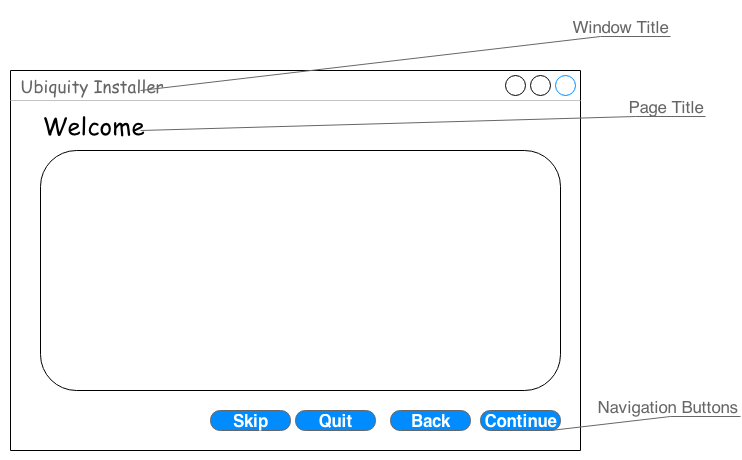
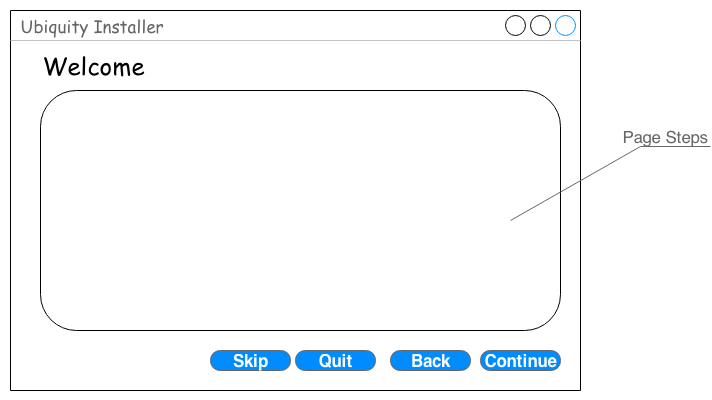
To make testing each state of Ubiquity easier we can separate the UI into two sections. As you can see in the sections below we have objects that are present throughout the installation and objects that a relevant to a particular state of the installer. By separating them like this we can generate test cases for either Section 1, which would be test cases that should be run on every state of the installer, and Section 2 which would be test cases that are only run on a particular state of the installation.
There are situations throughout the install where Section 2 test cases will need to access the objects in Section 1 which should be handled gracefully.
Section 1
Objects that are present on throughout the install
Section 2
Each step of the installer is embedded into a page of a GtkNotebook, which we can use to separate each step from each other as well as objects present throughout
Global Test Cases
Page Transition Test Cases
Welcome Page Test Cases
Connect Wireless Page Test Cases
Preparing Page Test Cases
Installation Type Page Test Cases
Encryption Page Test Cases
Advanced Partition Page Test Cases
Location Page Test Cases
Keyboard Layout Page Test Cases
User Info Page Test Cases
Ubuntu One Page Test Cases
Progress Page Test Cases
Completion Dialog Test Cases
QATeam/AutomatedTesting/StateTransitionTestCases (last edited 2014-01-03 12:50:54 by 89-168-6-168)