StateTransitionTestCases
|
Size: 35
Comment:
|
Size: 11263
Comment:
|
| Deletions are marked like this. | Additions are marked like this. |
| Line 1: | Line 1: |
| StateTransitionTestStrategy here. | = Introduction = This specification should outline test cases for the logic and functionality of each state of the installer and the transition between these states. This suite of test cases should be independent and not care if either the installation completes or the functionality of other states of the installer. Installation functionality is covered in the [[../InstallationTestCases|installation testcases]]. = Approval = || '''Author''' || || || || Dan Chapman || [[LaunchpadHome:dpniel ]] || Ubuntu Member || || '''Approved By''' || || || || <name> || < lp profile > || < position > || || || || || = Related Documents = || '''Ref #''' || '''Document Name''' || '''Link''' || || 01 || Installer Design - Ubuntu Installation Process || [[http://goo.gl/H12x6V]] || || 02 || Test Analysis and Specification for Ubiquity ||[[https://wiki.ubuntu.com/QATeam/AutomatedTesting?action=AttachFile&do=get&target=Test+analysis+and+specification+for+Ubiquity.pdf|Automated testing for Ubiquity]] || || 03 || Ubiquity Test Plan || [[https://wiki.ubuntu.com/QATeam/AutomatedTesting/Ubiquity/UbiquityTestPlan|Ubiquity Test Plan]] || || 04 || Installation Test Cases || ../InstallationTestCases || <<TableOfContents(3)>> = Considerations = Initially we will use a simple set of test cases, because ultimately we want to test that the installation is successful over testing logical functionality. Simple test cases are needed in order for the Installation Test Cases to be successful. Since we are using autopilot to implement these tests we need to assume that no human eyes will be watching the tests when executed, therefore it is essential we have test cases for checking objects are visible, correct size etc, all things we would normally visually test with our eyes. This document will be a work in progress and more test cases for logical functionality will be added once we have solid stable installation test cases. == State Trasition Diagram == Link to state transition diagram [[attachment:trans_diagram.jpg]] == Seperating Test Cases == To make testing each state of Ubiquity easier we can separate the UI into two sections. As you can see in the sections below we have objects that are present throughout the installation and objects that a relevant to a particular state of the installer. By separating them like this we can generate test cases for either Section 1, which would be test cases that should be run on every state of the installer, and Section 2 which would be test cases that are only run on a particular state of the installation. There are situations throughout the install where Section 2 test cases will need to access the objects in Section 1 which should be handled gracefully. === Section 1 === Objects that are present throughout the install {{attachment:UbiquityWindowConstants.png}} === Section 2 === Each step of the installer is embedded into a page of a !GtkNotebook, which we can use to separate each step from each other as well as objects present throughout {{attachment:UbiquityPageSection.png}} = Global Test Cases = These are test cases that ideally will be ran on each state of the installer (not including transitioning) || '''Test Case Id:''' || TC-Ubiquity-Global-!EngVals-01 || || '''Test Description:''' || On English installs test label values at each state || || '''Assumptions:''' || English Installation Required. Configuration file containing vetted expected values to test against.|| || '''Actions:''' || Check each visible label || || '''Expected Results:''' || Expect text value to equal vetted value in configuration file|| <<BR>> || '''Test Case Id:''' || TC-Ubiquity-Global-!NonEngVals-02 || || '''Test Description:''' || On Non-English installs test label values at each state || || '''Assumptions:''' || Non-English Installation Required.|| || '''Actions:''' || Check each visible label || || '''Expected Results:''' || Expect text value to not be empty and is a valid Unicode string|| = Page Transition Test Cases = For these test cases we should use the page title and the navigation button's sensitive properties to determine we have transitioned states. Ideally it would be easier to check the next page/state becomes visible, but this is not possible due to the visible properties of child pages in a !GtkNotebook always being True, regardless of whether the user can see them. || '''Test Case Id:''' || TC-Ubiquity-Transition-Continue-01 || || '''Test Description:''' || Test case for transition to the next state of the installer || || '''Assumptions:''' || All required user input for the current state has been completed || || '''Actions:''' || 1. Select 'Continue' button <<BR>> 2. Click 'Continue' button <<BR>> 3. Select page title || || '''Expected Results:''' || 1. button should be sensitive and not greyed out <<BR>> 2. Button's sensitive property becomes False while transitioning <<BR>> 3. Page title eventually changes to the next states title || <<BR>> || '''Test Case Id:''' || TC-Ubiquity-Transition-Back-02 || || '''Test Description:''' || Test case for transition to the previous state of the installer || || '''Assumptions:''' || Assume we are not on either the 'stepLanguage' or 'stepLocation' states || || '''Actions:''' || 1. Select 'Back' button <<BR>> 2. Click 'Back' button <<BR>> 3. Select page title || || '''Expected Results:''' || 1. button should be sensitive and not greyed out <<BR>> 2. Button's sensitive property becomes False while transitioning <<BR>> 3. Page title eventually changes to the previous states title || <<BR>> || '''Test Case Id:''' || TC-Ubiquity-Transition-Quit-03 || || '''Test Description:''' || Test case for terminating the installer || || '''Assumptions:''' || Assume we have not gone past either the 'stepPartAsk', 'stepPartAdvanced or 'stepPartCrypto' states || || '''Actions:''' || 1. Select 'Quit' button <<BR>> 2. Click 'Quit' button <<BR>> 3. Click dialog Quit button || || '''Expected Results:''' || 1. button should be sensitive and not greyed out <<BR>> 2. A dialog is displayed asking “Do you really want to quit the installation now?” <<BR>> 3. The installer gracefully terminates and Ubiquity window closes || <<BR>> || '''Test Case Id:''' || TC-Ubiquity-Transition-Skip-04 || || '''Test Description:''' || Test case for skipping the current step || || '''Assumptions:''' || The skip button is visible for the current step || || '''Actions:''' || 1. Select 'Skip' button <<BR>> 2. Click 'Skip' button <<BR>> 3. Select page title || || '''Expected Results:''' || 1. button should be sensitive and not greyed out <<BR>> 2. Button's sensitive property becomes False while transitioning <<BR>> 3. Page title eventually changes to the next states title || = Welcome Page Test Cases = For the welcome page test cases we need to keep in mind that we will be running English and Non-English test cases side-by-side so at the end of the test case we need to ensure we leave with the required locale selected for the install. <<BR>> || '''Test Case Id:''' || TC-Ubiquity-Welcome-01 || || '''Test Description:''' || Test case for checking all expected visible objects can be seen || || '''Assumptions:''' || None || || '''Actions:''' || 1. Select Language Tree View <<BR>> 2. Check all items in tree view <<BR>> 3. Select release notes label || || '''Expected Results:''' || 1. Visible property is True <<BR>> 2. All items should be visible non empty unicode strings and not contain strange characters <<BR>> 3. Visible property is True || <<BR>> || '''Test Case Id:''' || TC-Ubiquity-Welcome-locale-02 || || '''Test Description:''' || Test case for localisation of the installer works correctly. This is very basic and should be expanded in future. || || '''Assumptions:''' || None || || '''Actions:''' || 1. Click on 'Deutsch' in the location tree view <<BR>> 2. Select page title <<BR>> 3. Depending on install, <<BR>> . a) Click 'English' in the location tree view <<BR>> . b) Click random Non-English location in location tree view <<BR>> 4. Select page title || || '''Expected Results:''' || 1. 'Deutsch' item's selected property is True <<BR>> 2. Page title text should be 'Willkommen' <<BR>> 3. Clicked tree item is selected <<BR>> 4. If 'English' install page title text will change to 'Welcome' else the page title contains text of the selected language|| = Connect Wireless Page Test Cases = || '''Test Case Id:''' || TC-Ubiquity--0 || || '''Test Description:''' || || || '''Assumptions:''' || || || '''Actions:''' || || || '''Expected Results:''' || || = Preparing Page Test Cases = The statebox's on the preparing page differ depending on power source, disk size and connectivity. A test case is needed for each scenario to determine the correct information is being displayed to the user || '''Test Case Id:''' || TC-Ubiquity-Preparing-Statebox-01 || || '''Test Description:''' || Test we || || '''Assumptions:''' || || || '''Actions:''' || || || '''Expected Results:''' || || = Installation Type Page Test Cases = || '''Test Case Id:''' || TC-Ubiquity--0 || || '''Test Description:''' || || || '''Assumptions:''' || || || '''Actions:''' || || || '''Expected Results:''' || || = Encryption Page Test Cases = || '''Test Case Id:''' || TC-Ubiquity--0 || || '''Test Description:''' || || || '''Assumptions:''' || || || '''Actions:''' || || || '''Expected Results:''' || || = Advanced Partition Page Test Cases = || '''Test Case Id:''' || TC-Ubiquity--0 || || '''Test Description:''' || || || '''Assumptions:''' || || || '''Actions:''' || || || '''Expected Results:''' || || = Location Page Test Cases = || '''Test Case Id:''' || TC-Ubiquity--0 || || '''Test Description:''' || || || '''Assumptions:''' || || || '''Actions:''' || || || '''Expected Results:''' || || = Keyboard Layout Page Test Cases = || '''Test Case Id:''' || TC-Ubiquity--0 || || '''Test Description:''' || || || '''Assumptions:''' || || || '''Actions:''' || || || '''Expected Results:''' || || = User Info Page Test Cases = || '''Test Case Id:''' || TC-Ubiquity--0 || || '''Test Description:''' || || || '''Assumptions:''' || || || '''Actions:''' || || || '''Expected Results:''' || || = Ubuntu One Page Test Cases = || '''Test Case Id:''' || TC-Ubiquity--0 || || '''Test Description:''' || || || '''Assumptions:''' || || || '''Actions:''' || || || '''Expected Results:''' || || = Progress Page Test Cases = || '''Test Case Id:''' || TC-Ubiquity--0 || || '''Test Description:''' || || || '''Assumptions:''' || || || '''Actions:''' || || || '''Expected Results:''' || || = Completion Dialog Test Cases = || '''Test Case Id:''' || TC-Ubiquity--0 || || '''Test Description:''' || || || '''Assumptions:''' || || || '''Actions:''' || || || '''Expected Results:''' || || |
Introduction
This specification should outline test cases for the logic and functionality of each state of the installer and the transition between these states. This suite of test cases should be independent and not care if either the installation completes or the functionality of other states of the installer.
Installation functionality is covered in the installation testcases.
Approval
Author |
|
|
Dan Chapman |
Ubuntu Member |
|
Approved By |
|
|
<name> |
< lp profile > |
< position > |
|
|
|
Related Documents
Ref # |
Document Name |
Link |
01 |
Installer Design - Ubuntu Installation Process |
|
02 |
Test Analysis and Specification for Ubiquity |
|
03 |
Ubiquity Test Plan |
|
04 |
Installation Test Cases |
Contents
- Introduction
- Approval
- Related Documents
- Considerations
- Global Test Cases
- Page Transition Test Cases
- Welcome Page Test Cases
- Connect Wireless Page Test Cases
- Preparing Page Test Cases
- Installation Type Page Test Cases
- Encryption Page Test Cases
- Advanced Partition Page Test Cases
- Location Page Test Cases
- Keyboard Layout Page Test Cases
- User Info Page Test Cases
- Ubuntu One Page Test Cases
- Progress Page Test Cases
- Completion Dialog Test Cases
Considerations
Initially we will use a simple set of test cases, because ultimately we want to test that the installation is successful over testing logical functionality. Simple test cases are needed in order for the Installation Test Cases to be successful.
Since we are using autopilot to implement these tests we need to assume that no human eyes will be watching the tests when executed, therefore it is essential we have test cases for checking objects are visible, correct size etc, all things we would normally visually test with our eyes.
This document will be a work in progress and more test cases for logical functionality will be added once we have solid stable installation test cases.
State Trasition Diagram
Link to state transition diagram trans_diagram.jpg

Seperating Test Cases
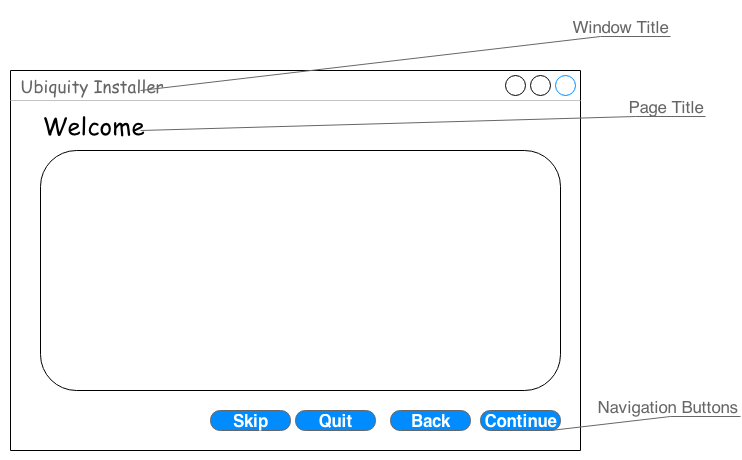
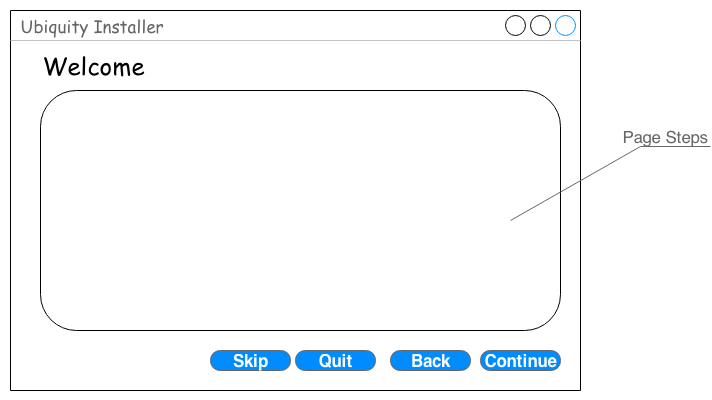
To make testing each state of Ubiquity easier we can separate the UI into two sections. As you can see in the sections below we have objects that are present throughout the installation and objects that a relevant to a particular state of the installer. By separating them like this we can generate test cases for either Section 1, which would be test cases that should be run on every state of the installer, and Section 2 which would be test cases that are only run on a particular state of the installation.
There are situations throughout the install where Section 2 test cases will need to access the objects in Section 1 which should be handled gracefully.
Section 1
Objects that are present throughout the install
Section 2
Each step of the installer is embedded into a page of a GtkNotebook, which we can use to separate each step from each other as well as objects present throughout
Global Test Cases
These are test cases that ideally will be ran on each state of the installer (not including transitioning)
Test Case Id: |
TC-Ubiquity-Global-EngVals-01 |
Test Description: |
On English installs test label values at each state |
Assumptions: |
English Installation Required. Configuration file containing vetted expected values to test against. |
Actions: |
Check each visible label |
Expected Results: |
Expect text value to equal vetted value in configuration file |
Test Case Id: |
TC-Ubiquity-Global-NonEngVals-02 |
Test Description: |
On Non-English installs test label values at each state |
Assumptions: |
Non-English Installation Required. |
Actions: |
Check each visible label |
Expected Results: |
Expect text value to not be empty and is a valid Unicode string |
Page Transition Test Cases
For these test cases we should use the page title and the navigation button's sensitive properties to determine we have transitioned states. Ideally it would be easier to check the next page/state becomes visible, but this is not possible due to the visible properties of child pages in a GtkNotebook always being True, regardless of whether the user can see them.
Test Case Id: |
TC-Ubiquity-Transition-Continue-01 |
Test Description: |
Test case for transition to the next state of the installer |
Assumptions: |
All required user input for the current state has been completed |
Actions: |
1. Select 'Continue' button |
Expected Results: |
1. button should be sensitive and not greyed out |
Test Case Id: |
TC-Ubiquity-Transition-Back-02 |
Test Description: |
Test case for transition to the previous state of the installer |
Assumptions: |
Assume we are not on either the 'stepLanguage' or 'stepLocation' states |
Actions: |
1. Select 'Back' button |
Expected Results: |
1. button should be sensitive and not greyed out |
Test Case Id: |
TC-Ubiquity-Transition-Quit-03 |
Test Description: |
Test case for terminating the installer |
Assumptions: |
Assume we have not gone past either the 'stepPartAsk', 'stepPartAdvanced or 'stepPartCrypto' states |
Actions: |
1. Select 'Quit' button |
Expected Results: |
1. button should be sensitive and not greyed out |
Test Case Id: |
TC-Ubiquity-Transition-Skip-04 |
Test Description: |
Test case for skipping the current step |
Assumptions: |
The skip button is visible for the current step |
Actions: |
1. Select 'Skip' button |
Expected Results: |
1. button should be sensitive and not greyed out |
Welcome Page Test Cases
For the welcome page test cases we need to keep in mind that we will be running English and Non-English test cases side-by-side so at the end of the test case we need to ensure we leave with the required locale selected for the install.
Test Case Id: |
TC-Ubiquity-Welcome-01 |
Test Description: |
Test case for checking all expected visible objects can be seen |
Assumptions: |
None |
Actions: |
1. Select Language Tree View |
Expected Results: |
1. Visible property is True |
Test Case Id: |
TC-Ubiquity-Welcome-locale-02 |
Test Description: |
Test case for localisation of the installer works correctly. This is very basic and should be expanded in future. |
Assumptions: |
None |
Actions: |
1. Click on 'Deutsch' in the location tree view |
Expected Results: |
1. 'Deutsch' item's selected property is True |
Connect Wireless Page Test Cases
Test Case Id: |
TC-Ubiquity--0 |
Test Description: |
|
Assumptions: |
|
Actions: |
|
Expected Results: |
|
Preparing Page Test Cases
The statebox's on the preparing page differ depending on power source, disk size and connectivity. A test case is needed for each scenario to determine the correct information is being displayed to the user
Test Case Id: |
TC-Ubiquity-Preparing-Statebox-01 |
Test Description: |
Test we |
Assumptions: |
|
Actions: |
|
Expected Results: |
|
Installation Type Page Test Cases
Test Case Id: |
TC-Ubiquity--0 |
Test Description: |
|
Assumptions: |
|
Actions: |
|
Expected Results: |
|
Encryption Page Test Cases
Test Case Id: |
TC-Ubiquity--0 |
Test Description: |
|
Assumptions: |
|
Actions: |
|
Expected Results: |
|
Advanced Partition Page Test Cases
Test Case Id: |
TC-Ubiquity--0 |
Test Description: |
|
Assumptions: |
|
Actions: |
|
Expected Results: |
|
Location Page Test Cases
Test Case Id: |
TC-Ubiquity--0 |
Test Description: |
|
Assumptions: |
|
Actions: |
|
Expected Results: |
|
Keyboard Layout Page Test Cases
Test Case Id: |
TC-Ubiquity--0 |
Test Description: |
|
Assumptions: |
|
Actions: |
|
Expected Results: |
|
User Info Page Test Cases
Test Case Id: |
TC-Ubiquity--0 |
Test Description: |
|
Assumptions: |
|
Actions: |
|
Expected Results: |
|
Ubuntu One Page Test Cases
Test Case Id: |
TC-Ubiquity--0 |
Test Description: |
|
Assumptions: |
|
Actions: |
|
Expected Results: |
|
Progress Page Test Cases
Test Case Id: |
TC-Ubiquity--0 |
Test Description: |
|
Assumptions: |
|
Actions: |
|
Expected Results: |
|
Completion Dialog Test Cases
Test Case Id: |
TC-Ubiquity--0 |
Test Description: |
|
Assumptions: |
|
Actions: |
|
Expected Results: |
|
QATeam/AutomatedTesting/StateTransitionTestCases (last edited 2014-01-03 12:50:54 by 89-168-6-168)