PowerManagementConfiguration
|
Size: 5509
Comment:
|
← Revision 42 as of 2008-08-06 16:31:02 ⇥
Size: 7174
Comment: converted to 1.6 markup
|
| Deletions are marked like this. | Additions are marked like this. |
| Line 2: | Line 2: |
| * '''Created:''' [[Date(2005-04-23T01:36:42Z)]] by MattZimmerman[[BR]] * '''Contributors:''' MatthewGarret, OliverGrawert, MatthewPaulThomas, ThomMay, ReinhardTartler, RyanLortie, CoreyBurger, MatthiasUrlichs, MartijnVanDeStreeks, DanielHolbach * '''Drafter:''' DanielHolbach * '''Assignee:''' DanielHolbach * '''Packages:''' `gnome-power`, `gnome-session`, `gnome-applets` |
* '''Created:''' <<Date(2005-04-23T01:36:42Z)>> by MattZimmerman, replaced [<<Date(2006-02-23T11:15:25Z)>>] by DanielSilverstone * '''Original Contributors:''' MatthewGarrett, OliverGrawert, MatthewPaulThomas, ThomMay, ReinhardTartler, RyanLortie, CoreyBurger, MatthiasUrlichs, MartijnVanDeStreek, DanielHolbach * '''Original Drafter:''' DanielHolbach * '''Original Assignee:''' RyanLortie * '''Original Packages:''' `gnome-power`, `gnome-session`, `gnome-applets` * '''Drafter:''' DanielSilverstone * '''Assignee:''' DanielSilverstone * '''Packages:''' `gnome-power-manager`, `gnome-session`, `control-center`, `hal` |
| Line 10: | Line 13: |
| GNOME Power Preferences should by default only propose controversial options (ie: if we suspend when the lid closes). Other options have sane defaults which we should select for the user and not ask them about. For example, the following events are assumed to behave as follows: * power button press -> logout dialog * suspend press (if exists) -> suspend * ac unplugged -> so what? (do nothing -- but go into laptop mode!) |
To maintain simplicity, Ubuntu's power management interface allows configuration only of those options that people are likely to want to change (with other options having sane defaults, not configurable graphically). We will present battery and power information for the computer itself and also any other battery-powered devices which hal can tell us about. |
| Line 15: | Line 15: |
| == Scope and rationale == | == Rationale == |
| Line 18: | Line 18: |
| Line 27: | Line 26: |
| == Use Cases == | == Use cases == |
| Line 29: | Line 28: |
| Michael just installed Ubuntu 6.04, he doesn't care about Power Preferences, he wants it to just work and do the right thing (tm). | * Michael is a harried Hong Kong businessman who has just installed Ubuntu 6.04 on his home desktop machine. He doesn't care about power management; he wants it to just work and do the right thing. |
| Line 31: | Line 30: |
| Hubert has different ideas, about how Power Preferences should work by default. He should be able to change the option that make sense. | * Mei-Li is flying back to her home in London after a successful business trip to Hong Kong (during which she persuaded Michael to install Ubuntu). At the start of the flight, she sees she has 3 hours 20 minutes of battery left on her Think``Pad, possibly enough to finish a presentation she has to give tomorrow. As it turns out, she doesn't quite finish it; Ubuntu automatically puts the machine into hibernation when the battery reaches a critically low level. Nineteen hours later, Mei-Li arrives back at her apartment, plugs in her Think``Pad, opens it up and resumes work from where she left off. |
| Line 33: | Line 32: |
| === Panel Icon === There will be exactly one power status icon on the panel (either applet or notification icon) that will show the current battery charge status to the user. The icon will only show "primary" battery status (we make no attempt to deal with wireless mouse batteries, for example). The icon will not have its own preference dialog, but rather, a pulldown menu. The preferences item in this menu will lead to the global power preferences dialog (same dialog that is accessed via the System -> Preferences menu). |
* Candice runs a university computer lab containing 60 iMacs -- a significant use of electricity for a university on a tight budget (they upgraded from Mac OS 9 to Ubuntu partly because it was cheaper than OS X). To save power, Candice wants each computer to go to sleep if idle for half an hour, even when nobody is logged in, and she does not want students to be able to alter the power management settings. |
| Line 36: | Line 34: |
| {{{ +-------------------------+ | _Preferences | -> system power preferences |(o) No text | |( ) Remaining time | |( ) Remaining percentage | +-------------------------+ }}} |
* Bob runs the IT department at Hydroponical Light Industries. He gives his salespeople laptops with Ubuntu preinstalled, but since they're salespeople and not tech wizards, Bob locks down the power settings so they can't be messed with. |
| Line 45: | Line 36: |
| === Power Off Dialog === | * Courtney shares her Presario with her evil twin sister, Tara. Tara likes playing practical jokes, and tries to set up a cron job to spontaneously shut down or suspend the system if Courtney is logged in. This is unsuccessful. |
| Line 47: | Line 38: |
| {{{ +-------------------------------------------------------------------------+ | | | [ ] | | [ ? ] Are you sure you want to power off? | | [ ] | +-------------------------------------------------------------------------+ | (_Log Out) (_Restart) (S_witch User) (_Sleep) (_Cancel) ((_Power Off)) | +-------------------------------------------------------------------------+ }}} |
== Design == |
| Line 58: | Line 40: |
| * Power button -> pop up the power off dialog * all options in dialog are accessible with single (no need to hold alt) keypress. * possibly remove switch user * have ability to remove some items for certain users (admin may not want users shutting down, for example) * default is poweroff, accessible by pressing enter * this poweroff dialog might replace the global logout dialog |
=== Power Manager Interface === |
| Line 65: | Line 42: |
| == Power Preferences Dialog == | The `gnome-power-manager` package provides us with a notification-area icon which displays information about the battery status. It should be possible to get it to provide a popup of the current status on a given keypress (many laptops have a battery key which would be ideal for this). |
| Line 67: | Line 44: |
| If '''Suspend''' is supported: {{{ +-----------------Power Preferences-------------------------+ | Sleep | | | | Running on batteries: | | Put computer to sleep after: +---------||---+ | | 50min | | | | Options | | [x] Suspend on lid close: | | [x] require password when | | waking from sleep/hibernate | | | | Warnings | | Issue warning: +---------||---+ | | 15 min remaining | | | +-----------------------------------------------------------+ }}} |
=== Shutdown confirmation alert === |
| Line 88: | Line 46: |
| Pressing the power button on the computer puts up the shutdown alert immediately. | |
| Line 89: | Line 48: |
| * one tab * if suspend is unsupported then: - hide suspend time slider - hide suspend-on-lid-close option * time until automatic suspend * checkbox for suspend on lid close - defaults to on if suspend is whitelisted for laptop * checkbox for "require password when waking from sleep/hibernate" - defaults to off if user is autologin - essentially, invoke the screensaver just before suspending * sliders for battery low in TIME (not percentage) - warnings issued for battery low - automatic shutdown for battery critical - automatic shutdown may be disabled by hidden gconf key |
The Alert provides for shutting down the computer, rebooting it, putting it to sleep, etc. |
| Line 104: | Line 50: |
| === Power Management preferences === By using the gnome-power-manager preferences applet we reduce the development work needed at the expense of one or two of our use-cases being incomplete. In particular, Candace's iMacs won't sleep when noone is logged in and Courtney will still be at the mercy of her malicious sister. == Implementation == For Ubuntu, `gnome-power-manager` will be used. With a small amount of work, this should be suitable for Xubuntu - KDE already has a runtime configuration system. The `gnome-power-manager` package provides us with almost all of the functionality we desire. Where it diverges from our requirements, it is likely that it simply hasn't tried to address those points yet. I anticipate a reasonably large diff between upstream and Ubuntu in the first instance. A small amount of work is required for this to be possible: * Investigation into providing policy when no user is logged in, and changing to system policy when the user logs in/out (RichardHughes is working on this upstream although I don't currently believe it'll be ready in time.) === Further details === dbus has had the at_console policy patched to check that the user is at the foreground console. This requires libpam-foreground to be part of the default pam session. This is the case as of current dapper. This way only the 'active' user can do power management stuff but it doesn't address the issue of preventing certain users from messing with power settings. However we believe this is an acceptable situation for the first pass (the best you could do is prevent any power management stuff from occuring when a certain user is logged in). {{attachment:diagram.png}} == Future work == * Find a less bad way of expressing the relationship between computer sleep and display sleep. * Find a less confusing way of allowing lockdown of non-admin accounts. * Allow configuration of UPS devices. RichardHughes: g-p-m already detects UPS's using HAL. At the moment only APC UPS's are supported, but it's pretty trivial to convert a NUT plugin to a HAL addon for other makes. g-p-m treats them like external batteries, doing the usual (hibernate/shutdown etc) when they get critical, with warnings when they get low. What else would you want to configure, other than the time before shutting down? == Outstanding issues == * How do we cater for the part of Candice's use case where she wants to configure what happens while nobody is logged in? RichardHughes: I was proposing using the root user preferences, i.e. safe defaults. == Proposals outside of the specification's remit == * NicolòChieffo: a way to switch between different power configurations (for laptops) should be a good feature too. Last month I made a simple script using zenity, to support this (it's called power4gear because my laptop has a hotkey called power4gear). to let you know what I'm talking about I'll give you the [[http://bugzilla.ubuntu.com/show_bug.cgi?id=17652|link]] (there is also a screenshot in the .tar.gz). Let me know ---- CategorySpec |
Launchpad entry: https://launchpad.net/distros/ubuntu/+spec/power-management-configuration
Created: 2005-04-23 by MattZimmerman, replaced [2006-02-23] by DanielSilverstone
Original Contributors: MatthewGarrett, OliverGrawert, MatthewPaulThomas, ThomMay, ReinhardTartler, RyanLortie, CoreyBurger, MatthiasUrlichs, MartijnVanDeStreek, DanielHolbach
Original Drafter: DanielHolbach
Original Assignee: RyanLortie
Original Packages: gnome-power, gnome-session, gnome-applets
Drafter: DanielSilverstone
Assignee: DanielSilverstone
Packages: gnome-power-manager, gnome-session, control-center, hal
Summary
To maintain simplicity, Ubuntu's power management interface allows configuration only of those options that people are likely to want to change (with other options having sane defaults, not configurable graphically). We will present battery and power information for the computer itself and also any other battery-powered devices which hal can tell us about.
Rationale
There should be simple, reliable, and understandable methods of:
- shutting down the computer
- putting the computer into a low-power-use state
- going into a low-power-use state after some period of inactivity
- blanking the screen, instead of using a power-sapping screensaver, when running on battery power
- preventing data loss when the battery runs out.
Currently people need to edit text files in /etc to enable suspend to RAM, and to select which services will be restarted. Also, it's currently impossible to configure how the system should behave in various situations, such as on lid close. All of these points should be configurable graphically.
Use cases
- Michael is a harried Hong Kong businessman who has just installed Ubuntu 6.04 on his home desktop machine. He doesn't care about power management; he wants it to just work and do the right thing.
Mei-Li is flying back to her home in London after a successful business trip to Hong Kong (during which she persuaded Michael to install Ubuntu). At the start of the flight, she sees she has 3 hours 20 minutes of battery left on her ThinkPad, possibly enough to finish a presentation she has to give tomorrow. As it turns out, she doesn't quite finish it; Ubuntu automatically puts the machine into hibernation when the battery reaches a critically low level. Nineteen hours later, Mei-Li arrives back at her apartment, plugs in her ThinkPad, opens it up and resumes work from where she left off.
- Candice runs a university computer lab containing 60 iMacs -- a significant use of electricity for a university on a tight budget (they upgraded from Mac OS 9 to Ubuntu partly because it was cheaper than OS X). To save power, Candice wants each computer to go to sleep if idle for half an hour, even when nobody is logged in, and she does not want students to be able to alter the power management settings.
- Bob runs the IT department at Hydroponical Light Industries. He gives his salespeople laptops with Ubuntu preinstalled, but since they're salespeople and not tech wizards, Bob locks down the power settings so they can't be messed with.
- Courtney shares her Presario with her evil twin sister, Tara. Tara likes playing practical jokes, and tries to set up a cron job to spontaneously shut down or suspend the system if Courtney is logged in. This is unsuccessful.
Design
Power Manager Interface
The gnome-power-manager package provides us with a notification-area icon which displays information about the battery status. It should be possible to get it to provide a popup of the current status on a given keypress (many laptops have a battery key which would be ideal for this).
Shutdown confirmation alert
Pressing the power button on the computer puts up the shutdown alert immediately.
The Alert provides for shutting down the computer, rebooting it, putting it to sleep, etc.
Power Management preferences
By using the gnome-power-manager preferences applet we reduce the development work needed at the expense of one or two of our use-cases being incomplete. In particular, Candace's iMacs won't sleep when noone is logged in and Courtney will still be at the mercy of her malicious sister.
Implementation
For Ubuntu, gnome-power-manager will be used. With a small amount of work, this should be suitable for Xubuntu - KDE already has a runtime configuration system. The gnome-power-manager package provides us with almost all of the functionality we desire. Where it diverges from our requirements, it is likely that it simply hasn't tried to address those points yet. I anticipate a reasonably large diff between upstream and Ubuntu in the first instance.
A small amount of work is required for this to be possible:
Investigation into providing policy when no user is logged in, and changing to system policy when the user logs in/out (RichardHughes is working on this upstream although I don't currently believe it'll be ready in time.)
Further details
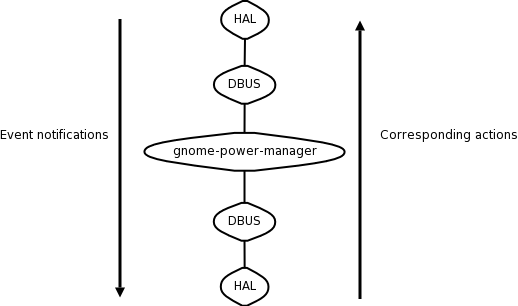
dbus has had the at_console policy patched to check that the user is at the foreground console. This requires libpam-foreground to be part of the default pam session. This is the case as of current dapper.
This way only the 'active' user can do power management stuff but it doesn't address the issue of preventing certain users from messing with power settings. However we believe this is an acceptable situation for the first pass (the best you could do is prevent any power management stuff from occuring when a certain user is logged in).
Future work
- Find a less bad way of expressing the relationship between computer sleep and display sleep.
- Find a less confusing way of allowing lockdown of non-admin accounts.
- Allow configuration of UPS devices.
RichardHughes: g-p-m already detects UPS's using HAL. At the moment only APC UPS's are supported, but it's pretty trivial to convert a NUT plugin to a HAL addon for other makes. g-p-m treats them like external batteries, doing the usual (hibernate/shutdown etc) when they get critical, with warnings when they get low. What else would you want to configure, other than the time before shutting down?
Outstanding issues
- How do we cater for the part of Candice's use case where she wants to configure what happens while nobody is logged in?
RichardHughes: I was proposing using the root user preferences, i.e. safe defaults.
Proposals outside of the specification's remit
NicolòChieffo: a way to switch between different power configurations (for laptops) should be a good feature too. Last month I made a simple script using zenity, to support this (it's called power4gear because my laptop has a hotkey called power4gear). to let you know what I'm talking about I'll give you the link (there is also a screenshot in the .tar.gz). Let me know
PowerManagementConfiguration (last edited 2008-08-06 16:31:02 by localhost)