AppleMagicTrackpad
|
Size: 2643
Comment: Added picture to Wikimedia commons, then resized and added here
|
Size: 2816
Comment: Added link to pairing howto for 10.04 LTS
|
| Deletions are marked like this. | Additions are marked like this. |
| Line 55: | Line 55: |
* [[http://excession.org.uk/blog/apple-magic-trackpad-and-ubuntu-lucid.html|Apple Magic Trackpad and Ubuntu Lucid]] - How to pair the Magic Trackpad in Ubuntu 10.04 LTS |

The Magic Trackpad is a multi-touch trackpad produced by Apple Inc.
It can be used as a single-touch device in Ubuntu by pairing it using the Bluetooth utilities in Ubuntu. The following setup instructions only need to be followed once, then Ubuntu will recognize the Magic Trackpad without further configuration.
Note: This has been tested in Ubuntu Maverick (10.10) only.
Multitouch status
Here is example output for lsinput with a Magic Trackpad present (other irrelevant input device removed):
$ sudo lsinput

/dev/input/event7
   bustype : BUS_BLUETOOTH
   vendor  : 0x5ac
   product : 0x30e
   version : 352
   name    : "Apple Wireless Trackpad"
   phys    : "00:0F:3D:3D:7C:5C"
   uniq    : "D8:A2:5E:F6:BE:08"
   bits ev : EV_SYN EV_KEY EV_REL EV_MSC
In this case the input device would be /dev/input/event7. The input device number would be 7.
For more information on testing this device for multi-touch support, see Multitouch/Testing.
Pairing the Magic Trackpad
Once you have inserted batteries in your Magic Trackpad, if your system is Bluetooth-capable and its radio is enabled, you will see a dialog box asking for a PIN number to pair it:
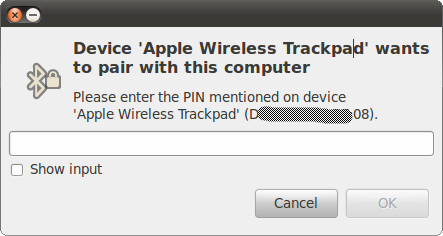
Such pairing can be forced by pressing and holding the button at the top-right side of the tablet.
You need to provide 0000 as the PIN code and press Enter to pair the trackpad. Once this has been done you need to permanently authorize this device to pair with your system. You can do so by going to the Bluetooth applet and choosing Apple Wireless Trackpad > Connect:
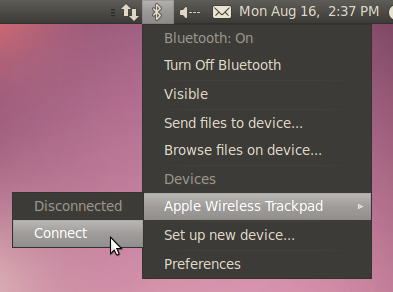
You will then be asked to confirm authorization to connect from this device. Make sure the "Always grant access" checkbox is ticked and click on Grant:
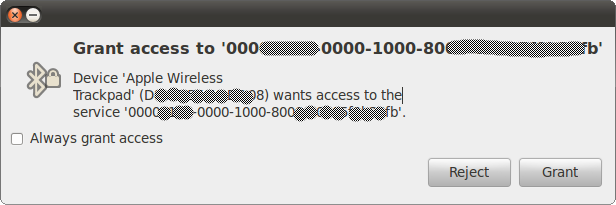
Once these steps have been completed the trackpad will remain available in Ubuntu.
Known issues
Related links
Multitouch - Ubuntu community documentation
http://en.wikipedia.org/wiki/Magic_Trackpad - Wikipedia entry
http://www.apple.com/magictrackpad/ - Apple product page
Apple Magic Trackpad and Ubuntu Lucid - How to pair the Magic Trackpad in Ubuntu 10.04 LTS
Multitouch/AppleMagicTrackpad (last edited 2013-10-21 16:13:22 by host86-136-125-87)