MouseAndTouchpad
|
Size: 147
Comment: draft mockups
|
Size: 2523
Comment: - old wireframe
|
| Deletions are marked like this. | Additions are marked like this. |
| Line 1: | Line 1: |
| ## page was renamed from TouchpadSettings This is a specification covering settings, notifications, and other UI for mice and touchpads (sometimes called trackpads). == Prompting to set up a mouse or touchpad == {{attachment:no-mouse-touchpad.png}} Whenever no pointing device is detected, the “Mouse & Touchpad” screen of System Settings should open with the text “No mouse or touchpad detected”. The following text should depend on the situation. * On a pocket PC: “You need to use a Bluetooth mouse or touchpad with this display. Make sure it is close to the phone and its batteries are charged.” * On a PC: “Connect a mouse or touchpad via USB, or use a Bluetooth device. If a Bluetooth device isn’t detected, make sure it is turned on and its batteries are charged.” As long as the screen is open, Bluetooth should be turned on to detect a Bluetooth keyboard. If it was off previously, it should turn off again if you exit the screen without connecting a device. Ubuntu should open the “Mouse & Touchpad” screen of System Settings, to display this prompt, if all of these are true: * you are using a PC, or a pocket PC with a non-touch external display in use; * no pointing device has been detected; * a keyboard ''has'' been detected (so Ubuntu is not [[Keyboard#prompting|prompting you to connect a keyboard]] instead); * System Settings is not already the active app; * System Settings “Bluetooth” or “Mouse & Touchpad” screen is not already open. <<Anchor(settings)>> == “Mouse & Touchpad” settings == ||<^ style="border:none">{{attachment:settings-mouse-touchpad-both.wide.png}}||<^ style="border:none">{{attachment:settings-mouse-touchpad-both.narrow.png}}|| '''“Set Up Bluetooth Mouse/Touchpad…”''' should navigate to the Bluetooth settings. * “Primary button” should be present only if the number of buttons is either unknown or at least two. In the “Touchpad” settings: * “Tap to click” should be present only if the touchpad has a tappable pad. * “Scroll with two fingers” should be present only if the touchpad allows this. ''TBD: Add scroll direction as a common setting.'' ''TBD: Split Mouse vs. Touchpad settings to separate screens on the phone.'' ||<tablestyle="clear:both" style="border:none">|| == Advanced touchpad settings == |
|
| Line 5: | Line 47: |
| {{attachment:touchpad-settings-p3.jpg}} | {{attachment:touchpad-settings-p4.jpg}} |
This is a specification covering settings, notifications, and other UI for mice and touchpads (sometimes called trackpads).
Prompting to set up a mouse or touchpad
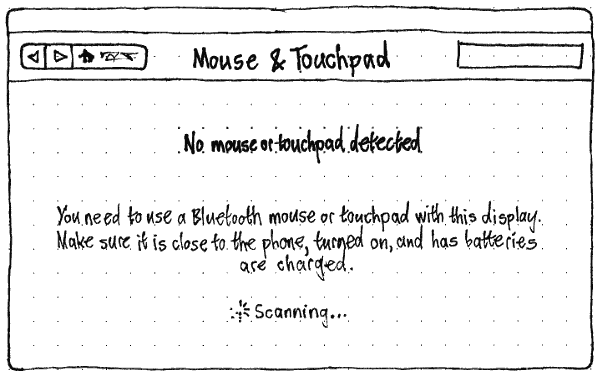
Whenever no pointing device is detected, the “Mouse & Touchpad” screen of System Settings should open with the text “No mouse or touchpad detected”. The following text should depend on the situation.
- On a pocket PC: “You need to use a Bluetooth mouse or touchpad with this display. Make sure it is close to the phone and its batteries are charged.”
- On a PC: “Connect a mouse or touchpad via USB, or use a Bluetooth device. If a Bluetooth device isn’t detected, make sure it is turned on and its batteries are charged.”
As long as the screen is open, Bluetooth should be turned on to detect a Bluetooth keyboard. If it was off previously, it should turn off again if you exit the screen without connecting a device.
Ubuntu should open the “Mouse & Touchpad” screen of System Settings, to display this prompt, if all of these are true:
- you are using a PC, or a pocket PC with a non-touch external display in use;
- no pointing device has been detected;
a keyboard has been detected (so Ubuntu is not prompting you to connect a keyboard instead);
- System Settings is not already the active app;
System Settings “Bluetooth” or “Mouse & Touchpad” screen is not already open.
“Mouse & Touchpad” settings
|
|
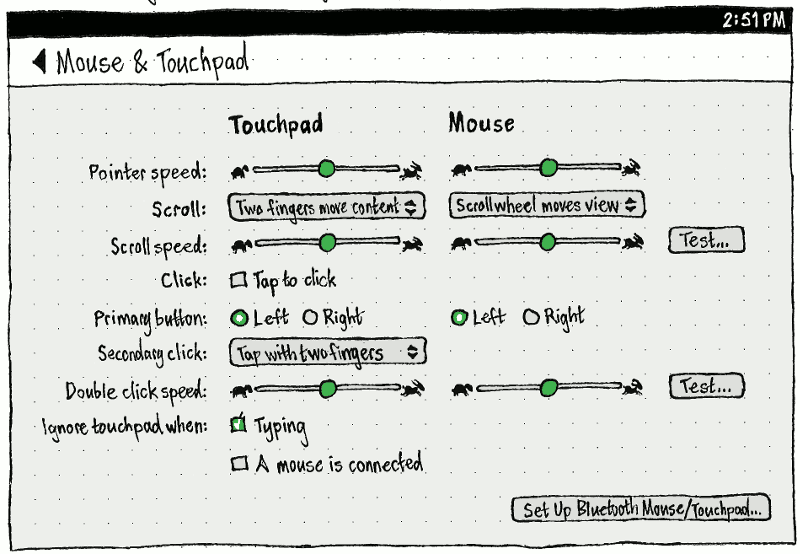
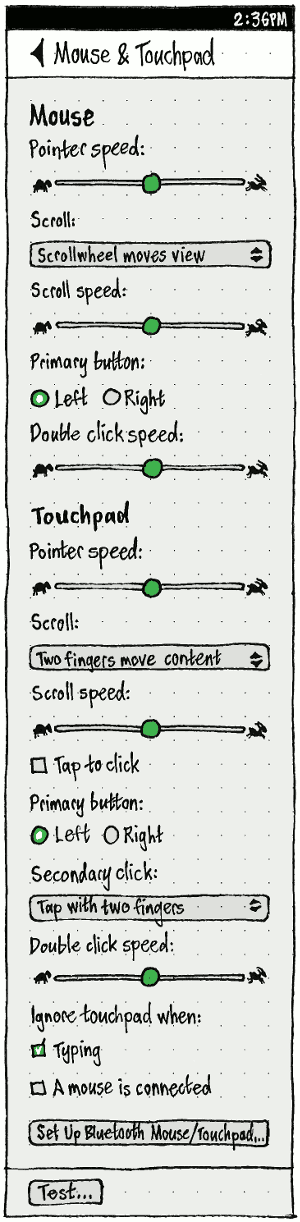
“Set Up Bluetooth Mouse/Touchpad…” should navigate to the Bluetooth settings.
- “Primary button” should be present only if the number of buttons is either unknown or at least two.
In the “Touchpad” settings:
- “Tap to click” should be present only if the touchpad has a tappable pad.
- “Scroll with two fingers” should be present only if the touchpad allows this.
TBD: Add scroll direction as a common setting.
TBD: Split Mouse vs. Touchpad settings to separate screens on the phone.
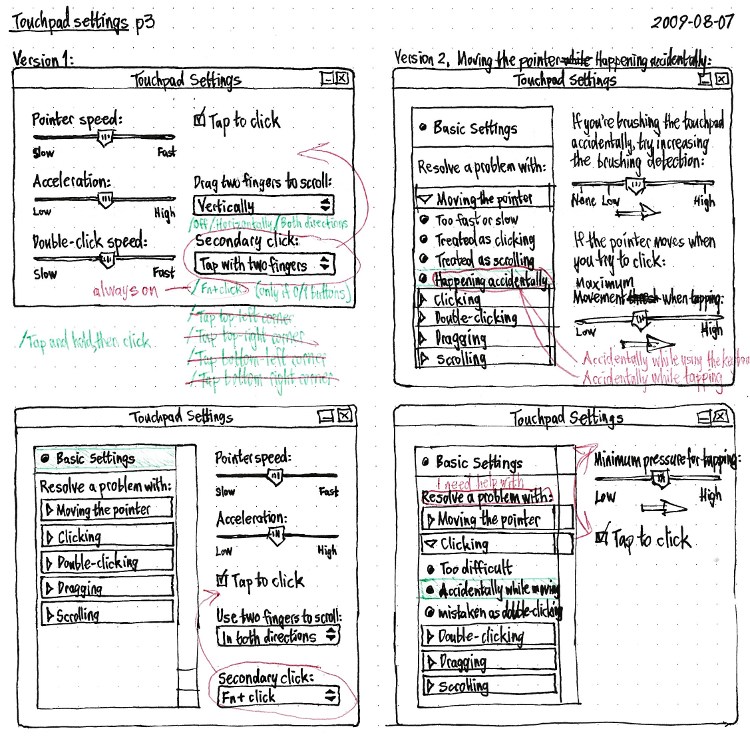
Advanced touchpad settings
These are unfinished draft designs. Do not implement.

MouseAndTouchpad (last edited 2016-10-13 14:18:47 by mpt)