LittleDetails
It is important that Ubuntu is polished up to the little details. You are encouraged to add more cases or improve existent ones!
Some cases that can be improved
Applications menu
- Highlight recently installed applications
Places menu
Bookmarks
Before:

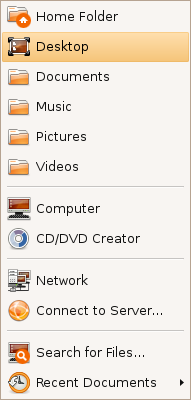
After:
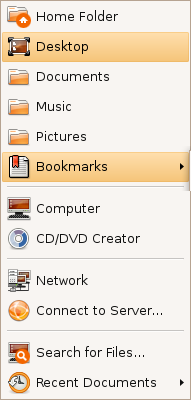
This menu shows now the 3 most used bookmarks and hides the rest under a submenu (instead of hiding all of them).
Shutdown/log out icon
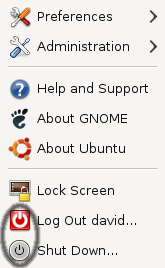

This is with the default Human theme on Intrepid. It should either stick with the red power off logo, or the grey one.
CD/DVD Creator
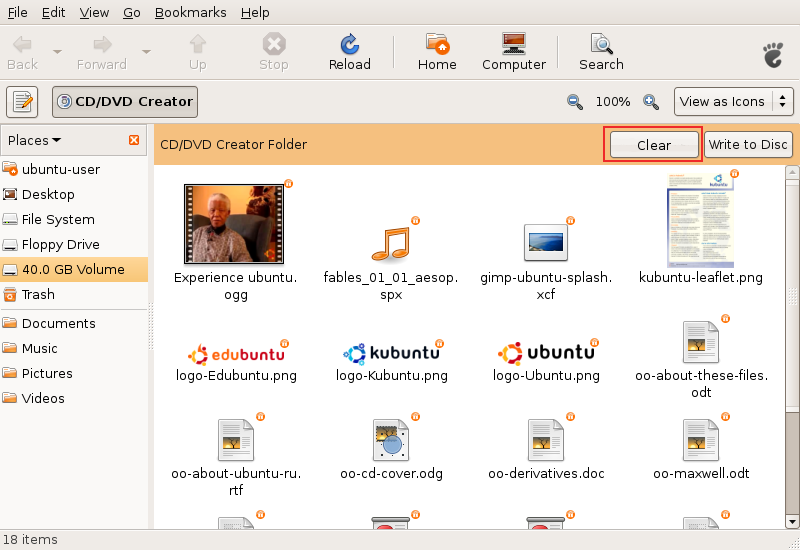
Added the "Clear" button. There should be also a message instructing the user and maybe a progress bar with the space occupied.
Response: Good idea! I started work on this: http://bugzilla.gnome.org/show_bug.cgi?id=520414
- Does it still make sense, as Brasero is used for burning?
Same icons in all places
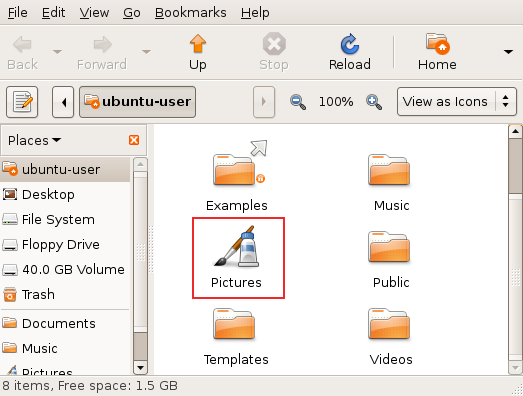
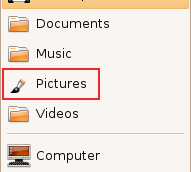
When the user changes the default icon of a folder (like shown in the first image), this change should be reflected under the Places menu (like shown in the second image). This behaviour is now inexistent.
F-Spot
F-Spot, the default photo application, lacks caching when watching photos. It would be nice if the next image would appear instantly, without redrawing, just like in gqview.
It is important, as users use cameras that produce very large (8 or 10MP) images.
Window list
Minimized windows use square brackets that looks ugly and reminds of the DOS era.
"[Title]" could simply become "Title", pleasing the eye and making the list more readable.
Gtk+ ComboBox has a big blank area above the position of its control
Gedit
- Gedit has unnecessary gap at the right edge prevents scroll bar from appearing at the right place. To click on the scroll bar- after moving the pointer all the way to the right side of the screen, the user must pull the mouse back to the left 2 pixels (instead of using Fitt's law to perform the action easily).
Nautilus
Easy unmounting
If user mounts usb device, it is important to unmount it to save data properly.
Additional bar in the Nautilus window displaying device's content would allow user to remember about it and perform the action easily.
Usable pathbar
Currently pathbar is hard to use with long folder names, e.g. parent folder button isn't displayed in such case. It would be easy to fix with using some "..."s to shorten long names.
Intelligent trash-bin
- Add an option to auto-purge elements older than X days
- Allow restoration of individual items or the entire trash bin to the locations they were in before they were moved to the trash
Context-sensitive emblems
- Nautilus should auto-detect the most common type of files inside a folder and attach an emblem accordingly (this feature is available in Konqueror)
Non-intuitive term "Move to trash"
An user doesn't want to move a file/folder, but to delete it (the fact that there's an undo - a trash, shouldn't change the terminology). The term "move" misses what user wants to do.
Simple "Delete" would be much easier to spot, especially when the menu has many items (there are >10 in mine). It would be simpler and shorter.
When user enables permanent deleting in preferences, the term could be "Delete permanently".
It was already mentioned in the forums (usability task "Search sample document from a specific option, delete and then restore it.").
Recent documents
Currently, recent documents in the Places menu are hard to reach. The list gets polluted very easily with unimportant files. It can be solved with creating "Recent documents" applet with pinning capability (just like in Tomboy or Microsoft Office 2007).
Misc
- When opening a file for which only root has write permissions, the user should be prompted for the password to enable writing to it. The user would of course have the option to supply no password, in which case the file will remain read-only. Similarly, if only root has read permissions, the user is notified and offered a password prompt to allow them to read the file.