LittleDetails
|
Size: 8671
Comment:
|
Size: 8906
Comment:
|
| Deletions are marked like this. | Additions are marked like this. |
| Line 179: | Line 179: |
| The clock applet can't be easily configured to use a 12 hour format, it is only available for some country's, most users are used to 12 hour format. Before {{attachment:clock24hour.png}} After {{attachment:clock12hour.png}} |
It is important that Ubuntu is polished up to the little details. You are encouraged to add more cases or improve existent ones!
Some cases that can be improved
Applications menu
- Highlight recently installed applications
- But only for the current session /dael99
Places menu
Quick Unmount
There should be an indicator attached to the main Places menu, to quickly unmount a drive.
Before:

After:

This is very useful and native for migrated MS Windows users.
Bookmarks
Before:

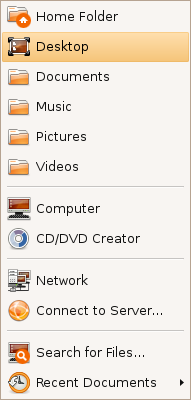
After:
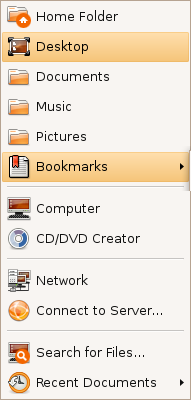
This menu shows now the 3 most used bookmarks and hides the rest under a submenu (instead of hiding all of them).
Shutdown/log out icon
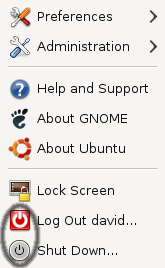

This is with the default Human theme on Intrepid. It should either stick with the red power off logo, or the grey one.
In the User Switcher Applet
The current user-switcher/shutdown applet shows the gnome-logout or gnome-session-logout or system-logout or maybe the gtk-exit icon. It should show the system-shutdown icon to be more consistent with the 4 main actions (Suspend, Hibernate, Restart, Shutdown)


CD/DVD Creator
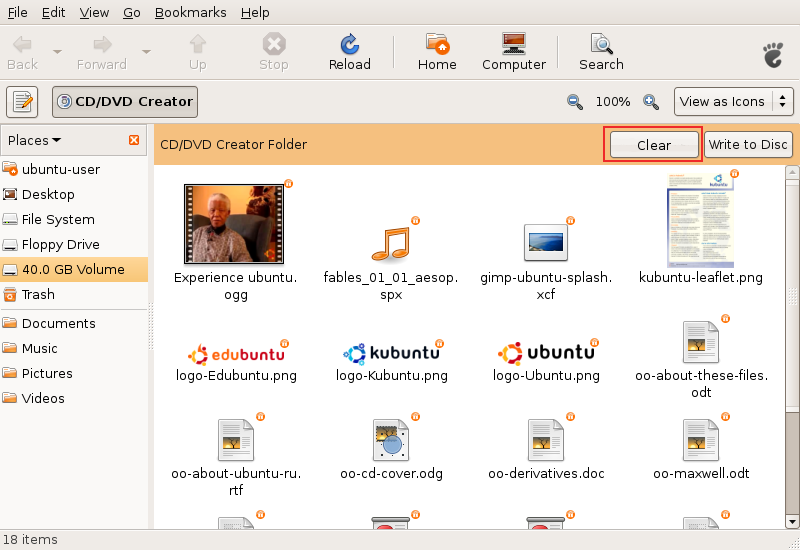
Added the "Clear" button. There should be also a message instructing the user and maybe a progress bar with the space occupied.
Response: Good idea! I started work on this: http://bugzilla.gnome.org/show_bug.cgi?id=520414
- Does it still make sense, as Brasero is used for burning?
Same icons in all places
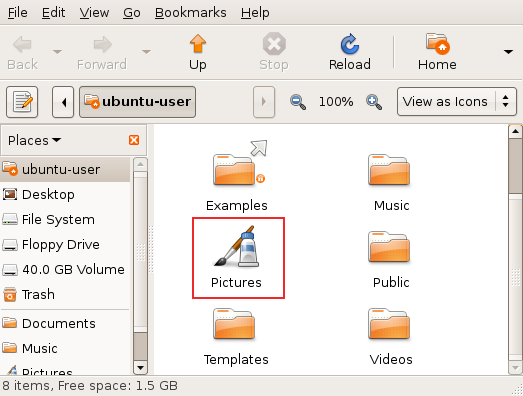
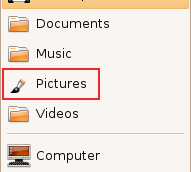
When the user changes the default icon of a folder (like shown in the first image), this change should be reflected under the Places menu (like shown in the second image). This behaviour is now inexistent.
F-Spot
F-Spot, the default photo application, lacks caching when watching photos. It would be nice if the next image would appear instantly, without redrawing, just like in gqview.
It is important, as users use cameras that produce very large (8 or 10MP) images.
Window list
Minimized windows use square brackets that looks ugly and reminds of the DOS era.
"[Title]" could simply become "Title", pleasing the eye and making the list more readable.
Gtk+ ComboBox has a big blank area above the position of its control
Gedit
- Gedit has unnecessary gap at the right edge prevents scroll bar from appearing at the right place. To click on the scroll bar- after moving the pointer all the way to the right side of the screen, the user must pull the mouse back to the left 2 pixels (instead of using Fitt's law to perform the action easily).
Nautilus
Easy unmounting
If user mounts usb device, it is important to unmount it to save data properly.
Additional bar in the Nautilus window displaying device's content would allow user to remember about it and perform the action easily.
Usable pathbar
Currently pathbar is hard to use with long folder names, e.g. parent folder button isn't displayed in such case. It would be easy to fix with using some "..."s to shorten long names.
Intelligent trash-bin
- Add an option to auto-purge elements older than X days
- Allow restoration of individual items or the entire trash bin to the locations they were in before they were moved to the trash
Context-sensitive emblems
- Nautilus should auto-detect the most common type of files inside a folder and attach an emblem accordingly (this feature is available in Konqueror)
- There's shold be context menu item to add emblems to a file, instead of going to the properties page. Tis will be very useful when we migrate to Zeitgeist/Mayanna.
Non-intuitive term "Move to trash"
An user doesn't want to move a file/folder, but to delete it (the fact that there's an undo - a trash, shouldn't change the terminology). The term "move" misses what user wants to do.
Simple "Delete" would be much easier to spot, especially when the menu has many items (there are >10 in mine). It would be simpler and shorter.
When user enables permanent deleting in preferences, the term could be "Delete permanently".
It was already mentioned in the forums (usability task "Search sample document from a specific option, delete and then restore it.").
Media Folders
Add and option to play the content of the folder (or the selected items) in the default media player or play a slide-show if images are selected.
Current: 
Media added: 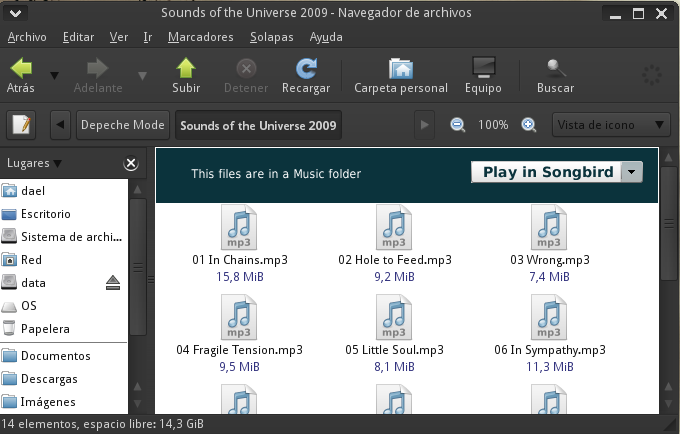
The drop-down list should show other players, showing first the default player.
Also, there should be an option to set the folder (and maybe it's subfolders) as Music, Video or Images folder. As it can be imagined, currently we have 3 media folders by default. Implementing this shouldn't be so hard.
Recent documents
Currently, recent documents in the Places menu are hard to reach. The list gets polluted very easily with unimportant files. It can be solved with creating "Recent documents" applet with pinning capability (just like in Tomboy or Microsoft Office 2007).
Scale Command
Currently, we can show all the working windows in the desktop trough the scale plugin of Compiz. It would be nice to have a "Scale" trigger next to the "Show Desktop" applet. Also, it should detect when there is only one app runnig, so it gets auto-desactivated. Also, it would look nicer if it looks like as the "Show Desktop" applet.
Python code (from Greg Till, GPL):
#!/usr/bin/env python
import os
def main():
- scale=os.popen('dbus-send --type=method_call ' + '--dest=org.freedesktop.compiz ' + '/org/freedesktop/compiz/scale/allscreens/initiate_key ' + ' org.freedesktop.compiz.activate string:\'root\' ' +
'int32:xwininfo -root | grep id: | awk \'{ print $4 }\'')
if name == 'main':
- main()
Calendar/Clock Applet
The curent clock/calendar applet is not very useful; we can view events and task but we need to open Evolution to modify them or simple add a new event. Also, it's very ugly.
Short time: Add contextual menus to the calendar to allow us to add, edit or remove an event, interaction trough a pop-up that ask for the less details as it could ask (name, date, description and a tag). The same for the tasklist. Also, the calendar should show the icons of the events and show the next 5 days events.
Current: 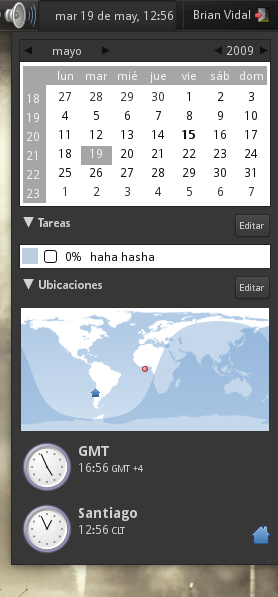
Maybe long time: Completey renew the applet. It could be based on the weather+the clock/calendar+hamster applets
Mockup: 
In the top is the weather, the day, the next 3 days weather. In the middle the calendar with full enhancements, the events and the to-do list. In the bottom, is the hamster-applet like time manager, tracking the time we expend doing some task.
The clock applet can't be easily configured to use a 12 hour format, it is only available for some country's, most users are used to 12 hour format.
Before 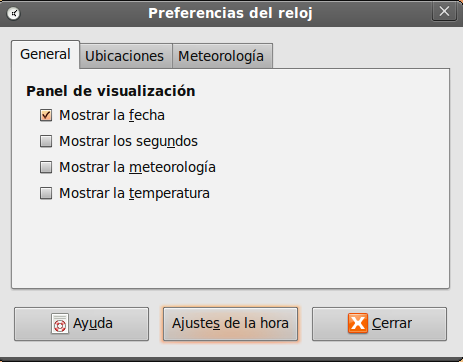
After 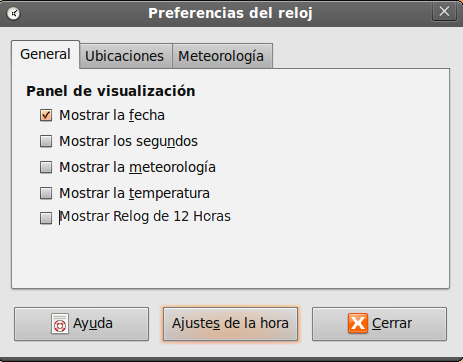
Misc
- When opening a file for which only root has write permissions, the user should be prompted for the password to enable writing to it. The user would of course have the option to supply no password, in which case the file will remain read-only. Similarly, if only root has read permissions, the user is notified and offered a password prompt to allow them to read the file.
- When unmounting an external hard drive Ubuntu should also eject it. It would bring us to MacOS parity. Currently when I unmount my 320 GB external drive it keeps spinning until I pull the USB plug manually and then it suddenly stops which makes me feel I did something wrong. In order to avoid this, I have to go to console and eject the drive.
LittleDetails (last edited 2012-01-23 08:00:25 by 230-55-139-94)