AcerTravelmate4150LMi
- Contact: ["Dhenry"]
- Make: Acer
Brand: TravelMate
- Model: 4150LMI
Website: http://global.acer.com/products/notebook/tm4100.htm
- S/N: ?
[http://tuxmobile.org http://tuxmobil.org/pics/tuxmobil_sticker.png]

Pictures
[http://tfc.duke.free.fr/screens/hardware/AcerTM4150LMi.jpg http://tfc.duke.free.fr/screens/hardware/AcerTM4150LMi-small.jpg]
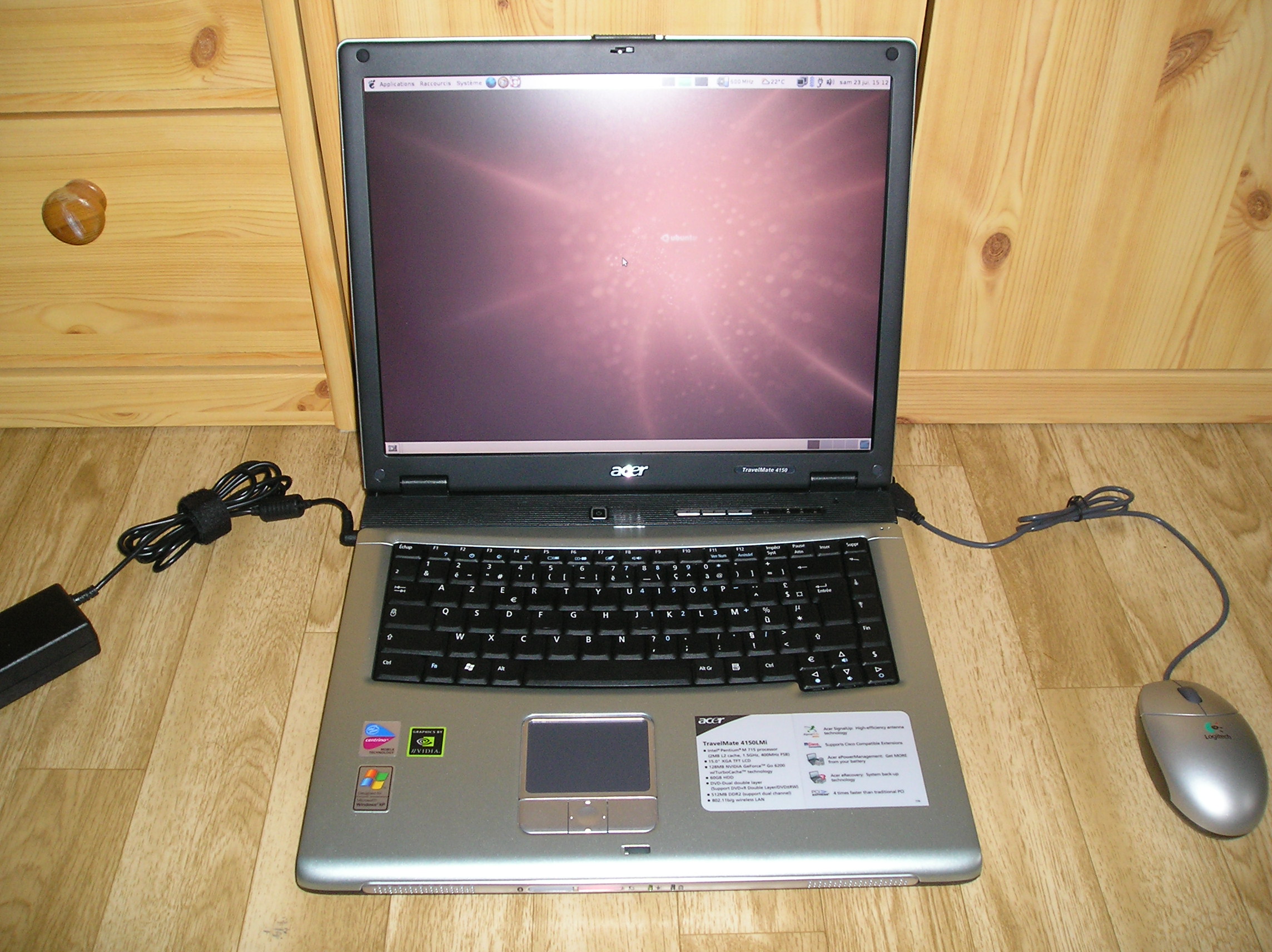

Hardware Specifications
- Intel Pentium M 715 (1.5 Ghz, 2 MB Cache)
- 512 MB Memory
- 15" XGA TFT Screen (1024x768)
- 60 GB PATA Hard Drive on Intel 82801FBM (ICH6) SATA Controller
Intel 915GM graphic controller OR NVIDIA GeForce Go 6200 (TurboCache) with 128 MB shared memory
- DVD/DVD-RW Drive
- 56K Modem ITU V.92
- LAN: Broadcom BCM4401-B0
- WLAN: Intel PRO/Intel 2200BG (802.11b/g)
- PCMCIA
- Bluetooth (not in all models!)
- IEEE-1394
- MS/MS PRO/MMC/SD/SM/xD-Picture Card reader (6 in 1)
- Audio: AC'97
Current Issues
Installing Breezy
The TM4150 has IDE drives (DVD and HDD) on an Intel ICH6 SATA Controller, which can work in combined mode (IDE and SATA). This caused a lot of troubles for installing Ubuntu Hoary and Breezy on it, because the DVD drive wasn't recognized (neither Live CD not Install CD did work). The solution was to install Warty and then upgrade to Breezy.
Also, DMA on both DVD and HDD drives couldn't be enabled because the kernel was using the generic IDE driver. The kernel had to be patched and rebuild in order to get DMA working. There were two solutions, see [http://www.linuxquestions.org/questions/showthread.php?s=&postid=1756151 this thread] on linuxquestions.org about that if you are interested.
I haven't been able to boot on Breezy's 2.6.12 kernel (problem with pivot root...), so I stuck with Hoary's 2.6.10 patched kernel (I haven't got the time to find an issue).
These problems have been solved in Dapper!
Installing Dapper/Edgy/Feisty
Steps to install Dapper, Edgy or Feisty on this laptop:
- Insert the install CD, boot on it;
- Install the system, reboot at the end of the installation process;
- Enjoy!
Don't need to pass any extra parameter to kernel for installation. All goes fine.
HDD and DVD drives
|
HDD |
DVD |
Breezy |
/dev/hdc |
/dev/hdd |
Dapper |
/dev/sda |
/dev/scd0 |
Edgy |
/dev/sda |
/dev/scd0 |
Feisty |
/dev/sda |
/dev/scd0 |
Hardware details
|
in Breezy? |
in Dapper? |
in Edgy? |
in Feisty? |
|
Installation works? |
No |
Yes |
Untested |
Yes |
|
Hardware Information |
|||||
Device |
Works? |
Bug # |
|||
in Breezy? |
in Dapper? |
in Edgy? |
in Feisty? |
||
Screen & Monitors (Intel 915GM) |
|||||
Screen |
Untested |
Yes |
Yes |
Yes |
|
Correct resolution? |
Untested |
Yes, at 1024x768 |
Yes, at 1024x768 |
Yes, at 1024x768 |
|
Correct refresh rate? |
Untested |
Yes, at 60 Hz |
Yes, at 60 Hz |
Yes, at 60 Hz |
|
3D Acceleration |
Untested |
Yes |
Yes |
Yes |
|
External monitor works? |
Untested |
Yes |
Untested |
Untested |
|
External monitor - mirrors |
Untested |
Untested |
Untested |
Untested |
|
External monitor - extend desktop |
Untested |
Untested |
Untested |
Untested |
|
TV Out |
Untested |
Untested |
Yes |
Untested |
|
Screen & Monitors (nVidia GeForce Go 6200) |
|||||
Screen |
Yes (nv and nvidia) |
Untested |
Untested |
Untested |
|
Correct resolution? |
Yes, at 1024x768 |
Untested |
Untested |
Untested |
|
Correct refresh rate? |
Yes, at 60 Hz |
Untested |
Untested |
Untested |
|
3D Acceleration |
Yes, with nvidia |
Untested |
Untested |
Untested |
|
External monitor works? |
Untested |
Untested |
Untested |
Untested |
|
External monitor - mirrors |
Untested |
Untested |
Untested |
Untested |
|
External monitor - extend desktop |
Untested |
Untested |
Untested |
Untested |
|
TV Out |
Yes |
Untested |
Untested |
Untested |
|
Power Management |
|||||
Battery detected? |
Untested |
Yes |
Yes |
Yes |
|
Hibernates? |
Untested |
Yes |
Yes |
Yes |
|
Sleep |
Untested |
Yes but partially broken |
Yes |
Yes |
|
Dim monitor on battery |
Untested |
Yes |
Yes |
Untested |
|
Blank monitor on inactivity |
Yes |
Yes |
Yes |
Untested |
|
Lid Close |
Untested |
Yes |
Yes |
Yes |
|
Cpu frequency scaling |
Yes |
Yes |
Yes |
Yes |
|
Sound |
|||||
Sound works? |
Yes |
Yes |
Yes |
Yes |
|
Correct volume? |
Yes |
Yes |
Yes |
Yes |
|
Hardware volume switch |
Yes |
Yes |
Yes |
Untested |
|
Headphone jack |
Yes |
Yes |
Yes |
Yes |
|
Mic jack |
Yes |
Yes |
Yes |
Untested |
|
Networking |
|||||
Wired NIC |
Yes |
Yes |
Yes |
Yes |
|
Wireless NIC |
Yes |
Yes |
Yes |
Yes |
|
PCMCIA NIC |
Untested |
Untested |
Untested |
Untested |
|
Firewire |
Untested |
Untested |
Untested |
Untested |
|
Modem |
Untested |
Untested |
Untested |
Untested |
|
Infrared |
Untested |
Untested |
No |
No |
|
Touchpad & Mice |
|||||
Touchpad |
Yes |
Yes |
Yes |
Yes |
|
Touchpad - Doubletap = double click |
Yes |
Yes |
Yes |
Yes |
|
Touchpad - Scroll down side |
Yes |
Yes |
Yes |
Yes |
|
External mouse - USB |
Yes |
Yes |
Yes |
Yes |
|
Additional Hardware |
|||||
CD/DVD drive |
Yes |
Yes |
Yes |
Yes |
|
PCMCIA cards |
Untested |
Untested |
Yes |
Yes |
|
Card reader(s) |
Untested |
Untested* |
Untested* |
No* |
|
Function and other keys |
|||||||
Fn key |
Operation |
Keycode |
Works? |
Bug # |
|||
in Breezy? |
in Dapper? |
in Edgy? |
in Feisty? |
||||
+ F1 |
Help |
|
No |
No |
No |
Untested |
|
+ F2 |
Acer eSettings |
|
No |
No |
No |
Untested |
|
+ F3 |
Acer ePower Management |
|
No |
No |
No |
Untested |
|
+ F4 |
Sleep |
|
Untested |
Yes |
Yes |
Yes |
|
+ F5 |
Toggle External Monitor |
|
Untested |
Yes |
Untested |
Untested |
|
+ F6 |
LCD On/Off |
|
Yes |
Yes |
Yes |
Yes |
|
+ F7 |
Toggle Touchpad |
|
Yes |
Yes |
Yes |
Yes |
|
+ F8 |
Mute |
|
Yes |
Yes |
Yes |
Yes |
|
+ F11 |
Num Lock |
|
Yes |
Yes |
Yes |
Yes |
|
+ F12 |
Scroll Lock |
|
Untested |
Untested |
Untested |
Untested |
|
+ DOWN |
Volume - |
|
Yes |
Yes |
Yes |
Yes |
|
+ UP |
Volume + |
|
Yes |
Yes |
Yes |
Yes |
|
+ LEFT |
LCD Brightness Down |
|
Yes |
Yes |
Yes |
Yes |
|
+ RIGHT |
LCD Brightness Up |
|
Yes |
Yes |
Yes |
Yes |
|
+ . |
Numpad . |
|
Yes |
Yes |
Yes |
Yes |
|
+ M |
Numpad 0 |
|
Yes |
Yes |
Yes |
Yes |
|
+ J |
Numpad 1 |
|
Yes |
Yes |
Yes |
Yes |
|
+ K |
Numpad 2 |
|
Yes |
Yes |
Yes |
Yes |
|
+ L |
Numpad 3 |
|
Yes |
Yes |
Yes |
Yes |
|
+ U |
Numpad 4 |
|
Yes |
Yes |
Yes |
Yes |
|
+ I |
Numpad 5 |
|
Yes |
Yes |
Yes |
Yes |
|
+ O |
Numpad 6 |
|
Yes |
Yes |
Yes |
Yes |
|
+ 7 |
Numpad 7 |
|
Yes |
Yes |
Yes |
Yes |
|
+ 8 |
Numpad 8 |
|
Yes |
Yes |
Yes |
Yes |
|
+ 9 |
Numpad 8 |
|
Yes |
Yes |
Yes |
Yes |
|
+ ; |
Numpad + |
|
Yes |
Yes |
Yes |
Yes |
|
+ P |
Numpad - |
|
Yes |
Yes |
Yes |
Yes |
|
+ 0 |
Numpad * |
|
Yes |
Yes |
Yes |
Yes |
|
+ / |
Numpad / |
|
Yes |
Yes |
Yes |
Yes |
|
+ Return |
Numpad Enter |
|
Yes |
Yes |
Yes |
Yes |
|
Other special keys |
|||||||
Key |
Operation |
Keycode |
Works? |
Bug # |
|||
in Breezy? |
in Dapper? |
in Edgy? |
in Feisty? |
||||
Acer eManager |
Acer eManager (user programmable) |
|
No |
No |
No |
Untested |
|
Launch email client (user programmable) |
|
No |
No |
No |
Untested |
|
|
Browser |
Launch Web Browser (user programmable) |
|
No |
No |
No |
Untested |
|
P |
User Programmable Key |
|
No |
No |
No |
Untested |
|
Notes
Sleep and Hibernate
The machine enters sleep mode correctly but has some troubles to wake up (seems fixed in Edgy). User has to switch screen (Fn+F5) in order to get the screen back [intel 915GM]. Also sometimes the computer fails to wake up (too often for an everyday use of the sleep mode).
Hibernate seems to work fine. Just add resume=/dev/sdaX in your grub config where sdaX is your swap partition, like that:
title           Ubuntu, kernel 2.6.15-21-386
root            (hd0,6)
kernel          /boot/vmlinuz-2.6.15-21-386 root=/dev/sda7 ro quiet splash resume=/dev/sda6
initrd          /boot/initrd.img-2.6.15-21-386
savedefault
boot
Card reader
SD under Feisty does not work. No other cards tested. dmesg does not show any hotplug event. Therefore I assume, there is no cardreader kernel module available.
The card reader can take xD-Picture, MS, MS PRO, MMC, SD and SM cards. The xD-Picture card is not supported (and will probably not be supported for some time, since it's a proprietary format). Other cards haven't been tested.