HelpfulHelp
|
Size: 14778
Comment: more details and external references
|
← Revision 28 as of 2008-08-06 16:16:34 ⇥
Size: 15604
Comment: converted to 1.6 markup
|
| Deletions are marked like this. | Additions are marked like this. |
| Line 3: | Line 3: |
| * Created: [[Date(2005-04-27T09:55:24Z)]] by MartinPool * Priority: NeedsPriority * People: MartinPoolLead, MatthewPaulThomasSecond * Contributors: * Interested: GregTaylor * Status: BrainDump * Packages: scrollkeeper, ubuntu-docs, yelp * Dependents: [[FullSearch(HelpfulHelp)]] * UduSessions: none |
* '''Launchpad entry:''' https://launchpad.net/distros/ubuntu/+spec/helpful-help * '''Created:''' <<Date(2005-04-27T09:55:24Z)>> by MartinPool * '''Contributors:''' MartinPool, MatthewPaulThomas, JeffWaugh * Packages affected: scrollkeeper, ubuntu-docs, yelp |
| Line 16: | Line 10: |
| Ubuntu offers vast opportunities for improvement in the quality, targeting, and presentation of its help and documentation. For Breezy, code effort should concentrate on adding search and print functions to the help viewer, and writing effort should concentrate on help.ubuntu.com and local help for Ubuntu in general. After Breezy, code effort should go into making help presentation faster and more compact, and writing effort should go into pushing properly-written help to upstream applications. | Ubuntu offers vast opportunities for improvement in the quality, targeting, and presentation of its help and documentation. For Breezy, code effort should concentrate on adding search and print functions to the help viewer, and writing effort should concentrate on help.ubuntu.com and local help for Ubuntu in general. After Breezy, code effort should go into making help presentation more compact and integrated, and writing effort should go into pushing properly-written help upstream. This informational spec has been split into a number of smaller implementation chunks: * EmbeddedHelp: Encouraging upstream to put useful documentationalistic (!) hints directly in their software. * ImprovingYelp: Iterative improvements to the GNOME help browser. * LinkingDesktopToOnlineHelp: Building a useful relationship between help available within the distro and on the web. * TopicBasedHelp: Splitting help pages into small useful chunks. * ExistingDocumentation: We have a huge amount of documentation we're not exposing to users very well, so we need to fix that. |
| Line 20: | Line 22: |
| Ubuntu is about humanity, and part of humanity is doing our best to help people who are having trouble. Providing useful help makes life easier for people MigratingToUbuntu, helping increase market share. And help that integrates well with external support services could also increase revenue for distributors of Ubuntu and derivative operating systems. | Ubuntu is about humanity, and part of humanity is helping people who have lost their way. Providing useful help makes life easier for people MigratingToUbuntu, helping to increase market share. And help that integrates well with external support services could also increase revenue for distributors of Ubuntu and derivative operating systems. |
| Line 27: | Line 29: |
| * may not even have Internet access. | * may not have Internet access. |
| Line 30: | Line 32: |
| * already have Ubuntu installed * are usually looking for a quick answer, not a tutorial * do not want to look in multiple places for their answer * do not care about "books", "chapters", "FAQs", "Doc''''''Book", "yelp", or the "Ubuntu Documentation Project" * will often be frustrated or angry, having spent considerable time trying to solve their problem already * will have accessed the [http://g2meyer.com/usablehelp/lastreso.html help as a last resort], with nearby humans not being knowledgable enough, and Google being either unavailable or not focused enough * will be pessimistic about their chances of the help being helpful. |
* are accessing [[http://g2meyer.com/usablehelp/lastreso.html|help as a last resort]], if nearby humans are not knowledgable enough, and Google is either unavailable or not focused enough * are often frustrated, impatient, and [[http://uie.com/articles/documentation/|pessimistic about the usefulness of the help]] * almost always want to [[http://uie.com/articles/online_information/|search for instructions or explanations]], rather than look at tables of contents, tutorials or overviews * will give up if they reach a dead end, even if the answer might be elsewhere * do not care about "books", "chapters", "FAQs", "Doc''''''Book", "yelp", or the "Ubuntu Documentation Project". |
| Line 39: | Line 39: |
| * will probably read it while following the instructions in the program alongside | * will most likely use it successfully if they can read it while carrying out the instructions in the program alongside |
| Line 44: | Line 44: |
| * Niels is installing Ubuntu for the first time, and has no other computers nearby. Fortunately, the colleague who gave him the Ubuntu CD also gave him a printed one-page installation guide. This comes in handy especially while Niels is doing the disk partitioning. After installation, he looks in the "Internet and networking" section of the the Ubuntu Help to find out how to get his dialup connection working. | * Niels is installing Ubuntu for the first time, and has no other computers nearby. Fortunately, the colleague who gave him the Ubuntu CD also printed a copy of the installation guide for him. After installation, Niels looks in the "Internet and networking" section of the Ubuntu Help to find out how to get his dialup connection working. |
| Line 46: | Line 46: |
| * Sandra has successfully imported her holiday photos into gThumb, and now she wants to e-mail three of them to her mother. She trawls through gThumb's menus but fails to find anything to do with e-mail. So she opens gThumb's help function and immediately searches for "mail photographs". There are no matching pages in gThumb's help, but the help viewer returns a result from the general Ubuntu Help about how to e-mail a file to someone (even though this page doesn't use the word "photographs" in its visible text). Following the instructions in this page, Sandra successfully sends the photos, despite the originals being 2 MB each and her mother having a mail quota of 5 MB. | * Sandra has imported her holiday photos into gThumb, and wants to e-mail three of them to her mother. After failing to find this function in the menus, and with no-one nearby to ask, she opens gThumb's help function and searches for "mail photographs". There are no matching pages in gThumb's help, but the help viewer returns a result from the general Ubuntu Help about how to e-mail a file to someone. Following the instructions, Sandra successfully sends the photos. |
| Line 48: | Line 48: |
| * Claude is a Web developer who wants to set up a local Apache server to test his sites. He looks in the help for step-by-step instructions on how to do this. Later, he wants to know how to configure `.htaccess` files; this topic is not covered in the Ubuntu Help, but the help does link to the Apache page on `help.ubuntu.com`, which in turn links to [http://httpd.apache.org/docs/howto/htaccess.html the apache.org page about .htaccess]. | * Claude wants to set up a local Apache server to test Web sites he's developing. He looks in the help for instructions on how to do this. Later, he wants to know how to configure `.htaccess` files; this topic is not covered in the Ubuntu Help, but the help does link to the Apache page on help.ubuntu.com, which in turn links to [[http://httpd.apache.org/docs/howto/htaccess.html|the apache.org page about .htaccess]]. |
| Line 50: | Line 50: |
| * Tukta needs help using Evolution's calendar. She doesn't like reading help on a computer screen, especially since English is her third language and she is used to the Thai translations of help in other software being either non-existent or hopelessly incomplete. So she is glad to find, at the bottom of Evolution's main help page in Ubuntu, a link to contact details for a phone support service. | * Tukta needs help using Evolution's calendar. She doesn't like reading help on a computer screen, especially since English is her third language and she is used to Thai translations of help being either non-existent or incomplete. So she is glad to find, at the bottom of Evolution's main help page in Ubuntu, a link to contact details for a paid phone support service. |
| Line 56: | Line 56: |
| For most people, however, their primary access to help is a program with the unfortunate name "yelp". (In theory that name is never visible, but in practice [http://joelonsoftware.com/articles/LeakyAbstractions.html of course] it is -- in the About box, in the Package Manager, in the System Monitor, and in error messages). By default, a button for accessing help appears on the Gnome panel, but it does not look like a button and people may not realize what it is for. Once people do open the help viewer, its interface is fairly simple (if a bit too large), but [http://mpt.net.nz/archive/2005/04/11/ubuntu#help its categorization and contents are quite unhelpful]. In general, it assumes that you already know (a) what program you want to use and (b) where that program fits in the Gnome taxonomy, neither of which are usually true. Compounding the problem, there is no search function. | For most people, however, their primary access to help is a program with the unfortunate name "yelp". (In theory that name is never visible, but [[http://joelonsoftware.com/articles/LeakyAbstractions.html|in practice]] it is -- in the About box, in the Package Manager, in the System Monitor, and in error messages.) By default, a button for accessing help appears on the Gnome panel, but it does not look like a button and people may not realize what it is for. Once people do open the help viewer, its interface is fairly simple (if a bit too large), but [[http://mpt.net.nz/archive/2005/04/11/ubuntu#help|its categorization and contents are quite unhelpful]]. It assumes that you already know (a) what program you want to use and (b) where that program fits in the Gnome taxonomy, neither of which are usually true. Compounding the problem, there is no search function. |
| Line 58: | Line 58: |
| Most individual programs offer their own help, which is good; but it is usually accessed from a menu item labelled "Contents", which is not obvious. Help is written as a set of "books" with "chapters", often taking the form of a depth-first traversal of the interface, rather than actually offering help on likely tasks. Such reference manuals have their place, but [http://www.useit.com/alertbox/9602.html that place is not on a computer screen]: for example, the screenshots they use are often too large for the help viewer window, and are also [http://64.233.161.104/search?q=cache:Ab7nx7LLa3EJ:www.infomanagementcenter.com/enewsletter/200411/secondary.htm+%22dropped+most+screenshots%22 likely to be confused with the actual interface]. Yelp's interface is also cluttered by the reference manual mindset, with a table of contents and previous/next page links taking up valuable screen space. | Most individual programs offer their own help, which is good; but it is usually hidden in the Help menu as a "Contents" menu item, which is not obvious. Help is written as a set of "books" with "chapters", often taking the form of a depth-first traversal of the interface, rather than actually offering help on likely tasks. Such reference manuals have their place, but that place is [[http://www.useit.com/alertbox/9602.html|in print]], [[http://hcibib.org/tcuid/chap-7.html#7-2|not on a computer screen]]. For example, the screenshots they use are often too large for the help viewer window, and are also [[http://www.google.com/search?q=cache:Ab7nx7LLa3EJ:www.infomanagementcenter.com/enewsletter/200411/secondary.htm+%22even+fairly+sophisticated+users+were+clicking+the+graphic%22|likely to be confused with the actual interface]]. Yelp's interface is also cluttered by the reference manual mindset, with a table of contents and previous/next page links taking up valuable screen space. |
| Line 60: | Line 60: |
| For added fun, Firefox, Gimp, and OpenOffice use their own help viewers with inconsistent interface designs. The [http://www.mozilla.org/projects/help-viewer/ Firefox] and OpenOffice help viewers are too complex to fit comfortably alongside the program they're providing help on, but they have the advantage of offering a working search function. Gimp's help viewer is more compact than yelp, but is nevertheless harder to use. None of these help systems have decent integration between the help viewer, the software it is providing help on, and other sources of support. Programs can launch the help viewer at a particular page, but the reverse is not true; the help viewer cannot tell a program to highlight a particular control in a window. And with the notable exception of Firefox, programs do not offer any suggestions of where to get help if the local help documents are not enough. There is a lot to be improved. |
Firefox, Open''''''Office, and Gimp use their own help viewers with inconsistent interface designs. The [[http://www.mozilla.org/projects/help-viewer/|Firefox]] and Open''''''Office help viewers are too complex to fit comfortably alongside the program they're providing help on, but they have the advantage of offering a working search function. Gimp's help viewer is more compact than yelp, but is nevertheless harder to use. None of these help systems have adequate integration between the help viewer, the software it is providing help on, and other sources of support. However, programs can launch the help viewer at a particular page, and Firefox's front help page links to online support resources. |
| Line 68: | Line 64: |
| Ideally, the process of helping someone use software should be a smooth continuum between the software itself, the help viewer, the Web, and paid support services. | Ideally, the process of helping people use software should be an integration of the software itself, the help viewer, the Web, and paid support services. |
| Line 70: | Line 66: |
| attachment:helpsystem.jpg | {{attachment:helpsystem.jpg}} |
| Line 72: | Line 68: |
| === The software === | === Embedded help === |
| Line 74: | Line 70: |
| Making Ubuntu easier to use to begin with is outside the scope of this spec. However, help writers should be active in reporting bugs which, when fixed, allow a help document to become simpler or to concentrate on likely problems rather than on basic use. In particular, software authors should be encouraged to add help tips (including explanations of why controls are unavailable), hints for form elements, and other short help embedded into dialogs and rarely-used windows. | Help writers should be active in reporting bugs which, when fixed, allow a help document to become simpler or to concentrate on likely problems rather than on basic use. Since people other than [[http://ui.netbeans.org/usability/Mar_20_02/#help|programmers]] are [[http://tc.eserver.org/10347.html|highly reluctant to use anything in the Help menu]], software authors should be encouraged to add help tips (including explanations of why controls are unavailable), hints and examples for form elements, and other [[http://klariti.com/technical-writing/Improve-Usability-Embedded-Help.shtml|embedded help]] in dialogs and rarely-used windows. |
| Line 78: | Line 74: |
| The help viewer should be, by default, compact enough to fit comfortably alongside the program it is providing help on. It should be easily searchable, with results being returned despite misspellings and use of synonyms, and results from the general Ubuntu Help grouped underneath results from the current program's help. Programs should be able to tell the help viewer to search for particular words, protecting against broken links when help is updated independently from the software (better for the help viewer to open at search results than to open at an error message). | The help viewer should be, by default, compact enough to fit comfortably alongside the program it is providing help on. It should be easily searchable, with results being returned despite misspellings and use of synonyms, and results from the general Ubuntu Help being grouped underneath results for the current program. Programs should be able to tell the help viewer to search for particular words, a less fragile alternative to linking to individual pages. |
| Line 80: | Line 76: |
| The help itself should concentrate on giving people step-by-step instructions on ''how to do things'', rather than on overviews. Where appropriate, a help page should end with a list of links to related pages. (These links should not be noticed by the search function.) As part of the teaching process, the help viewer should be able to tell GTK to highlight an element in a program's window by drawing a translucent ring around it. This mechanism should be smart enough to draw a ring around the program's launcher if it is not running, waiting until it is; then to draw a ring around the window's button in the window switcher if the control is not immediately visible, waiting for you to bring the window to the front; and if the desired element is a menu item, it should guide you to the parent menu and (if applicable) submenu first. |
The help itself should concentrate on giving people step-by-step instructions on how to achieve things and how to solve problems. Where appropriate, a help page should end with a list of links to related pages or well-crafted searches. (These links themselves should not be indexed for the search function.) As part of the teaching process, the help viewer should be able to tell GTK to highlight an element in a program's window by drawing a translucent ring around it. |
| Line 85: | Line 79: |
| * [http://knabedesign.com/articles/applehelp/applehelp.html ''Designing Apple Help'' by Kevin Knabe] * [http://help-info.de/en/Help_Info_Longhorn/longhorn_help_pane.htm Preview of Windows "Longhorn" help viewer] * [http://g2meyer.com/usablehelp/gallery/ Gallery of modern help systems] |
* [[http://knabedesign.com/articles/applehelp/applehelp.html|''Designing Apple Help'' by Kevin Knabe]] * [[http://www.xvsxp.com/help/|Comparison of help viewers in Windows XP and Mac OS X]] * [[http://help-info.de/en/Help_Info_Longhorn/longhorn_help_pane.htm|Preview of Windows "Longhorn" help viewer]] * [[http://g2meyer.com/usablehelp/gallery/|Gallery of modern help systems]] |
| Line 93: | Line 88: |
| However, as mentioned above, when people need help they want to look in only one place for their answer. For Ubuntu, this one place should be the help viewer. So if the packaged help does not answer a question, the help viewer should integrate as smoothly as possible with help.ubuntu.com and paid support services, so that looking for help is a single process. This can be done as follows. | Because people are very likely to just give up if they do not find the answer on the first path they follow, the help viewer should integrate as smoothly as possible with help.ubuntu.com and paid support services. This can be done as follows. |
| Line 95: | Line 90: |
| * All pages, including search results, but not including the front page (which should already link to a "Getting more help" section), should have a distinct but unobtrusive link at the bottom for "Look for more help online". This link should search help.ubuntu.com for pages containing the search words if there are any, or the title of the current page otherwise. The link should never break, regardless of what CMS help.ubuntu.com is using next week or next year or next decade. The link should be greyed out with an explanation if the network is offline (''see'' NetworkMagic). | * A distinct but unobtrusive link at the bottom for "Get more help online" should be present at the bottom of all search results, and at the bottom of all pages except those that explicitly opt out. In Ubuntu, this link should open a Web browser to search help.ubuntu.com for pages containing the same search terms (for search results) and/or the page title (for a help page). The link should never break as long as help.ubuntu.com exists, regardless of what CMS it is using in a given year. The link should be greyed out with an explanation if the network is offline (''see'' NetworkMagic). |
| Line 97: | Line 92: |
| * Distributors may choose to add a further link to the bottom of each page for "Get support from ''name-of-company''. They may also customize the "Getting more help" page. | * Distributors may choose to add a further link to the bottom of each page, such as "Get support from ''name-of-company''". They may also customize the "Getting more help" page. ''Comparison:'' * [[http://www.helpware.net/longhorn/review1b.htm#No_Dead_Ends|Windows Longhorn's "Assistance Escalation Path"]] |
| Line 101: | Line 99: |
| The most useful troubleshooting techniques are generally to ask a knowledgeable person or group, or to ask Google. | Many people will search the Web for answers without even looking at the packaged help. While the help viewer's search function remains either non-existent or primitive, the Web may even produce better results, because search engines recognize synonyms and misspellings more thoroughly than the help does. |
| Line 103: | Line 101: |
| * Google does a remarkably good job of matching synonyms, both because of its own intelligence and because the synonyms are likely to be used in at least some web resources. Few online help systems can correct spelling errors or synonyms. | These people should be catered for by making help.ubuntu.com a superset of the packaged help, rather than a partially intersecting set. help.ubuntu.com should have a slight bias towards information that may change from month to month (such as how to install support for [[https://wiki.ubuntu.com/RestrictedFormats|RestrictedFormats]]), while the packaged help should have a slight bias towards information on how to connect to the Internet or use programs offline. |
| Line 105: | Line 103: |
| Obviously not all users have net access all the time, but many do. For people with no net access at all there should be a baseline of documentation loaded onto the machine. Some people have net access only intermittently, or not from the machine where they are trying to use Ubuntu. | Like the packaged help, online help should be [[http://www.useit.com/alertbox/9710a.html|well-written]] and task-centered, though on the Web there is more scope for tutorials and overview documents. help.ubuntu.com should also provide links to Web forums and IRC channels, with advice on how to use them; and offer tips on how to search the Web for error messages, file good bug reports, and so on. |
| Line 107: | Line 105: |
| * The Help menu contains a link to e.g. a web forum about the product. (Or an irc channel, though IRC has usability problems of its own.) If the user prefers a language other than English ideally it would take them to a forum in that language, which might imply going to e.g. a general Ubuntu Xhosa forum rather than a product-specific English forum. There is also a role for the help system to teach people how to use these resources effectively: for example, by googling for error messages, filing good bug reports, etc. |
Like the packaged help, help.ubuntu.com should automatically display in your preferred language, with help being written in parallel in multiple languages. For example, if you are using Ubuntu in Xhosa, the help viewer should link to the Xhosa area of help.ubuntu.com, which in turn should link to Xhosa Web forums if they exist. |
| Line 111: | Line 107: |
| Like the packaged help, online help should be task-centered, though there is more scope for tutorials and overview documents. ... |
|
| Line 116: | Line 108: |
| * [http://blogs.msdn.com/jonathanh/archive/2005/04/11/407484.aspx Web search vs. online help in MS Office] == Implementation == === Breezy suggestions === ''These are not confirmed bounties, only suggestions. If you're looking for a bounty, come back when this spec has reached Approved status.'' In approximate order of importance: 1. Write general help for Ubuntu following the assumptions above (''see'' [https://wiki.ubuntu.com/LocalHelp LocalHelp]), and have this help appear immediately when the "Help" menu item is chosen. 1. Write a one-page installation guide for Ubuntu. 1. Set up help.ubuntu.com as a repository for reviewed versions of documents on wiki.ubuntu.com, with an easy approval process. 1. Set up a bounty to add search to yelp. 1. Set up a bounty to add a print function. 1. Rename yelp to Help''''''Viewer or some similar human-understandable name. |
* [[http://codex.wordpress.org/Main_Page|WordPress Codex]] * [[http://blogs.msdn.com/jonathanh/archive/2005/04/11/407484.aspx|Web search vs. online help in MS Office]] * [[http://en.wikipedia.org/wiki/Wikipedia:Multilingual_coordination|Wikipedia: Multilingual coordination]] |
| Line 135: | Line 115: |
| * Provide the ability for distributors to add a support link to the bottom of every set of search results and every help page except the front page. * Hide or remove the table of contents frame (and the previous/next links) from the help viewer, making the default window size smaller to match. |
* Implement the opt-out supplemental links for help pages as described [[#head-a3fcc4ba5d6fd2d12cc7ef1d54644adf416d1a85|above]]. As a useful example of the feature, link to a context-sensitive search of help.ubuntu.com from all pages except the front page, the "Getting more help" page, and the pages about connecting to the Internet. * Hide or remove the table of contents frame and the previous/next links from the help viewer, making the default window size smaller to match. |
| Line 144: | Line 124: |
=== Data preservation and migration === == Outstanding issues == == References == * [http://ubuntu.com/wiki/DocteamProjects Current Ubuntu Documentation Team projects] |
* Begin [[http://uie.com/articles/documentation_help/|usability testing]] of existing help. |
| Line 156: | Line 129: |
| * [[http://ubuntu.com/wiki/DocteamProjects|Current Ubuntu Documentation Team projects]] == Discussion == * LunaTick : I am sure that this must have been discussed somewhere but, as I can't find it, I will throw this idea down. If anyone knows where it should be, feel free to move it. I would love to see Launchpad absorb the management of help for programs. I should be able to go to the "Get Help Online" page and read the latest version of the help and make edits if I spot mistakes or make additions (these would be moderated). These should automatically create offline versions to be pushed upstream and form the basis of man pages and the help through the help menu. If it was all handled in Launchpad, it would be relatively easy to feed the help into the translation section. Currently contributing to Help files is a relatively difficult task for non-programmers (AFAICS), yet it is often non-programmers that can best communicate with the masses. The online help could be divided into the 'official' part that formed the offline help, was translated etc. and a 'comments' section where other users could post links and advice in a more casual manner. Again, I apologise if this is not where this should have gone. ---- CategorySpec CategoryDocteam |
Making Ubuntu Help helpful
Launchpad entry: https://launchpad.net/distros/ubuntu/+spec/helpful-help
Created: 2005-04-27 by MartinPool
Contributors: MartinPool, MatthewPaulThomas, JeffWaugh
- Packages affected: scrollkeeper, ubuntu-docs, yelp
Summary
Ubuntu offers vast opportunities for improvement in the quality, targeting, and presentation of its help and documentation. For Breezy, code effort should concentrate on adding search and print functions to the help viewer, and writing effort should concentrate on help.ubuntu.com and local help for Ubuntu in general. After Breezy, code effort should go into making help presentation more compact and integrated, and writing effort should go into pushing properly-written help upstream.
This informational spec has been split into a number of smaller implementation chunks:
EmbeddedHelp: Encouraging upstream to put useful documentationalistic
 hints directly in their software.
 ImprovingYelp: Iterative improvements to the GNOME help browser.
LinkingDesktopToOnlineHelp: Building a useful relationship between help available within the distro and on the web.
TopicBasedHelp: Splitting help pages into small useful chunks.
ExistingDocumentation: We have a huge amount of documentation we're not exposing to users very well, so we need to fix that.
Rationale
Ubuntu is about humanity, and part of humanity is helping people who have lost their way. Providing useful help makes life easier for people MigratingToUbuntu, helping to increase market share. And help that integrates well with external support services could also increase revenue for distributors of Ubuntu and derivative operating systems.
Assumptions
When someone is installing or troubleshooting Ubuntu, they:
- probably don't have another computer available
- don't have the ability to run other programs on the same computer
- may not have Internet access.
When someone is looking for help within Ubuntu, they:
are accessing help as a last resort, if nearby humans are not knowledgable enough, and Google is either unavailable or not focused enough
are often frustrated, impatient, and pessimistic about the usefulness of the help
almost always want to search for instructions or explanations, rather than look at tables of contents, tutorials or overviews
- will give up if they reach a dead end, even if the answer might be elsewhere
do not care about "books", "chapters", "FAQs", "DocBook", "yelp", or the "Ubuntu Documentation Project".
If people find the help they need, they:
- will most likely use it successfully if they can read it while carrying out the instructions in the program alongside
- may want to print it out for easier study.
Use cases
- Niels is installing Ubuntu for the first time, and has no other computers nearby. Fortunately, the colleague who gave him the Ubuntu CD also printed a copy of the installation guide for him. After installation, Niels looks in the "Internet and networking" section of the Ubuntu Help to find out how to get his dialup connection working.
- Sandra has imported her holiday photos into gThumb, and wants to e-mail three of them to her mother. After failing to find this function in the menus, and with no-one nearby to ask, she opens gThumb's help function and searches for "mail photographs". There are no matching pages in gThumb's help, but the help viewer returns a result from the general Ubuntu Help about how to e-mail a file to someone. Following the instructions, Sandra successfully sends the photos.
Claude wants to set up a local Apache server to test Web sites he's developing. He looks in the help for instructions on how to do this. Later, he wants to know how to configure .htaccess files; this topic is not covered in the Ubuntu Help, but the help does link to the Apache page on help.ubuntu.com, which in turn links to the apache.org page about .htaccess.
- Tukta needs help using Evolution's calendar. She doesn't like reading help on a computer screen, especially since English is her third language and she is used to Thai translations of help being either non-existent or incomplete. So she is glad to find, at the bottom of Evolution's main help page in Ubuntu, a link to contact details for a paid phone support service.
State of the help in Ubuntu 5.04
From Ubuntu's Terminal program, manual pages are available with the usual man and apropos commands -- good if you're wanting to know how to invoke individual programs, and if you're one of the small percentage of people who are comfortable with the terminal (see CommandLineDisintegration).
For most people, however, their primary access to help is a program with the unfortunate name "yelp". (In theory that name is never visible, but in practice it is -- in the About box, in the Package Manager, in the System Monitor, and in error messages.) By default, a button for accessing help appears on the Gnome panel, but it does not look like a button and people may not realize what it is for. Once people do open the help viewer, its interface is fairly simple (if a bit too large), but its categorization and contents are quite unhelpful. It assumes that you already know (a) what program you want to use and (b) where that program fits in the Gnome taxonomy, neither of which are usually true. Compounding the problem, there is no search function.
Most individual programs offer their own help, which is good; but it is usually hidden in the Help menu as a "Contents" menu item, which is not obvious. Help is written as a set of "books" with "chapters", often taking the form of a depth-first traversal of the interface, rather than actually offering help on likely tasks. Such reference manuals have their place, but that place is in print, not on a computer screen. For example, the screenshots they use are often too large for the help viewer window, and are also likely to be confused with the actual interface. Yelp's interface is also cluttered by the reference manual mindset, with a table of contents and previous/next page links taking up valuable screen space.
Firefox, OpenOffice, and Gimp use their own help viewers with inconsistent interface designs. The Firefox and OpenOffice help viewers are too complex to fit comfortably alongside the program they're providing help on, but they have the advantage of offering a working search function. Gimp's help viewer is more compact than yelp, but is nevertheless harder to use. None of these help systems have adequate integration between the help viewer, the software it is providing help on, and other sources of support. However, programs can launch the help viewer at a particular page, and Firefox's front help page links to online support resources.
How help should work
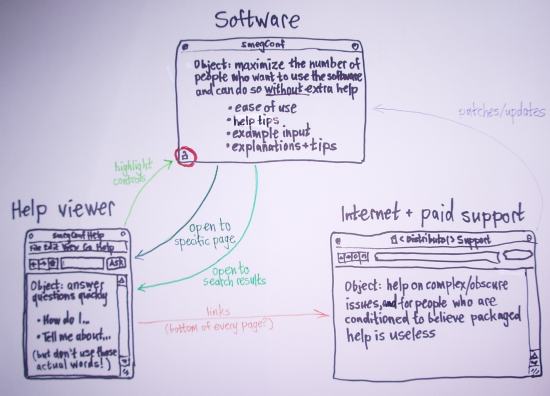
Ideally, the process of helping people use software should be an integration of the software itself, the help viewer, the Web, and paid support services.
Embedded help
Help writers should be active in reporting bugs which, when fixed, allow a help document to become simpler or to concentrate on likely problems rather than on basic use. Since people other than programmers are highly reluctant to use anything in the Help menu, software authors should be encouraged to add help tips (including explanations of why controls are unavailable), hints and examples for form elements, and other embedded help in dialogs and rarely-used windows.
The help viewer
The help viewer should be, by default, compact enough to fit comfortably alongside the program it is providing help on. It should be easily searchable, with results being returned despite misspellings and use of synonyms, and results from the general Ubuntu Help being grouped underneath results for the current program. Programs should be able to tell the help viewer to search for particular words, a less fragile alternative to linking to individual pages.
The help itself should concentrate on giving people step-by-step instructions on how to achieve things and how to solve problems. Where appropriate, a help page should end with a list of links to related pages or well-crafted searches. (These links themselves should not be indexed for the search function.) As part of the teaching process, the help viewer should be able to tell GTK to highlight an element in a program's window by drawing a translucent ring around it.
Comparisons:
Web integration
People experienced with Ubuntu can, and do, post help and suggestions to Web forums and wikis. While upstream help is in its current state, such DIY documentation will often answer questions in non-developer language better than most help files do. Online documentation can also be updated more easily than packaged help, and can continue to be updated after an Ubuntu release.
Because people are very likely to just give up if they do not find the answer on the first path they follow, the help viewer should integrate as smoothly as possible with help.ubuntu.com and paid support services. This can be done as follows.
A distinct but unobtrusive link at the bottom for "Get more help online" should be present at the bottom of all search results, and at the bottom of all pages except those that explicitly opt out. In Ubuntu, this link should open a Web browser to search help.ubuntu.com for pages containing the same search terms (for search results) and/or the page title (for a help page). The link should never break as long as help.ubuntu.com exists, regardless of what CMS it is using in a given year. The link should be greyed out with an explanation if the network is offline (see NetworkMagic).
Distributors may choose to add a further link to the bottom of each page, such as "Get support from name-of-company". They may also customize the "Getting more help" page.
Comparison:
help.ubuntu.com
Many people will search the Web for answers without even looking at the packaged help. While the help viewer's search function remains either non-existent or primitive, the Web may even produce better results, because search engines recognize synonyms and misspellings more thoroughly than the help does.
These people should be catered for by making help.ubuntu.com a superset of the packaged help, rather than a partially intersecting set. help.ubuntu.com should have a slight bias towards information that may change from month to month (such as how to install support for RestrictedFormats), while the packaged help should have a slight bias towards information on how to connect to the Internet or use programs offline.
Like the packaged help, online help should be well-written and task-centered, though on the Web there is more scope for tutorials and overview documents. help.ubuntu.com should also provide links to Web forums and IRC channels, with advice on how to use them; and offer tips on how to search the Web for error messages, file good bug reports, and so on.
Like the packaged help, help.ubuntu.com should automatically display in your preferred language, with help being written in parallel in multiple languages. For example, if you are using Ubuntu in Xhosa, the help viewer should link to the Xhosa area of help.ubuntu.com, which in turn should link to Xhosa Web forums if they exist.
Comparisons:
Future work
In approximate order of importance:
Implement the opt-out supplemental links for help pages as described above. As a useful example of the feature, link to a context-sensitive search of help.ubuntu.com from all pages except the front page, the "Getting more help" page, and the pages about connecting to the Internet.
- Hide or remove the table of contents frame and the previous/next links from the help viewer, making the default window size smaller to match.
Make the help viewer toolbar icons-only, regardless of the "Menus & Toolbars" setting.
- Add index-based spelling suggestions to the search function.
Get OpenOffice to use the standard help viewer.
- Get Gimp to use the standard help viewer.
- Get Firefox to use the standard help viewer.
- Implement highlighting of controls (requires XOrg Composite + Damage).
Begin writing useful help for programs in main and push it upstream.
Begin usability testing of existing help.
See also
Discussion
LunaTick : I am sure that this must have been discussed somewhere but, as I can't find it, I will throw this idea down. If anyone knows where it should be, feel free to move it. I would love to see Launchpad absorb the management of help for programs. I should be able to go to the "Get Help Online" page and read the latest version of the help and make edits if I spot mistakes or make additions (these would be moderated). These should automatically create offline versions to be pushed upstream and form the basis of man pages and the help through the help menu. If it was all handled in Launchpad, it would be relatively easy to feed the help into the translation section. Currently contributing to Help files is a relatively difficult task for non-programmers (AFAICS), yet it is often non-programmers that can best communicate with the masses. The online help could be divided into the 'official' part that formed the offline help, was translated etc. and a 'comments' section where other users could post links and advice in a more casual manner. Again, I apologise if this is not where this should have gone.
HelpfulHelp (last edited 2008-08-06 16:16:34 by localhost)