Alpha4
|
Size: 8065
Comment: xvncviewer --> xvnc4viewer
|
← Revision 35 as of 2008-08-06 16:40:24 ⇥
Size: 8492
Comment: converted to 1.6 markup
|
| Deletions are marked like this. | Additions are marked like this. |
| Line 1: | Line 1: |
| ||<tablestyle="float:right; width:40%; background:#F1F1ED; margin: 0 0 1em 1em;" style="padding:0.5em;">'''Contents'''[[BR]] [[TableOfContents]]|| | ||<tablestyle="float:right; width:40%; background:#F1F1ED; margin: 0 0 1em 1em;" style="padding:0.5em;">'''Contents'''<<BR>> <<TableOfContents>>|| |
| Line 23: | Line 23: |
| Alpha 4 includes [http://pulseaudio.org PulseAudio] enabled by default. Some non-GNOME applications still need to be changed to output to pulse/esd by default and the volume control tools are still not integrated. [https://blueprints.launchpad.net/ubuntu/+spec/cleanup-audio-jumble] | Alpha 4 includes [[http://pulseaudio.org|PulseAudio]] enabled by default. Some non-GNOME applications still need to be changed to output to pulse/esd by default and the volume control tools are still not integrated. [[https://blueprints.launchpad.net/ubuntu/+spec/cleanup-audio-jumble]] |
| Line 28: | Line 28: |
| attachment:alpha4_polkit5.png | {{attachment:alpha4_polkit5.png}} |
| Line 30: | Line 30: |
| For details of Policy``Kit integration in Hardy, refer to the [https://blueprints.launchpad.net/ubuntu/+spec/policykit-integration policykit-integration blueprint]. | For details of Policy``Kit integration in Hardy, refer to the [[https://blueprints.launchpad.net/ubuntu/+spec/policykit-integration|policykit-integration blueprint]]. |
| Line 34: | Line 34: |
| The latest Firefox 3 beta is packaged in the repositories, bringing much better system integration including theming that mirrors the system such as icons and colours as well as having GTK2 form buttons and open dialog. | The latest Firefox 3 beta is packaged in the repositories, bringing much better system integration including icon and colour theming that matches the system, as well as GTK2 form buttons and open dialog. |
| Line 36: | Line 36: |
| attachment:ff3-screenshot.png You can read more about the work on the [http://ventnorsblog.blogspot.com/2008/01/fox-and-penguin.html Fox and Penguin blog post] by Michael Ventor, a Mozilla intern. |
{{attachment:ff3-screenshot.png}} |
| Line 44: | Line 42: |
| attachment:transmission-gtk.png | {{attachment:transmission-gtk.png}} |
| Line 48: | Line 46: |
| The new Vinagre VNC client, which is set to replace xvnc4viewer, is installed by default in Alpha 4. | The new Vinagre VNC client is installed by default in Alpha 4, replacing xvnc4viewer. |
| Line 50: | Line 48: |
| attachment:vinagre.png | {{attachment:vinagre.png}} |
| Line 58: | Line 56: |
| attachment:brasero.png | {{attachment:brasero.png}} |
| Line 64: | Line 62: |
| attachment:intlclock.png | {{attachment:intlclock.png}} |
| Line 70: | Line 68: |
| attachment:nautilus-gvfs.jpg | {{attachment:nautilus-gvfs.jpg}} |
| Line 76: | Line 74: |
| attachment:g-s-m-alpha4.png | {{attachment:g-s-m-alpha4.png}} |
| Line 80: | Line 78: |
| * KVM is now officially maintained within in the Ubuntu kernel. | * KVM is now officially maintained within the Ubuntu kernel. |
| Line 83: | Line 81: |
== Firewall == ufw (Uncomplicated Firewall) is a new firewall application designed to make administering a firewall easier for end-users while not getting in the way of network administrators. Currently, ufw is a command-line interface for administering host-based firewalls. For more details, read the UbuntuFirewall specification. |
|
| Line 88: | Line 92: |
| http://cdimage.ubuntu.com/releases/hardy/alpha-4/ (Ubuntu) [[BR]] http://cdimage.ubuntu.com/kubuntu/releases/hardy/alpha-4/ (Kubuntu) [[BR]] http://cdimage.ubuntu.com/edubuntu/releases/hardy/alpha-4/ (Edubuntu) [[BR]] http://cdimage.ubuntu.com/jeos/releases/hardy/alpha-4/ (Ubuntu JeOS) [[BR]] http://cdimage.ubuntu.com/xubuntu/releases/hardy/alpha-4/ (Xubuntu) [[BR]] http://cdimage.ubuntu.com/gobuntu/releases/hardy/alpha-4/ (Gobuntu) [[BR]] |
http://cdimage.ubuntu.com/releases/hardy/alpha-4/ (Ubuntu) <<BR>> http://cdimage.ubuntu.com/kubuntu/releases/hardy/alpha-4/ (Kubuntu) <<BR>> http://cdimage.ubuntu.com/edubuntu/releases/hardy/alpha-4/ (Edubuntu) <<BR>> http://cdimage.ubuntu.com/jeos/releases/hardy/alpha-4/ (Ubuntu JeOS) <<BR>> http://cdimage.ubuntu.com/xubuntu/releases/hardy/alpha-4/ (Xubuntu) <<BR>> http://cdimage.ubuntu.com/gobuntu/releases/hardy/alpha-4/ (Gobuntu) <<BR>> http://cdimage.ubuntu.com/ubuntustudio/releases/hardy/alpha-4/ (Ubuntu``Studio) <<BR>> |
| Line 99: | Line 105: |
| * The new kernel in Alpha 4 is unable to access CD-ROM devices in some configurations, which means some users who were previously able to install Ubuntu will not be able to install this alpha from CD media. Investigation is ongoing; no workaround is known at this time. [https://launchpad.net/bugs/181561] | * The new kernel in Alpha 4 is unable to access CD-ROM devices in some configurations, which means some users who were previously able to install Ubuntu will not be able to install this alpha from CD media. Investigation is ongoing; no workaround is known at this time. [[https://launchpad.net/bugs/181561]] |
| Line 101: | Line 107: |
| * Video problems have been reported with the 64-bit (amd64) version of Edubuntu desktop. As a workaround, users can manually specify a video resolution at the boot menu. [https://launchpad.net/bugs/173130] | * Video problems have been reported with the 64-bit (amd64) version of Edubuntu desktop. As a workaround, users can manually specify a video resolution at the boot menu. [[https://launchpad.net/bugs/173130]] |
| Line 103: | Line 109: |
| * Users with an older ATI Radeon graphics card might have video problems. As a workaround, you can boot the livecd with a failsafe mode, and after installation add 'Option "AGPMode" "4"' to the "Device" -section of your /etc/X11/xorg.conf. [https://launchpad.net/bugs/180343] | * Users with an older ATI Radeon graphics card might have video problems. As a workaround, you can boot the livecd with a failsafe mode, and after installation add 'Option "AGPMode" "4"' to the "Device" -section of your /etc/X11/xorg.conf. [[https://launchpad.net/bugs/180343]] |
| Line 105: | Line 111: |
| * Due to the switch to GVFS, which is not feature complete, the "Network" item in the Places menu doesn't work, and Nautilus can behave erratically, especially in trash operations. Refrain from operating on valuable files with this version. [https://bugs.launchpad.net/bugs/185756] | * Due to the switch to GVFS, which is not feature complete, the "Network" item in the Places menu doesn't work, and Nautilus can behave erratically, especially in trash operations. Refrain from operating on valuable files with this version. [[https://bugs.launchpad.net/bugs/185756]] * The OEM install functionality does not work in this alpha. Investigation of this issue is ongoing. [[https://bugs.launchpad.net/188240]] |
| Line 109: | Line 117: |
| It should come as no surprise that this alpha release of Hardy Heron contains other bugs. Your comments, bug reports, patches and suggestions will help fix bugs and improve future releases. Please report bugs through [https://bugs.launchpad.net/distros/ubuntu/+bugs the Ubuntu bug tracker] | It should come as no surprise that this alpha release of Hardy Heron contains other bugs. Your comments, bug reports, patches and suggestions will help fix bugs and improve future releases. Please report bugs through [[https://bugs.launchpad.net/distros/ubuntu/+bugs|the Ubuntu bug tracker]] |
| Line 111: | Line 119: |
| If you want to help out with bugs, the [http://wiki.ubuntu.com/BugSquad Bug Squad] is always looking for help. | If you want to help out with bugs, the [[http://wiki.ubuntu.com/BugSquad|Bug Squad]] is always looking for help. |
| Line 121: | Line 129: |
| You can find out more about Ubuntu on our [http://www.ubuntu.com website] and [http://wiki.ubuntu.com wiki]. | You can find out more about Ubuntu on our [[http://www.ubuntu.com|website]] and [[http://wiki.ubuntu.com|wiki]]. |
Contents |
Introduction
The Ubuntu developers are moving very quickly to bring you the absolute latest and greatest software the Open Source Community has to offer. Hardy Heron Alpha 4 is the fourth alpha release of Ubuntu 8.04, and with this new alpha release comes a whole host of excellent new features.
Note: This is still an alpha release. Do not install it on production machines. The final stable version will be released in April 2008.
In General
These features are showcased for your attention. Please test them and report any bugs you find. If you want to see what the developers have cooking for the next alpha release, take a look through the Hardy blueprints page: https://blueprints.launchpad.net/ubuntu/hardy
Upgrading from Ubuntu 7.10
To upgrade from Ubuntu 7.10, run "update-manager -d" using the update-manager package from Gutsy.
Xorg 7.3
The latest Xorg is available in Hardy, Xorg 7.3, with an emphasis on better autoconfiguration with a minimal configuration file.
Linux kernel 2.6.24
Alpha 4 includes the 2.6.24-5.8 (2.6.24-rc8-based) kernel. This brings in significant enhancements and fixes that have been merged in the last few months into the mainline kernel. Among these is the introduction of dynticks support for amd64, bringing the same power savings already available on 32-bit systems to 64-bit laptops and desktops.
PulseAudio
Alpha 4 includes PulseAudio enabled by default. Some non-GNOME applications still need to be changed to output to pulse/esd by default and the volume control tools are still not integrated. https://blueprints.launchpad.net/ubuntu/+spec/cleanup-audio-jumble
PolicyKit
With Alpha 4, PolicyKit integration is visible in the administrative user interfaces. PolicyKit makes it possible to run administrative applications as a normal user, and have them get a particular set of extra privileges for certain operations, which allows fine-grained control over user permissions and enhances usability, as well as eliminating the security implications of running the whole application as root.

For details of PolicyKit integration in Hardy, refer to the policykit-integration blueprint.
Firefox 3 Beta 2
The latest Firefox 3 beta is packaged in the repositories, bringing much better system integration including icon and colour theming that matches the system, as well as GTK2 form buttons and open dialog.
Transmission
The GTK version of the popular Transmission BitTorrent client comes with Alpha 4. It's set to replace the Gnome BitTorrent downloader.

Vinagre
The new Vinagre VNC client is installed by default in Alpha 4, replacing xvnc4viewer.
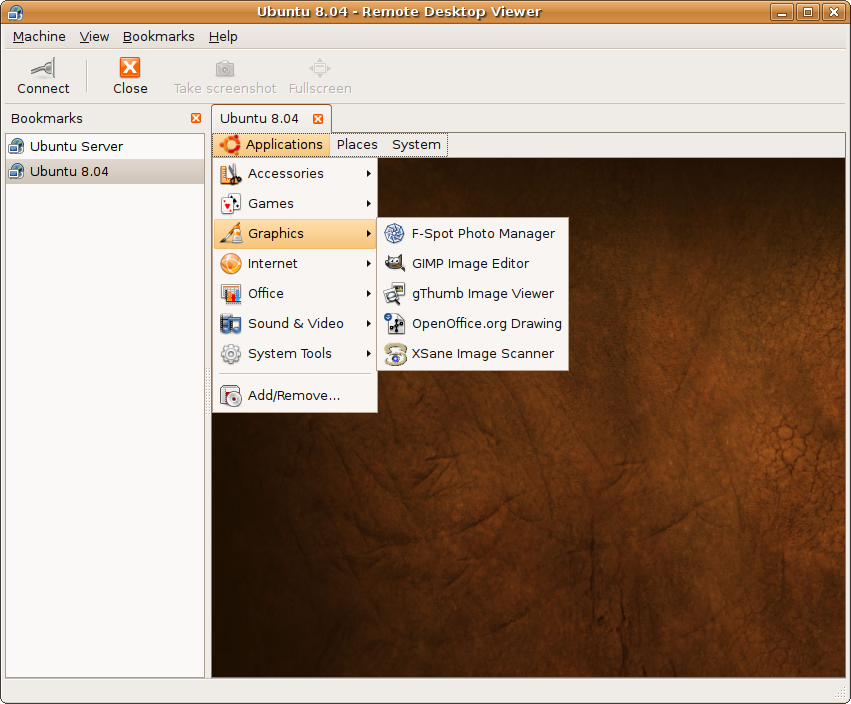
Vinagre allows the user to view multiple machines simultaneously, can discover VNC servers on the network via Avahi, and can keep track of recently used and favorite connections.
Brasero
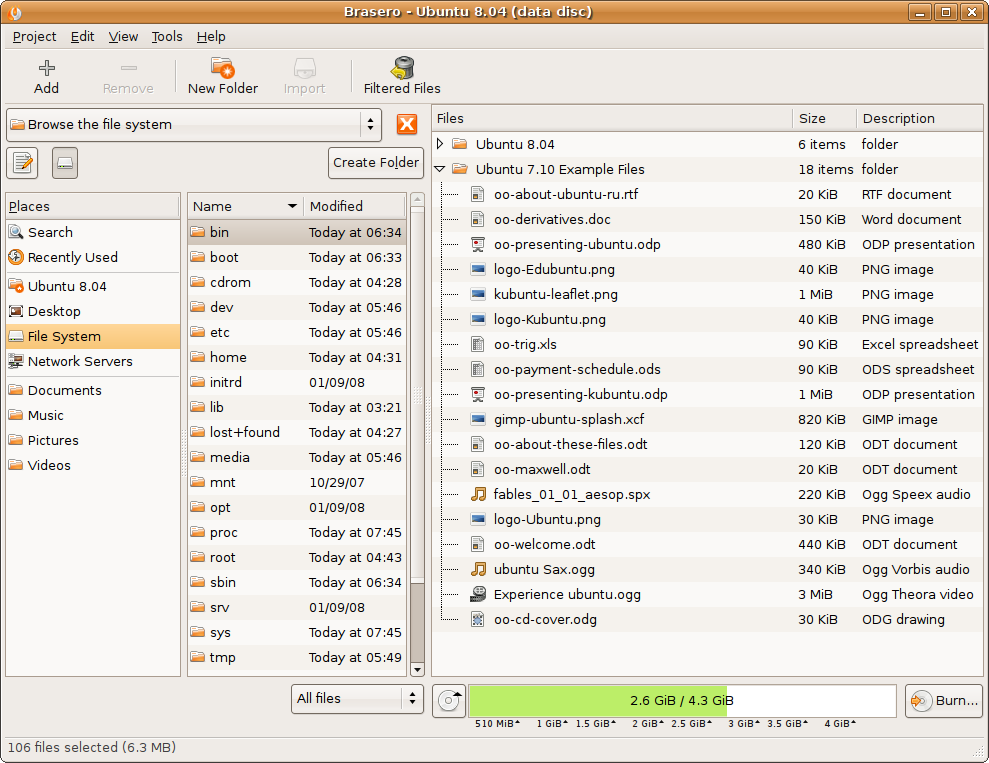
The Brasero CD/DVD burning application, which will complement the CD/DVD burning functions of Nautilus and replace the Serpentine audio CD burning utility, is installed by default in Alpha 4.
World Clock Applet
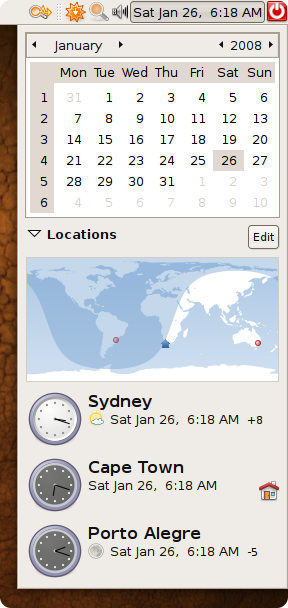
Integrating the features of the intlclock applet, the GNOME panel clock in Alpha 4 can display the time and weather in multiple locations.
GVFS
Nautilus 2.21.6 in Alpha 4 uses GVFS, the virtual filesystem abstraction layer that's set to replace the aging GnomeVFS in GNOME 2.22, as its backend. In the near future, GVFS will make it possible to fix shortcomings of Nautilus such as the inability to restore files from trash, pause and undo file operations, and make it possible to escalate user privileges for certain operations using PolicyKit for authentication. It also brings a significant performance boost to many operations.

GNOME System Monitor
The GNOME System Monitor has a revamped "Resources" tab, with Cairo graphs that scroll and scale smoothly, and brand new widgets.
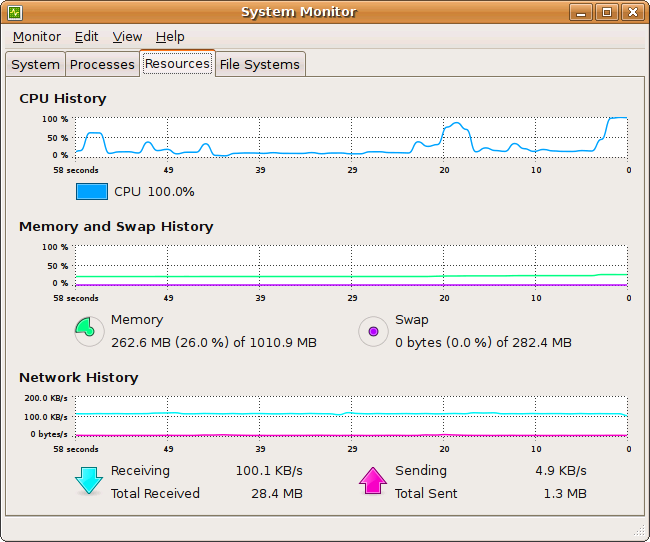
Virtualization
- KVM is now officially maintained within the Ubuntu kernel.
- libvirt and virt-manager have been adapted to Ubuntu. They allow for easy guest creation and basic management out of the box. Virt-manager can be used to remotely administer guests on a remote server. They also work with XEN, even though it is not officially maintained.
- The kernel also includes the virtio modifications which should greatly improve guest I/O access.
Firewall
ufw (Uncomplicated Firewall) is a new firewall application designed to make administering a firewall easier for end-users while not getting in the way of network administrators. Currently, ufw is a command-line interface for administering host-based firewalls.
For more details, read the UbuntuFirewall specification.
Download Alpha 4
Get it while it's hot. ISOs and torrents are available at:
http://cdimage.ubuntu.com/releases/hardy/alpha-4/ (Ubuntu)
http://cdimage.ubuntu.com/kubuntu/releases/hardy/alpha-4/ (Kubuntu)
http://cdimage.ubuntu.com/edubuntu/releases/hardy/alpha-4/ (Edubuntu)
http://cdimage.ubuntu.com/jeos/releases/hardy/alpha-4/ (Ubuntu JeOS)
http://cdimage.ubuntu.com/xubuntu/releases/hardy/alpha-4/ (Xubuntu)
http://cdimage.ubuntu.com/gobuntu/releases/hardy/alpha-4/ (Gobuntu)
http://cdimage.ubuntu.com/ubuntustudio/releases/hardy/alpha-4/ (UbuntuStudio)
Caveats
There are several known bugs that users are likely to run into with Hardy Alpha 4. We have documented them here for your convenience along with any known workarounds, so that you don't need to spend time reporting these bugs again:
The new kernel in Alpha 4 is unable to access CD-ROM devices in some configurations, which means some users who were previously able to install Ubuntu will not be able to install this alpha from CD media. Investigation is ongoing; no workaround is known at this time. https://launchpad.net/bugs/181561
Video problems have been reported with the 64-bit (amd64) version of Edubuntu desktop. As a workaround, users can manually specify a video resolution at the boot menu. https://launchpad.net/bugs/173130
Users with an older ATI Radeon graphics card might have video problems. As a workaround, you can boot the livecd with a failsafe mode, and after installation add 'Option "AGPMode" "4"' to the "Device" -section of your /etc/X11/xorg.conf. https://launchpad.net/bugs/180343
Due to the switch to GVFS, which is not feature complete, the "Network" item in the Places menu doesn't work, and Nautilus can behave erratically, especially in trash operations. Refrain from operating on valuable files with this version. https://bugs.launchpad.net/bugs/185756
The OEM install functionality does not work in this alpha. Investigation of this issue is ongoing. https://bugs.launchpad.net/188240
Reporting Bugs
It should come as no surprise that this alpha release of Hardy Heron contains other bugs. Your comments, bug reports, patches and suggestions will help fix bugs and improve future releases. Please report bugs through the Ubuntu bug tracker
If you want to help out with bugs, the Bug Squad is always looking for help.
Participate in Ubuntu
If you would like to help shape Ubuntu, take a look at the list of ways you can participate at
More Information
You can find out more about Ubuntu on our website and wiki.
To sign up for future Ubuntu development announcements, please subscribe to Ubuntu's development announcement list at:
Credits
The Alpha 4 release notes were brought to you by:
- Murat Güneş
- Timo Aaltonen
- Corey Burger
- Steve Langasek
HardyHeron/Alpha4 (last edited 2008-08-06 16:40:24 by localhost)