DeveloperStackTour
|
Size: 19771
Comment:
|
Size: 21387
Comment:
|
| Deletions are marked like this. | Additions are marked like this. |
| Line 159: | Line 159: |
| === PyGTK and Quickly Widgets === | === PyGTK === <screenshot of an application using this technology - make sure to use the standard Ambiance dark theme and include the window borders - 800px wide> ''Caption that explains what the app is in the screenshot''. '''PyGtk is the GUI toolkit that Ubuntu Developers use to create Ubuntu Applications'''. ''PyGtk combines the ease of the Python language with the power of the Gtk GUI Toolkit. PyGtk has widgets for creating windows, dialogs, buttons, toolbars, sliders, text entry fields, everything you could need to create an application for your users. PyGtk also works with advanced controls like GooCanvas for rocking a freeform 2d surface, and allows you to dive down into Pango or gdk if you want to push your app to the limit.'' ''Quickly Widgets is a package of widgets built on top of PyGtk that make it easy to quickly add core functionality to your application. These widgets include things like grids for displaying data, web cam widgets, a media player widget, and prompts for getting input from users''. Five reasons to care about PyGtk: 1. '''Glade''' - Is the UI designer that makes creating GUIs fast. 1. '''Gtk Widgets''' - PyGtk delivers all the GUI Widgets needed to create any application. 1. '''Quickly Widgets''' - Makes common tasks easy and fun. 1. '''Desktop Integration''' - Native widgets make your app look like a real part of the desktop Find out more: * '''Using Glade''' - manual chapter. * '''Using PyGtk with quickly''' - more manual chapters. * '''PyGtk Library Reference''' - Online reference deep divers into each widget and related classes. === Desktop Couch === (talk about the benefits of putting data in desktop couch, replication benefits, Ubuntu One etc) <screenshot of an application using this technology - make sure to use the standard Ambiance dark theme and include the window borders - 800px wide> ''Caption that explains what the app is in the screenshot''. '''First provide a 20 world bolded out description that summarizes the technology and really grabs the user'''. ''Now provide two paragraphs of more detailed content about what the technology can be used for. Lorem ipsum dolor sit amet, consectetur adipiscing elit. Duis interdum metus sed odio aliquet mollis. Pellentesque imperdiet suscipit dui vitae tincidunt. Donec a iaculis enim. Morbi pharetra vestibulum facilisis. Pellentesque egestas aliquam eros, eget blandit odio malesuada varius. Donec dolor nibh, elementum ac dignissim a, sagittis sed dui. Class aptent taciti sociosqu ad litora torquent per conubia nostra, per inceptos himenaeos. Nam nec turpis nibh, eu dapibus lectus''. ''Morbi adipiscing erat id felis elementum luctus. Nunc erat mi, aliquet sed pulvinar vel, lacinia ut nulla. Fusce id urna est. Duis luctus convallis turpis, et suscipit risus ultricies id. Proin ut lacinia nunc. In hac habitasse platea dictumst. Mauris blandit, eros sed ultrices ullamcorper, risus nibh condimentum lorem, at accumsan quam elit quis turpis''. Five reasons to care about <component>: 1. '''Feature name''' - no more than 50 words about the feature. 1. '''Feature name''' - no more than 50 words about the feature. 1. '''Feature name''' - no more than 50 words about the feature. 1. '''Feature name''' - no more than 50 words about the feature. 1. '''Feature name''' - no more than 50 words about the feature. Find out more: * '''Resource name that links to a site''' - description of the resource. * '''Resource name that links to a site''' - description of the resource. * '''Resource name that links to a site''' - description of the resource. === Quickly === |
| Line 187: | Line 241: |
| === Desktop Couch === (talk about the benefits of putting data in desktop couch, replication benefits, Ubuntu One etc) <screenshot of an application using this technology - make sure to use the standard Ambiance dark theme and include the window borders - 800px wide> ''Caption that explains what the app is in the screenshot''. '''First provide a 20 world bolded out description that summarizes the technology and really grabs the user'''. ''Now provide two paragraphs of more detailed content about what the technology can be used for. Lorem ipsum dolor sit amet, consectetur adipiscing elit. Duis interdum metus sed odio aliquet mollis. Pellentesque imperdiet suscipit dui vitae tincidunt. Donec a iaculis enim. Morbi pharetra vestibulum facilisis. Pellentesque egestas aliquam eros, eget blandit odio malesuada varius. Donec dolor nibh, elementum ac dignissim a, sagittis sed dui. Class aptent taciti sociosqu ad litora torquent per conubia nostra, per inceptos himenaeos. Nam nec turpis nibh, eu dapibus lectus''. ''Morbi adipiscing erat id felis elementum luctus. Nunc erat mi, aliquet sed pulvinar vel, lacinia ut nulla. Fusce id urna est. Duis luctus convallis turpis, et suscipit risus ultricies id. Proin ut lacinia nunc. In hac habitasse platea dictumst. Mauris blandit, eros sed ultrices ullamcorper, risus nibh condimentum lorem, at accumsan quam elit quis turpis''. Five reasons to care about <component>: 1. '''Feature name''' - no more than 50 words about the feature. 1. '''Feature name''' - no more than 50 words about the feature. 1. '''Feature name''' - no more than 50 words about the feature. 1. '''Feature name''' - no more than 50 words about the feature. 1. '''Feature name''' - no more than 50 words about the feature. Find out more: * '''Resource name that links to a site''' - description of the resource. * '''Resource name that links to a site''' - description of the resource. * '''Resource name that links to a site''' - description of the resource. |
Ubuntu Developer Stack
As part of the 10.10 plan I am keen to provide a simple tour of the Ubuntu developer stack, providing a rock solid tour of what opportunities the stack offers for developers on the platform. This will be structured as a list of the common components in the developer stack, each of which links to a page which provides a common structure with key information about that component.
To get the ball rolling I have produced this common structure and documented an initial set of components, but need help to flesh out the content to get it ready.
When editing content please bear the following rules in mind:
- The writing style should be clear and easy to read.
- The style should be attractive and excited about the technology - the goal here is to "sell" the platform to developers.
- This content is targeted at developers, so feel free to use developer terms, but don't assume the reader knows anything about the technology.
- Please keep your content within the structure of the Structure section below.
Please don't add additional components to this page yet.
Any questions? Email Jono Bacon at jono AT ubuntu DOT com.
Structure
<screenshot of an application using this technology - make sure to use the standard Ambiance dark theme and include the window borders - 800px wide>
Caption that explains what the app is in the screenshot.
First provide a 20 world bolded out description that summarizes the technology and really grabs the user.
Now provide two paragraphs of more detailed content about what the technology can be used for. Lorem ipsum dolor sit amet, consectetur adipiscing elit. Duis interdum metus sed odio aliquet mollis. Pellentesque imperdiet suscipit dui vitae tincidunt. Donec a iaculis enim. Morbi pharetra vestibulum facilisis. Pellentesque egestas aliquam eros, eget blandit odio malesuada varius. Donec dolor nibh, elementum ac dignissim a, sagittis sed dui. Class aptent taciti sociosqu ad litora torquent per conubia nostra, per inceptos himenaeos. Nam nec turpis nibh, eu dapibus lectus.
Morbi adipiscing erat id felis elementum luctus. Nunc erat mi, aliquet sed pulvinar vel, lacinia ut nulla. Fusce id urna est. Duis luctus convallis turpis, et suscipit risus ultricies id. Proin ut lacinia nunc. In hac habitasse platea dictumst. Mauris blandit, eros sed ultrices ullamcorper, risus nibh condimentum lorem, at accumsan quam elit quis turpis.
Five reasons to care about <component>:
Feature name - no more than 50 words about the feature.
Feature name - no more than 50 words about the feature.
Feature name - no more than 50 words about the feature.
Feature name - no more than 50 words about the feature.
Feature name - no more than 50 words about the feature.
Find out more:
Resource name that links to a site - description of the resource.
Resource name that links to a site - description of the resource.
Resource name that links to a site - description of the resource.
Content
Content can be added below...
GStreamer
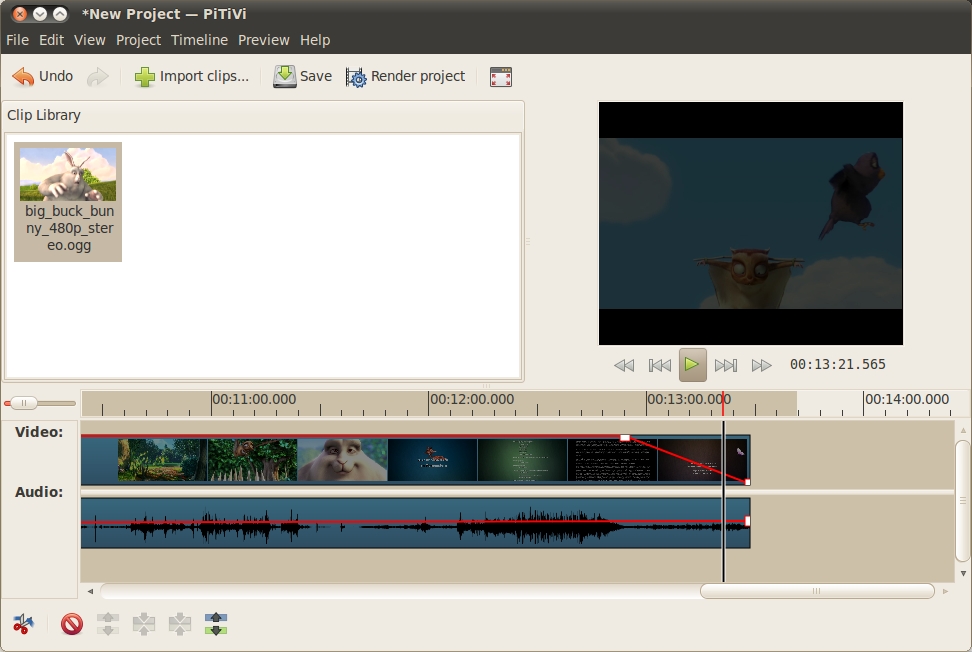
The PiTiVi non-linear digital video editor that ships in Ubuntu 10.04 is built using GStreamer technology.
A powerful toolkit for managing a wide variety of media and codecs for playback, recording, digital effects and more.
The powerful GStreamer framework provides a complete set of tools for managing multimedia. GStreamer provides a wide range of plugins that are connected together in a pipeline to offer unparalleled flexibility in how multimedia is processed in your application. Whether you want to produce a non-linear video editor, a multi-track audio recorder, a video processing tool, music streaming application or simply play back a sound, GStreamer has the flexibility you need.
GStreamer provides support for a range of container formats (asf, avi, webm, 3gp/mp4/mov, flv, mpeg-ps/ts, mkv, mxf, ogg), supporting both local decoding/encoding as well as streaming over the network. GStreamer is also at the heart of a number of other additional technologies such as Farsight for handling audio/video calls and GNonlin for producing non-linear editing support in your applications.
Five reasons to care about GStreamer:
Powerful Pipeline Creation - no matter how specialized your needs are, GStreamer can string together a wide range of different multimedia encoders/decoders and processors in exactly the way you need.
Comprehensive Codec Support - GStreamer support for all major local and streaming playback/recording codecs for both encoding and decoding.
Non Linear Support - GStreamer can be used to create non-linear editing support in applications with the GNonLin set of plugins. This can be seen in the PiTiVi (video editor) and Jokosher (audio multi-tracker) applications.
Network Syncing - GStreamer's network clocks provide a powerful method of multiple clients syncing to a server and synchronizing their playback perfectly for all clients.
Extensible - With GStreamer's plugin architecture, more and more plugins are being created all the time satisfy different multimedia needs.
Find out more:
Python GStreamer Tutorial - an introductory guide to getting started with GStreamer.
Python Documentation - reference documentation for the GStreamer Python bindings.
Python
(talk about the sheer flexibility of the python standard library and the many features it affords programmers)
<screenshot of an application using this technology - make sure to use the standard Ambiance dark theme and include the window borders - 800px wide>
Caption that explains what the app is in the screenshot.
First provide a 20 world bolded out description that summarizes the technology and really grabs the user.
Now provide two paragraphs of more detailed content about what the technology can be used for. Lorem ipsum dolor sit amet, consectetur adipiscing elit. Duis interdum metus sed odio aliquet mollis. Pellentesque imperdiet suscipit dui vitae tincidunt. Donec a iaculis enim. Morbi pharetra vestibulum facilisis. Pellentesque egestas aliquam eros, eget blandit odio malesuada varius. Donec dolor nibh, elementum ac dignissim a, sagittis sed dui. Class aptent taciti sociosqu ad litora torquent per conubia nostra, per inceptos himenaeos. Nam nec turpis nibh, eu dapibus lectus.
Morbi adipiscing erat id felis elementum luctus. Nunc erat mi, aliquet sed pulvinar vel, lacinia ut nulla. Fusce id urna est. Duis luctus convallis turpis, et suscipit risus ultricies id. Proin ut lacinia nunc. In hac habitasse platea dictumst. Mauris blandit, eros sed ultrices ullamcorper, risus nibh condimentum lorem, at accumsan quam elit quis turpis.
Five reasons to care about <component>:
Feature name - no more than 50 words about the feature.
Feature name - no more than 50 words about the feature.
Feature name - no more than 50 words about the feature.
Feature name - no more than 50 words about the feature.
Feature name - no more than 50 words about the feature.
Find out more:
Resource name that links to a site - description of the resource.
Resource name that links to a site - description of the resource.
Resource name that links to a site - description of the resource.
Ayatana
(talk about app indicators, notify-osd, messaging menu)
<screenshot of an application using this technology - make sure to use the standard Ambiance dark theme and include the window borders - 800px wide>
Caption that explains what the app is in the screenshot.
First provide a 20 world bolded out description that summarizes the technology and really grabs the user.
Now provide two paragraphs of more detailed content about what the technology can be used for. Lorem ipsum dolor sit amet, consectetur adipiscing elit. Duis interdum metus sed odio aliquet mollis. Pellentesque imperdiet suscipit dui vitae tincidunt. Donec a iaculis enim. Morbi pharetra vestibulum facilisis. Pellentesque egestas aliquam eros, eget blandit odio malesuada varius. Donec dolor nibh, elementum ac dignissim a, sagittis sed dui. Class aptent taciti sociosqu ad litora torquent per conubia nostra, per inceptos himenaeos. Nam nec turpis nibh, eu dapibus lectus.
Morbi adipiscing erat id felis elementum luctus. Nunc erat mi, aliquet sed pulvinar vel, lacinia ut nulla. Fusce id urna est. Duis luctus convallis turpis, et suscipit risus ultricies id. Proin ut lacinia nunc. In hac habitasse platea dictumst. Mauris blandit, eros sed ultrices ullamcorper, risus nibh condimentum lorem, at accumsan quam elit quis turpis.
Five reasons to care about <component>:
Feature name - no more than 50 words about the feature.
Feature name - no more than 50 words about the feature.
Feature name - no more than 50 words about the feature.
Feature name - no more than 50 words about the feature.
Feature name - no more than 50 words about the feature.
Find out more:
Resource name that links to a site - description of the resource.
Resource name that links to a site - description of the resource.
Resource name that links to a site - description of the resource.
Social From The Start
(talk about the gwibber API)
<screenshot of an application using this technology - make sure to use the standard Ambiance dark theme and include the window borders - 800px wide>
Caption that explains what the app is in the screenshot.
First provide a 20 world bolded out description that summarizes the technology and really grabs the user.
Now provide two paragraphs of more detailed content about what the technology can be used for. Lorem ipsum dolor sit amet, consectetur adipiscing elit. Duis interdum metus sed odio aliquet mollis. Pellentesque imperdiet suscipit dui vitae tincidunt. Donec a iaculis enim. Morbi pharetra vestibulum facilisis. Pellentesque egestas aliquam eros, eget blandit odio malesuada varius. Donec dolor nibh, elementum ac dignissim a, sagittis sed dui. Class aptent taciti sociosqu ad litora torquent per conubia nostra, per inceptos himenaeos. Nam nec turpis nibh, eu dapibus lectus.
Morbi adipiscing erat id felis elementum luctus. Nunc erat mi, aliquet sed pulvinar vel, lacinia ut nulla. Fusce id urna est. Duis luctus convallis turpis, et suscipit risus ultricies id. Proin ut lacinia nunc. In hac habitasse platea dictumst. Mauris blandit, eros sed ultrices ullamcorper, risus nibh condimentum lorem, at accumsan quam elit quis turpis.
Five reasons to care about <component>:
Feature name - no more than 50 words about the feature.
Feature name - no more than 50 words about the feature.
Feature name - no more than 50 words about the feature.
Feature name - no more than 50 words about the feature.
Feature name - no more than 50 words about the feature.
Find out more:
Resource name that links to a site - description of the resource.
Resource name that links to a site - description of the resource.
Resource name that links to a site - description of the resource.
PyGTK
<screenshot of an application using this technology - make sure to use the standard Ambiance dark theme and include the window borders - 800px wide>
Caption that explains what the app is in the screenshot.
PyGtk is the GUI toolkit that Ubuntu Developers use to create Ubuntu Applications.
PyGtk combines the ease of the Python language with the power of the Gtk GUI Toolkit. PyGtk has widgets for creating windows, dialogs, buttons, toolbars, sliders, text entry fields, everything you could need to create an application for your users. PyGtk also works with advanced controls like GooCanvas for rocking a freeform 2d surface, and allows you to dive down into Pango or gdk if you want to push your app to the limit.
Quickly Widgets is a package of widgets built on top of PyGtk that make it easy to quickly add core functionality to your application. These widgets include things like grids for displaying data, web cam widgets, a media player widget, and prompts for getting input from users.
Five reasons to care about PyGtk:
Glade - Is the UI designer that makes creating GUIs fast.
Gtk Widgets - PyGtk delivers all the GUI Widgets needed to create any application.
Quickly Widgets - Makes common tasks easy and fun.
Desktop Integration - Native widgets make your app look like a real part of the desktop
Find out more:
Using Glade - manual chapter.
Using PyGtk with quickly - more manual chapters.
PyGtk Library Reference - Online reference deep divers into each widget and related classes.
Desktop Couch
(talk about the benefits of putting data in desktop couch, replication benefits, Ubuntu One etc)
<screenshot of an application using this technology - make sure to use the standard Ambiance dark theme and include the window borders - 800px wide>
Caption that explains what the app is in the screenshot.
First provide a 20 world bolded out description that summarizes the technology and really grabs the user.
Now provide two paragraphs of more detailed content about what the technology can be used for. Lorem ipsum dolor sit amet, consectetur adipiscing elit. Duis interdum metus sed odio aliquet mollis. Pellentesque imperdiet suscipit dui vitae tincidunt. Donec a iaculis enim. Morbi pharetra vestibulum facilisis. Pellentesque egestas aliquam eros, eget blandit odio malesuada varius. Donec dolor nibh, elementum ac dignissim a, sagittis sed dui. Class aptent taciti sociosqu ad litora torquent per conubia nostra, per inceptos himenaeos. Nam nec turpis nibh, eu dapibus lectus.
Morbi adipiscing erat id felis elementum luctus. Nunc erat mi, aliquet sed pulvinar vel, lacinia ut nulla. Fusce id urna est. Duis luctus convallis turpis, et suscipit risus ultricies id. Proin ut lacinia nunc. In hac habitasse platea dictumst. Mauris blandit, eros sed ultrices ullamcorper, risus nibh condimentum lorem, at accumsan quam elit quis turpis.
Five reasons to care about <component>:
Feature name - no more than 50 words about the feature.
Feature name - no more than 50 words about the feature.
Feature name - no more than 50 words about the feature.
Feature name - no more than 50 words about the feature.
Feature name - no more than 50 words about the feature.
Find out more:
Resource name that links to a site - description of the resource.
Resource name that links to a site - description of the resource.
Resource name that links to a site - description of the resource.
Quickly
(talk about different widgets, how they are useful)
<screenshot of an application using this technology - make sure to use the standard Ambiance dark theme and include the window borders - 800px wide>
Caption that explains what the app is in the screenshot.
First provide a 20 world bolded out description that summarizes the technology and really grabs the user.
Now provide two paragraphs of more detailed content about what the technology can be used for. Lorem ipsum dolor sit amet, consectetur adipiscing elit. Duis interdum metus sed odio aliquet mollis. Pellentesque imperdiet suscipit dui vitae tincidunt. Donec a iaculis enim. Morbi pharetra vestibulum facilisis. Pellentesque egestas aliquam eros, eget blandit odio malesuada varius. Donec dolor nibh, elementum ac dignissim a, sagittis sed dui. Class aptent taciti sociosqu ad litora torquent per conubia nostra, per inceptos himenaeos. Nam nec turpis nibh, eu dapibus lectus.
Morbi adipiscing erat id felis elementum luctus. Nunc erat mi, aliquet sed pulvinar vel, lacinia ut nulla. Fusce id urna est. Duis luctus convallis turpis, et suscipit risus ultricies id. Proin ut lacinia nunc. In hac habitasse platea dictumst. Mauris blandit, eros sed ultrices ullamcorper, risus nibh condimentum lorem, at accumsan quam elit quis turpis.
Five reasons to care about <component>:
Feature name - no more than 50 words about the feature.
Feature name - no more than 50 words about the feature.
Feature name - no more than 50 words about the feature.
Feature name - no more than 50 words about the feature.
Feature name - no more than 50 words about the feature.
Find out more:
Resource name that links to a site - description of the resource.
Resource name that links to a site - description of the resource.
Resource name that links to a site - description of the resource.
GNOME
(talk about GTK, the GNOME platform, gvfs etc)
<screenshot of an application using this technology - make sure to use the standard Ambiance dark theme and include the window borders - 800px wide>
Caption that explains what the app is in the screenshot.
First provide a 20 world bolded out description that summarizes the technology and really grabs the user.
Now provide two paragraphs of more detailed content about what the technology can be used for. Lorem ipsum dolor sit amet, consectetur adipiscing elit. Duis interdum metus sed odio aliquet mollis. Pellentesque imperdiet suscipit dui vitae tincidunt. Donec a iaculis enim. Morbi pharetra vestibulum facilisis. Pellentesque egestas aliquam eros, eget blandit odio malesuada varius. Donec dolor nibh, elementum ac dignissim a, sagittis sed dui. Class aptent taciti sociosqu ad litora torquent per conubia nostra, per inceptos himenaeos. Nam nec turpis nibh, eu dapibus lectus.
Morbi adipiscing erat id felis elementum luctus. Nunc erat mi, aliquet sed pulvinar vel, lacinia ut nulla. Fusce id urna est. Duis luctus convallis turpis, et suscipit risus ultricies id. Proin ut lacinia nunc. In hac habitasse platea dictumst. Mauris blandit, eros sed ultrices ullamcorper, risus nibh condimentum lorem, at accumsan quam elit quis turpis.
Five reasons to care about <component>:
Feature name - no more than 50 words about the feature.
Feature name - no more than 50 words about the feature.
Feature name - no more than 50 words about the feature.
Feature name - no more than 50 words about the feature.
Feature name - no more than 50 words about the feature.
Find out more:
Resource name that links to a site - description of the resource.
Resource name that links to a site - description of the resource.
Resource name that links to a site - description of the resource.
Telepathy
(talk about what Telepathy can do for connecting multiple protocols, audio/video calls etc)
<screenshot of an application using this technology - make sure to use the standard Ambiance dark theme and include the window borders - 800px wide>
Caption that explains what the app is in the screenshot.
First provide a 20 world bolded out description that summarizes the technology and really grabs the user.
Now provide two paragraphs of more detailed content about what the technology can be used for. Lorem ipsum dolor sit amet, consectetur adipiscing elit. Duis interdum metus sed odio aliquet mollis. Pellentesque imperdiet suscipit dui vitae tincidunt. Donec a iaculis enim. Morbi pharetra vestibulum facilisis. Pellentesque egestas aliquam eros, eget blandit odio malesuada varius. Donec dolor nibh, elementum ac dignissim a, sagittis sed dui. Class aptent taciti sociosqu ad litora torquent per conubia nostra, per inceptos himenaeos. Nam nec turpis nibh, eu dapibus lectus.
Morbi adipiscing erat id felis elementum luctus. Nunc erat mi, aliquet sed pulvinar vel, lacinia ut nulla. Fusce id urna est. Duis luctus convallis turpis, et suscipit risus ultricies id. Proin ut lacinia nunc. In hac habitasse platea dictumst. Mauris blandit, eros sed ultrices ullamcorper, risus nibh condimentum lorem, at accumsan quam elit quis turpis.
Five reasons to care about <component>:
Feature name - no more than 50 words about the feature.
Feature name - no more than 50 words about the feature.
Feature name - no more than 50 words about the feature.
Feature name - no more than 50 words about the feature.
Feature name - no more than 50 words about the feature.
Find out more:
Resource name that links to a site - description of the resource.
Resource name that links to a site - description of the resource.
Resource name that links to a site - description of the resource.
DeveloperStackTour (last edited 2010-10-12 17:48:03 by pool-98-110-175-166)