Launchpad Entry: desktop-karmic-network-ui
Contributors: AlexanderSack, TonyEspy
Before editing this page, please contact the drafter or approver of the spec. Feel free to drop comments in the Comments section
Summary
In Karmic we identified a few UI/usability issues that stuck out while still appearing doable from a workload perspective. The three areas chosen were:
- passphrase experience - make editing and providing passphrases a more user friendly experience; for that we hide usually not needed details from passphrase dialog and ensure that the passphrase format is remembered for WEP keys (e.g. if you provided a ascii passphrase you will see the same if you "show key"
- mobile broadband wizard - improve the first connect experience to allow users to directly connect; also fix inconsistencies on how the passphrase is presented for wep (ascii/hex).
- in order to disable background scanning the AP menu will be extended to have "Show more ..." button; upon click NM will perform an explicit scan and update the AP list dynamically.
Release Notes
NetworkManager in Ubuntu 9.10 features an improved passphrase user experience for WEP keys; a tighter integration of the Mobile Broadband Wizard in the applet ensures that users can get on their 3G network more easily. By disabling automatic background scanning, Ubuntu 9.10 improves network stability for wifi connections.
Use-Cases
A wants to connect to a wireless network that requires a passphrase; he is confused by all the options presented in the password dialog
B wants to change his passphrase and is confused by the hex value displayed in the connection editor
C has a NetworkManager that does not do background scanning; after being connected to some SSID for a while he wants to change the network he is connected to, however, there are no other networks visible in the applet.
D plugs in his 3G card for the first time; after going through the configuration wizard he wants to go online directly without clicking on the applet first.
D changes provider and wants to reconfigure his provider info in the nm connection editor; he opens the 3G configuration page and wants to be able to use the wizard he used to initially configure his 3G connection, instead of filling out the required information manually
Design
Based on the use cases above, this spec identified three main topics to tackle during karmic cycle WRT network manager UI:
- Passphrase UI Experience
- Hide options from passphrase dialogs that are usually auto connected and confuse users
- Connect to more SSID Experience
- add a menu entry at the bottom of the AP list that reads "Show more ..."; pushing this entry will trigger an explicit scan; display progress until scan results are updated and will then display updated menu entries.
- Mobile Broadband Wizard Experience
- Mobile broadband wizard will have an option to "Connect now" on the last wizard page
- 3G configuration page will have a "Change ..." button next to the APN that will launch the mobile broadband provider wizard.
Implementation
Details and mock-ups on the main topics.
Key / Passphrase UI
Wireless Network Authentication Required (WEP) Dialog
This dialog is displayed the first time a user selects a wireless network that's configured to use WEP. It's also re-displayed if association fails, as it's assumed the user entered the wrong key.
The changes to this dialog include:
remove Required from dialog title
remove Authentication required by wireless network
Optional - change keys icon to something that represents Wi-Fi ( large signal strength icon? )
re-word message displayed, as it's technically incorrect to talk about a password; WEP networks are protected by a key or a passphrase. Optional - make the label of the key / passphrase input field dynamically switch based on the Wireless Security choice.
add tooltips to input fields and combo boxes. See Network Connections : Wireless Connections for example.
hide little-used controls; still make them available via Advanced triangle
fix default Wireless Security option; should be: WEP 40/104-bit key or WEP 64/128-bit key ( see LP bug # 386393 )
The current dialog looks like this:
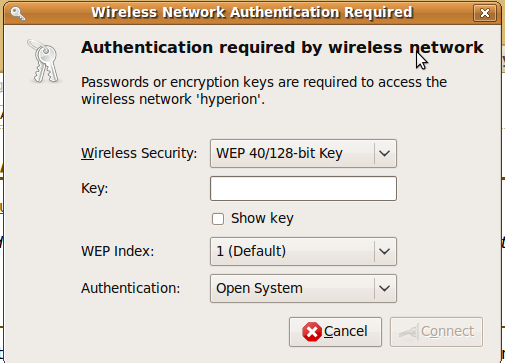
The new dialog hides the WEP Index, and Auth combo boxes. Clicking the Advanced button causes these widgets to be displayed.
The new dialog looks like this ( note - icons aren't shown ):

TODO [awe] - update screenshot
Finally, I'm not sure if the following mockup breaks GNOME policy for dialogs or not, but the following is an example of the Authentication dialog fully stripped of extraneous text:

Based on design team feedback, this is too stripped down.
This could be used for WEP or WPA, by simply changing the key / passphrase label dynamically.
Wireless Network Authentication Required (WPA/WPA2) Dialog
This dialog is displayed the first time a user selects a wireless network that's configured to use WPA/WPA2 Personal. It's also re-displayed if association fails, as it's assumed the user entered the wrong key.
The changes to this dialog include:
remove Required from dialog title
remove Authentication required by wireless network
Optional - change keys icon to something that represents Wi-Fi ( large signal strength icon? )
re-word message displayed, as it's technically incorrect to talk about passwords; WPA/WPA2 networks are protected almost always protected by a passphrase ( 8-63 chars in length ); if the user enters 64 characters, this is considered a key.
re-label the passphrase / key field and Show Password fields: Passphrase / Key
add tooltips to input fields and combo boxes. See Network Connections : Wireless Connections for example.
hide little-used controls; still make them available via Advanced triangle
Optional - investigate adding an Encryption combo ( TKIP or AES ) as an advanced control.
The current dialog looks like this:

The new dialog looks like this ( note - icons aren't shown ):

TODO [awe] - update screenshot
Edit Wireless Network : Wireless Security Tab
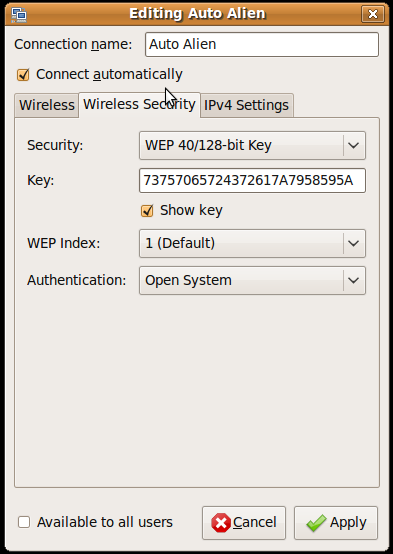
The Network Connections application allows a user to edit the details of saved wireless networks. If a user clicks on the Wireless Security tab for a network, and then clicks the Show Password checkbox, the key / passphrase is displayed as a hexadecimal string even if it was originally entered as an ASCII string.
Here's a screen shot of the dialog displaying a hexadecimal key:
Here's how it would look with the password displayed as entered:
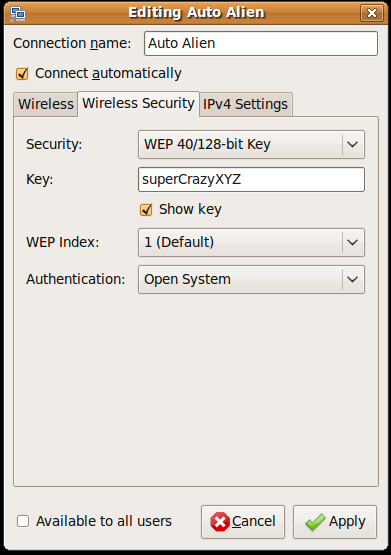
Note -- there needs to be some investigation into whether or not this is technically feasible. It's known that wpa_supplicant supports both string and hexadecimal keys. What's not known is whether the applet code can be re-factored to support storage of secrets as entered.
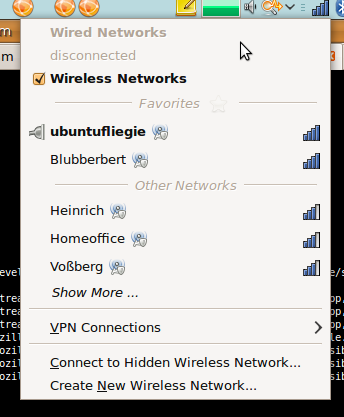
Applet Menu Changes
- remove radio buttons
- connected AP to top of network list, bold text, dotted icon? at the left
- replace signal strength progress bars with tray ss icons
- need new versions of tray icons with lock to indicate secure networks
ACTION [awe] - add screenshot
Connect to more SSID experience
The following workflow is suggested
- user clicks on applet
network manager applet opens menu that looks like:
(menu opened)
   ...
   | (o) Known AP 1                   |
   | (O) Connected AP 2               |
   | -------------------------------- |
   | More Networks ...                |
   ------------------------------------
user clicks on "More Networks ..." changes menu to:
   ...
   | (o) /Known AP 1/                 |
   | (O) /Connected AP 2              |
   | -------------------------------- |
   | (S) Searching ...                |
   ------------------------------------
  ( with (S) being a spinning throbber)
while scanning all AP menu entries should be insensitive to avoid accidental clicks on APs that suddenly might appear when scan has finished- scanning is completed (max 8 seconds); all menu entries are
sensitive again:
   | (o) Known AP 1                   |
   | (O) Connected AP 2               |
   | (o) Known AP 2                   |
   | (o) Known AP 3                   |
   | -------------------------------- |
   | More Networks ...                |
   ------------------------------------
- user selects his new AP and gets connected
- no background scanning is automatically done by NM until user asks for it by pushing the "More Networks ..." entry.
Mobile Broadband Wizard Experience
- Mobile broadband wizard will have an option to "Connect now" on the last wizard page; this will be implemented as a checkbox enabled on first connect.
- 3G configuration page will have a "Change ..." button next to the APN field; the user can then select the right provider using the wizard; this wizard variant will not have a "Connect now" button to avoid the need to give user a presentation of current connection state in the wizard.
Future Ideas
The following are a few ideas that should be considered for future enhancements:
Insecure(Open) Network Scan Filter -- filtering of Insecure networks in the scan list ( ie. don't show me insecure networks global setting )
There are variations of this like Only show me my networks, Only show new networks, etc...
Airplane Mode -- a new System Preferences application which allows a user to disable all radios ( eg. Wi-Fi, Bluetooth, 3G ) with a single control. There are system implications in doing this ( ie. this may have to wait until rfkill really works across all drivers ). There also may be possible legal implications... ie. what happens if the UI says a device is off, but it's not?
Test Plan
Defining a testplan is a work item associated with this spec
Comments
clear text passphrase was fixed in NetworkManager git commit 07cc26d5fc3df0ed47b4bb993ce9a0d4f0008876 see http://cgit.freedesktop.org/NetworkManager/NetworkManager/commit/?id=07cc26d5fc3df0ed47b4bb993ce9a0d4f0008876
see bug #291760 for more details regarding background scanning and it's effect on association.