MaverickAlpha2ReleaseNotes
|
Size: 1583
Comment:
|
Size: 2810
Comment:
|
| Deletions are marked like this. | Additions are marked like this. |
| Line 9: | Line 9: |
| {{attachment:Network-Menu-Prototype.png}} | {{attachment:Unity-Menubar.png}} |
| Line 23: | Line 23: |
| Unity now comes with a simple way to access files, with the new Files Place. Clicking on the Ubuntu button now reveals the Places bar from which users can lookup files (and soon folders). Internally Zeitgeist is used to reference different objects (files, events) and let the user access content in a meaningful way (files of the day, of the week, etc.). |
|
| Line 24: | Line 26: |
| (panel, launcher, etc.) | |
| Line 28: | Line 29: |
| Unity's Launcher improved to manage more applications at the same time: icons can now incline and animate to let users browse through a long list. The integrated Panel sports applications menubar to optimize the screen real estate. And several rendering refinement contribute to the visual quality of the user interface. |
|
| Line 30: | Line 33: |
| - player control | Our sound menu v2 is a rock star! (and his father a true musician, but that's a different story). |
| Line 32: | Line 35: |
| { screenshot } Featured in this first iteration of the v2, the sound menu becomes a category menu and can now regroup all sorts of sound applications. Music players like Rhythmbox, Amarok and VLC register with the menu, and expose a simple remote control interface to play/pause and skip songs. Behind the scenes, the menu leverages the Ayatana protocols pioneered by the messaging menu and MPRIS, another Freedesktop proposed standard, adopted by a growing number of applications developers. |
For the first major iteration of the Ubuntu Maverick development cycle, the DX Team is delivering a set of new features.
Part of those are related to our new netbook environment (called Unity), while the other part is meant to work on netbooks and across desktops as well, including the Gnome and KDE desktops.
Feature list
Cross-desktop single menubar

Meant to optimize vertical space usage on Netbooks, the single menubar hosts application menus directly on the top panel.
Modules are available to transparently support GTK+ applications and QT applications as well. This way, no special code is required and standard applications can be used. Some important applications are using custom toolkits however, and for example Firefox or OpenOffice are not supported for this cycle.
The Unity panel supports the feature by default. But Gnome or KDE users can also use a special applet to display menubars on their favorite panels too.
More details on how to enable the feature by default and how to report bugs at DesktopExperienceTeam/ApplicationMenu.
Unity Files Place
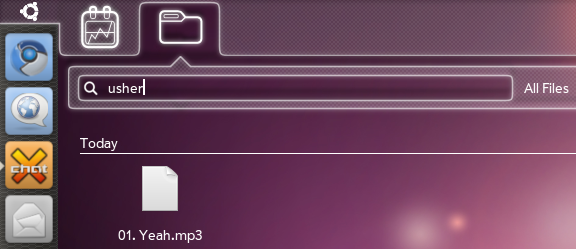
Unity now comes with a simple way to access files, with the new Files Place. Clicking on the Ubuntu button now reveals the Places bar from which users can lookup files (and soon folders). Internally Zeitgeist is used to reference different objects (files, events) and let the user access content in a meaningful way (files of the day, of the week, etc.).
Improved Unity interface
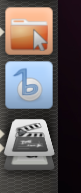
Unity's Launcher improved to manage more applications at the same time: icons can now incline and animate to let users browse through a long list. The integrated Panel sports applications menubar to optimize the screen real estate. And several rendering refinement contribute to the visual quality of the user interface.
Sound menu v2
Our sound menu v2 is a rock star! (and his father a true musician, but that's a different story).
{ screenshot }
Featured in this first iteration of the v2, the sound menu becomes a category menu and can now regroup all sorts of sound applications.
Music players like Rhythmbox, Amarok and VLC register with the menu, and expose a simple remote control interface to play/pause and skip songs. Behind the scenes, the menu leverages the Ayatana protocols pioneered by the messaging menu and MPRIS, another Freedesktop proposed standard, adopted by a growing number of applications developers.
Prototype Network Menu, based on Connman

Upcoming features
- early alpha 3 in fact: [ ARGB support in GTK+ ]
DesktopExperienceTeam/MaverickAlpha2ReleaseNotes (last edited 2010-06-25 20:08:59 by c-76-112-209-61)