UpdateIssues
|
Size: 9967
Comment:
|
Size: 12807
Comment:
|
| Deletions are marked like this. | Additions are marked like this. |
| Line 86: | Line 86: |
The present End-of-process Update Manager Dialogue windows are highly scary and almost border on warning for an average user. The present word used are: ------------------------------ Restart Required In order to complete the update of your system it needs to be restarted. Restart Later Restart Now ------------------------------ Which is totally wrong! Because: 1: the update doesnt *Require* or *need* a restart,The update has been performed and is over , it is just that in order to use the new updated version , we have to restart the system. The words 'Require' and 'need' , imply that it is almost necessary to perform a restart for the system to work properly. 2: there is no warning of the user to save & close all running apps. 3: missing punctuations, needs to be "... system , it needs..." 4: For users coming from Windows a restart is a scary/warning word , because in windows if the restart is not done immediately , apps/system do not work properly and has greater chances of crash/hang. Which is *totally not the case in Linux* . 5: Further of system working properly is that , when the user dismisses the restart dialogue , he *can update* his system before the restart. 6: Lack of the warning/confirmation to save work causes risk of the user loosing work over accidental clicks, Because the button to 'Restart Now' is placed on the right , which is the location where users commonly click "Close" Papercut Solution: Reword the dialogues, so that the *word Restart is not used* for any system restart dialogues. ||{{attachment:restart.png}} {{attachment:mockup.png}} || I have attached a mockup of the idea: Note: 1: the use of the present icon for a pleasant experience [An idea proposed by David Siegel] 2: Deliberate switch of the buttons , So that the continue working option is located on the right, which is the location of all the 'Close' buttons. This allows the user to not worry too much about the update, and to continue working. When the user selects the Use Latest version option he is taken to the dialogue: ----------------- Kindly save all your work and close all running apps. The system will start afresh. Once you have saved all your work, press "OK" , to start afresh. OK NO ------------------ If the user selects NO , he is taken back to the System updated dialogue. where he can dismiss the dialogue. ||{{attachment:Securityrestart.png}} {{attachment:Securitymockup.png}} || SideNote : This is a deliberate attempt to reword "Restart" the of *system reboot* to something pleasant because the risk, users face in other OS , do not exist in Linux. So that the user does not worry that he has to restart least he might break something. Restart of firefox/any other app is not the issue mentioned here. |
Ayatana : Issues with the Update Manager and updates in general
The goal of this page is to identify current issues in the process of package updates and to confront currently proposed solutions to each of these issues, in order to determine how well they are addressed.
We need to voluntarily adopt a paranoid point of view regarding security updates. For every flaw is considered serious enough by the security expert people to be granted a SRU, we need to deploy a fix as fast as possible. History has shown that a (critical) security flaw could be exploited 6 days after it was unveiled. If we count a good 2/3 days in order to make the update available at download, it means the time left to fix it is short, and thus we need to make sure users will update within a few days in order to be totally safe.
Identified issues
You are welcome to add more valid issues , try to avoid duplicates. Don't modify or remove someone else's issue without discussion on the ML. Please explain why they are issues, and what are the negative consequences they have.
The issues currently identified, by the Ayatana Discussion members, are :
1. Some updates take effect only after a reboot
Some updates, typically kernel and modules updates, take effect only after a reboot. Those updates, in the current Ubuntu stable releases, are allowed only if they are important security updates that need to be performed for the safety of the users. If the users don't reboot after performing the updates with the current implementation, they put themselves at risk till they reboot.
Even among users who do perform their security updates quickly, some may forget to shut their computer down and thus stay at risk.
2. Some updates require an application to be restarted, otherwise this application doesn't work as expected
Some applications, when updated, require an immediate restart in order to keep working. This is the case of at least one default application : Firefox. As the applications need to be restarted in order to keep working, this actually breaks the user's workflow.
3. The update notification mechanisms should never be rude / intrusive towards the user, at the risk of the user trying to neutralize it
Even if security issues are important and even if they may require some additional mechanisms than the normal updates, the goal of changes in the update-manager's policy is to increase the amount of people performing security updates.
If a majority of users (I consider this due to a very low level of expectation from users towards their OS) will accept intrusive or coercive methods for making them perform the updates, another part of the users may refuse anything they consider intrusive, and try to disable methods used to notify them of security updates. We should thus be looking for ways that will have a similar rate of fast updates with a consequently lesser rate of unhappy (end/average) users.
4. A fair proportion of users do not perform security updates fast enough
GNU/Linux is safer than other OSes because security breaches are unveiled, fixed and deployed faster than any OSes using a proprietary development model. If unveiling and fixing are usually performed extremely fast, deploying is often too slow - sometimes slow enough for a flaw to be exploited.
Some people will argue that they will be exploited on a little scale, but there are people who would benefit from an issue on a large number of machines (opponents, malicious hackers, commercial security products editors, etc.). The way we can avoid this is by making the deployment part as fast as possible, and hit the most important amount of machines possible. This is why security updates must be performed within days, and once the fix is patched and available in the repositories, we should have a 80% adoption rate in 3 days and a 90% adoption rate in a month.
Template For Ideas
Idea name
Rationale
This is primarily designed to solve issue #X and #Y.
Description
Describe the idea in a few short paragraphs, almost exhaustively , ie. I should make sure that what I propose can be interpreted only one way, so that if people like my idea but think it is perfectible, they can edit it and make it better, without leaving too much room for differences of interpretation that would provoke the need for a rewrite and reevaluation during the implementation if my idea.
Consequences for issue #X
Describing the expected result for the issue you are trying to address. It should be done for all the aimed issues, and also the issues for which you suspect there will be negative consequences. I shall not do it at all for issues which are not concerned and upon which my idea visibly has no consequences at all. I can give an explicit rating between -5 and +5 (that's all about feelings though).
Conclusion
Here try to explain why you think the downsides are worth the upsides, and propose ideas that may be able to make the user experience even better if used with this one.
Sidenote : one may disagree with another, but in order to keep things constructive, i think one should comment the idea directly but keep the original description. One comment per person sounds fair, and people can then edit their own comments for each idea. Also, don't hesitate to give a mark to other ideas so that we can see which ideas have a consensus and which need debate. Thanks for reading till here ! (Template is very probably perfectible)
Ideas
If you think you have an idea that could address one of the above issues, please describe it and evaluate it's influence on all the listed issues. You can use the template for adding your own proposals .
Progressively intrusive update notifications upon time
Rationale
The idea is to propose a good fix for the issue 4. (updates must be done) without forgetting 3. (updates shall'nt be intrusive) in the process.
Description
We will consider security and normal updates separately. We will also make the distinction between the kind of account (can / can't perform updates) and also whether or not other admins (by admin i mean someone who has the rights to perform updates) logged in since last security update was available, and propose a behaviour for each situation :
Security updates - Admin account
- The first 48 hours of availability
Use the tray icon to notify the presence of security updates, plus an unique libnotify notification per day (8.10 behaviour).
- Between 48 and 72 hours of availability only of the tray icon already spawned
When the admin logs in, spawn Update Manager unfocused, and only once.
- After 72 hours of availability only if the Update Manager spawned unfocused once
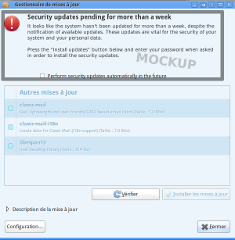
The Update Manager now spawns with a warning icon and a message explaining the importance of updates, it also contains a checkbox proposing automatic security updates (as in software-properties-gtk). You can see a mockup (with a quite bad wording) below.
Mockup |
|
- If the user performs some updates but not all the security updates available
It means (s)he may have good reasons to believe (s)he should not install packages that would possibly break his/her system, or that some packages couldn't install. The best approach is probably to go back to the tray icon till other security updates are available, in which case we go through the above procedure again.
Security updates - Restricted account - No admin logged in
- After 7 days of availability
Show a notification bubble at the opening of the session, and only once (till other security updates arrive), that more or less says "Important security updates have been available for a while now. Please contact your system administrator", for the companies that "forget" updating their machines or setting them to auto-update for security updates.
Normal updates The tray icon is enough in this case. I really don't see why the update manager should have a rude behaviour for non-security updates. If some users don't want to perform updates and prefer carrying bugs till the next LTS release, then so be it. At worse, you could spawn the update manager unfocused once if normal updates have been pending for at least two weeks, but I don't think it's needed to spawn it every week, and focused. Users should not get used to being disturbed.
Consequences for issue #3
I think there is a (little) positive impact for this issue. That is to say, instead of popping-up on first day, you leave users with a mechanism that allows them to chose when they want to open the Update Manager. And if on second day they didn't then only you begin poking them.
As for normal updates, I think this proposal is better than the current way it is. There is no need to urge the users for normal updates (ok, there can be dramatical bugs like "your FS is wiped when you do this or that", but I don't believe this is frequent enough to systematically bother users about normal updates).
Consequences for issue #4
The impact compared to the current implementation is almost null : the user is still notified every day about security updates, but if he doesn't perform them for a while, he's asked if he wants to toggle automatic security updates. This will not change paranoiac users' behaviour, but at least lazy users could learn about this possibility and stop delaying security updates for no reason.
Conclusion
I think that this proposal will significantly less disturb users who do perform their updates as soon as they're available and who complained about popups opening without their explicit consent, without damaging the efficiency of the current update notifications.
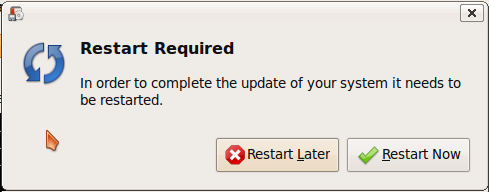
The present End-of-process Update Manager Dialogue windows are highly scary and almost border on warning for an average user.
The present word used are:
Restart Required In order to complete the update of your system it needs to be restarted.
- Restart Later Restart Now
Which is totally wrong! Because: 1: the update doesnt *Require* or *need* a restart,The update has been performed and is over , it is just that in order to use the new updated version , we have to restart the system. The words 'Require' and 'need' , imply that it is almost necessary to perform a restart for the system to work properly. 2: there is no warning of the user to save & close all running apps. 3: missing punctuations, needs to be "... system , it needs..." 4: For users coming from Windows a restart is a scary/warning word , because in windows if the restart is not done immediately , apps/system do not work properly and has greater chances of crash/hang. Which is *totally not the case in Linux* . 5: Further of system working properly is that , when the user dismisses the restart dialogue , he *can update* his system before the restart. 6: Lack of the warning/confirmation to save work causes risk of the user loosing work over accidental clicks,
- Because the button to 'Restart Now' is placed on the right , which is the location where users commonly click "Close"
Papercut Solution:
Reword the dialogues, so that the *word Restart is not used* for any system restart dialogues.
|
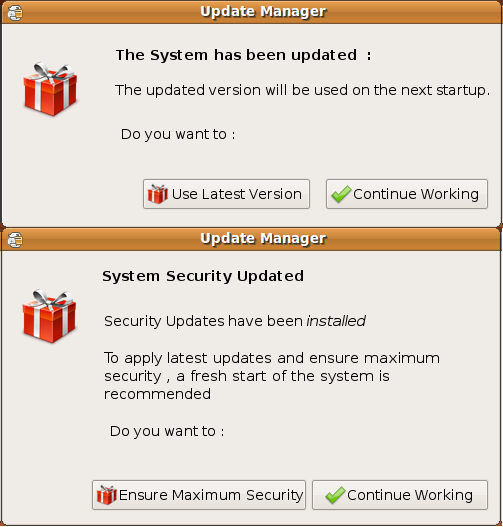
I have attached a mockup of the idea: Note: 1: the use of the present icon for a pleasant experience [An idea proposed by David Siegel] 2: Deliberate switch of the buttons , So that the continue working option is located on the right, which is the location of all the 'Close' buttons. This allows the user to not worry too much about the update, and to continue working.
When the user selects the Use Latest version option he is taken to the dialogue:
Kindly save all your work and close all running apps.
The system will start afresh.
Once you have saved all your work, press "OK" , to start afresh.
- OK NO
If the user selects NO , he is taken back to the System updated dialogue. where he can dismiss the dialogue.
|
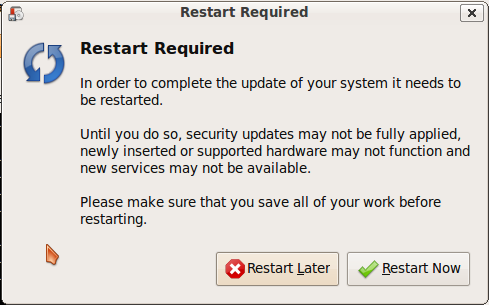
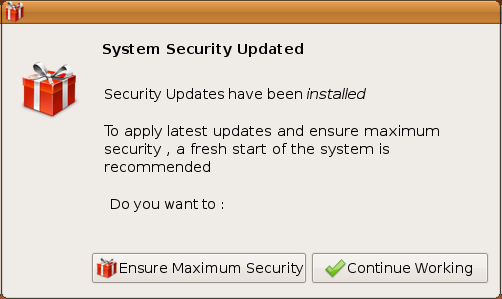

SideNote : This is a deliberate attempt to reword "Restart" the of *system reboot* to something pleasant because the risk, users face in other OS , do not exist in Linux. So that the user does not worry that he has to restart least he might break something. Restart of firefox/any other app is not the issue mentioned here.
Ayatana/UpdateIssues (last edited 2009-09-03 08:47:15 by ABTS-TN-dynamic-154)